


Ecommerce Product Image Optimization in 2026: Faster Photos That Convert and Rank

Table of Contents
TL;DR — Quick Hits
- Product images are the highest-leverage asset on a store: 56% of shoppers look at them before reading a single word of copy, per Baymard Institute.
- Images are the Largest Contentful Paint element on ~85% of desktop and ~76% of mobile pages, so slow photos directly fail Core Web Vitals.
- A 0.1-second faster mobile page lifted retail conversions 8.4% and average order value 9.2% in the Deloitte/Google study — image weight is usually the fastest 0.1s to win.
- Serve AVIF first (≈50% smaller than JPEG) with a WebP and JPEG fallback via
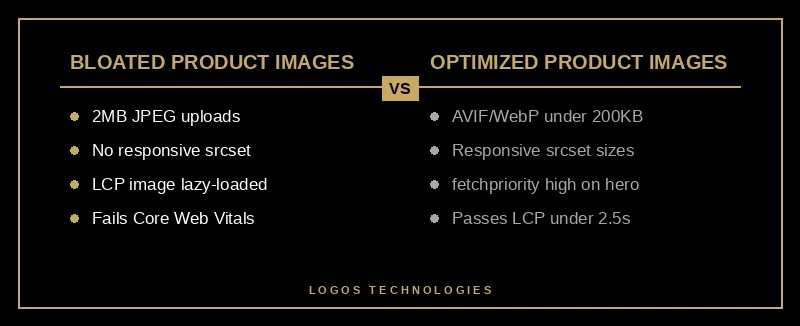
<picture>, keep each image under ~200KB, and add responsivesrcsetsizes. - Never lazy-load the main product image; add
fetchpriority="high"to it instead — Google saw LCP drop from 2.6s to 1.9s with that one attribute.
On a product page, the photo does the selling before the copy gets a chance. Baymard Institute's usability research found that 56% of test subjects explored the product images first, ahead of the title, price, or description — and that 40% of stores have gallery interfaces that hide images shoppers needed to see. Product images aren't decoration; they're the primary conversion surface.
The problem is that the same images doing the selling are usually the thing wrecking your page speed. Ecommerce product image optimization is where conversion goals and performance goals collide, and getting it right is one of the few levers that improves both at once. Get it wrong and you pay twice: shoppers bounce from a slow page, and Google demotes it. This guide is the technical playbook for making product photos that look great, load fast, and rank — no matter which of the best ecommerce platforms you build on.
Why product images decide both conversions and Core Web Vitals
Product images are the biggest single factor in both your conversion rate and your Core Web Vitals score, because they are simultaneously the asset shoppers judge you on and the heaviest thing on the page. According to the 2025 Web Almanac by HTTP Archive, images are responsible for the Largest Contentful Paint element on roughly 85% of desktop pages and 76% of mobile pages. On a product page, that LCP element is almost always your hero product shot.
That matters financially. In the Deloitte and Google "Milliseconds Make Millions" study, a 0.1-second improvement in mobile load time drove an 8.4% increase in retail conversions and a 9.2% lift in average order value. Because images dominate page weight, compressing and right-sizing them is usually the fastest tenth of a second you can find. This is the same principle we cover in our broader guide to Core Web Vitals in 2026 — the product page is just where the stakes are highest.

The tension is real: shoppers want more images, bigger images, and zoomable detail, while Google wants fewer bytes and faster paints. You resolve it not by choosing a side but by engineering the delivery so a rich gallery still ships as a light payload.
What is the best image format for ecommerce product photos in 2026?
The best format is AVIF with a WebP fallback and a JPEG as the final backstop, delivered through the HTML <picture> element. AVIF is roughly 50% smaller than JPEG at equivalent quality, WebP is about 25–35% smaller, and browsers download only the first format they support. As of 2026, WebP support sits around 96% of global users and AVIF around 95%, so the fallback chain covers the rest.
The practical markup looks like this:
<picture>
  <source srcset="/img/boot-800.avif 800w, /img/boot-1600.avif 1600w" type="image/avif">
  <source srcset="/img/boot-800.webp 800w, /img/boot-1600.webp 1600w" type="image/webp">
  <img src="/img/boot-800.jpg" alt="Brown leather work boot, side profile on white background"
       width="800" height="800" fetchpriority="high">
</picture>
Standardize on square (1:1) master images for the gallery grid — they crop predictably across product lists, mobile apps, and social shares. Keep a high-resolution master on hand for zoom, but never ship that master as the default; generate sized derivatives instead. If you're on a hosted platform, most of this is a pipeline setting rather than manual work, which is one reason we walk through it in our Shopify speed optimization guide.
How do you keep product images fast without making them look worse?
You keep them fast by serving the right size to each device, compressing aggressively, and controlling load priority — not by lowering visible quality. Four rules cover most of it.
First, set explicit width and height (or a CSS aspect-ratio) on every image so the browser reserves space and the layout doesn't jump. Unsized images are a leading cause of Cumulative Layout Shift, which annoys shoppers mid-scroll and hurts your CLS score.
Second, use responsive srcset with sizes so a phone never downloads a 1600px desktop image. This alone commonly cuts image payload 40–60%.
Third, compress every derivative to a target — most product shots look identical under ~200KB, and many well under it. Do it in your build pipeline, not by hand.
Fourth, get load priority right. Lazy-load everything below the fold with loading="lazy", but never the main product image. Instead, add fetchpriority="high" to it: in Google's Fetch Priority documentation, the Google Flights team cut Largest Contentful Paint from 2.6 seconds to 1.9 seconds with that single attribute. For a deeper walkthrough, see our post on how to improve LCP in 2026.
Product image SEO: getting found in Google Images and Shopping
Product image SEO is the practice of making images discoverable and eligible for rich results, and in 2026 it runs on three inputs: descriptive filenames, meaningful alt text, and structured data. Name the file for what it shows (brown-leather-work-boot-side.avif, not IMG_4821.jpg). Write alt text under 125 characters that describes the product as if to someone who can't see it — product name, key visual attributes, and the shot type — which serves both accessibility and image ranking.
Structured data is what unlocks Google Shopping surfaces. Google's merchant listing structured data guidelines require a valid product image, a name, and an offers block with a price and ISO-4217 currency. Images that meet the minimum resolution are eligible for merchant listing experiences and Google Lens results, which have become a real acquisition channel for visual categories. This connects directly to on-page work we cover in our ecommerce SEO strategy for product pages; optimized images amplify a page that's already structured to rank.
The static-site advantage for product images
The reason so many stores fail this is that the platform, not the merchant, controls image delivery — and most platforms ship conservative defaults. A hand-built or static front end lets you own the image pipeline: automated AVIF/WebP generation, per-breakpoint srcset, aggressive compression, and correct fetchpriority baked into the template so every new product inherits it. That's the same architecture we describe in our website image optimization playbook, applied to the highest-stakes page on a store.

Baymard's research is a useful reminder of why the effort pays off: shoppers reach for images first and need several — a clean-background shot, an in-scale reference, a texture close-up, and a lifestyle shot. A store that delivers all four and keeps the page under Google's 2.5-second LCP threshold wins the conversion and the ranking. Great product page design and fast images aren't competing priorities; they're the same project.
Frequently Asked Questions
What size should ecommerce product images be in 2026?
Serve multiple sizes via srcset rather than one fixed size. A common set is 400px, 800px, and 1600px wide derivatives, each compressed to roughly 200KB or less, with the browser picking the right one for the device. Keep a higher-resolution master only for zoom, and never ship it as the default image.
Does image optimization actually affect ecommerce SEO rankings?
Yes, in two ways. Directly, optimized images with descriptive filenames, alt text, and merchant structured data become eligible for Google Images, Lens, and Shopping surfaces. Indirectly, lighter images improve Largest Contentful Paint, and Core Web Vitals are a confirmed Google ranking signal — so faster product photos help the whole page rank.
Should I use AVIF or WebP for product photos?
Use both. Serve AVIF first because it's about 50% smaller than JPEG, with WebP as a fallback for the small share of browsers that don't support AVIF, and a JPEG backstop. The <picture> element handles this automatically — each browser downloads only the first format it supports.
Why do my product images slow down the page even after compression?
Usually because the main product image is being lazy-loaded or downloaded at full desktop resolution on mobile. Compression helps, but you also need responsive srcset sizing and fetchpriority="high" on the LCP image (never loading="lazy" on it). Fixing load priority often does more for LCP than another round of compression.
Product images are where design, speed, and SEO meet — and where a lot of stores quietly leave money on the table. At LOGOS Technologies, based in Papillion, Nebraska, we build fast, static, hand-tuned ecommerce sites with an image pipeline that keeps product photos sharp and pages under Google's Core Web Vitals thresholds, on whichever of the best ecommerce platforms fits your business. If your product pages look great but load slow, take a look at our web design services or contact us for a straight assessment of what's slowing them down.