
Ecommerce Checkout Optimization: How to Stop Losing 70% of Your Carts in 2026

Table of Contents
TL;DR — Quick Hits
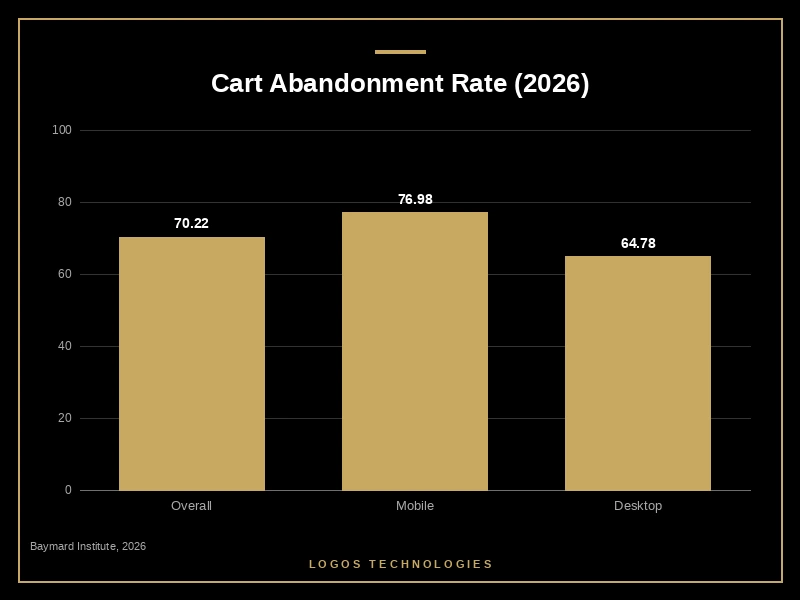
- The average ecommerce cart abandonment rate is 70.22% — roughly 7 in 10 shoppers leave before buying.
- Fixing documented checkout usability issues can lift conversion by up to 35.26% on a typical store.
- Surprise extra costs (shipping and taxes) cause 48% of abandonments — the single biggest reason.
- Forced account creation drives 26% of shoppers away; offer guest checkout instead.
- Every 100ms of checkout latency cuts conversions by about 1%, so a slow checkout page bleeds money before the form is even touched.
If you run an online store, the checkout page is the most expensive real estate you own — and it's probably leaking. According to the Baymard Institute's 2026 cart abandonment data, the average documented ecommerce cart abandonment rate is 70.22%, pooled across 50 separate studies. On mobile it's worse: 76.98% of carts are abandoned on phones versus 64.78% on desktop, a 12-point gap that matters more every year as mobile becomes the majority of traffic.
Here's the part most store owners miss. That 70% isn't a fixed cost of doing business — a large chunk of it is recoverable with checkout optimization. Baymard's checkout usability research found that the average ecommerce site has 32 distinct improvements available in its checkout flow, and addressing them can increase conversion rates by up to 35.26%. This post breaks down exactly why shoppers bail at checkout, the audit I run to fix it, and the one technical problem that quietly undoes every other improvement.
What is ecommerce checkout optimization?
Ecommerce checkout optimization is the process of removing friction from the steps between "add to cart" and "order confirmed" so that more shoppers who intended to buy actually complete the purchase. It targets the measurable drop-off at each checkout step — form fields, account requirements, payment options, page speed, and cost transparency — and systematically eliminates the reasons people quit.
It is not the same as conversion rate optimization across your whole site. Checkout optimization is narrower and higher-leverage: these are shoppers who already chose a product and started buying. Recovering them is far cheaper than acquiring new traffic, which is why it's the first thing I look at when a store's revenue doesn't match its visitor count. If you want the broader picture on store conversion, we cover it in our guide to website conversion rate benchmarks.
Why do shoppers abandon their carts?
Shoppers abandon carts for a short, predictable list of reasons — and most of them are fixable. Baymard's research consistently finds the top causes are extra costs being too high (shipping and taxes) at 48%, forced account creation at 26%, a checkout process that's too long or complicated at 22%, and a lack of trust in payment security at 18%.
Notice what's not on that list: price of the product itself. People who reach checkout have already accepted the price. What kills the sale is everything you add after they commit — a surprise $12 shipping charge revealed on the final screen, a demand to create an account, or a five-screen form asking for information you don't need. Each of these is a self-inflicted wound, and each one is something you control.
How to reduce cart abandonment: a 6-step checkout audit
To reduce cart abandonment, audit your checkout against the six highest-impact friction points below and fix them in order. This is the exact sequence I work through on a client store, starting with the change that moves the most revenue.
1. Show the total cost early
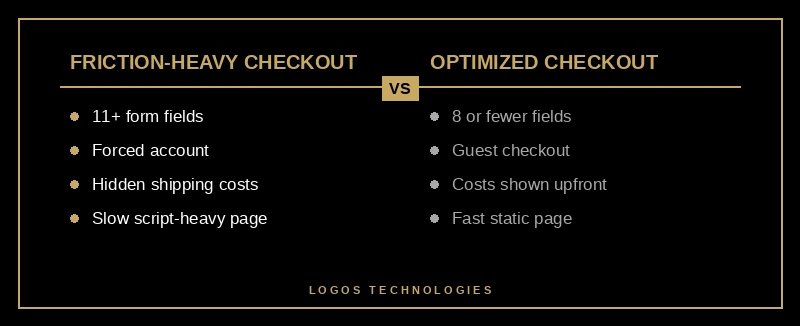
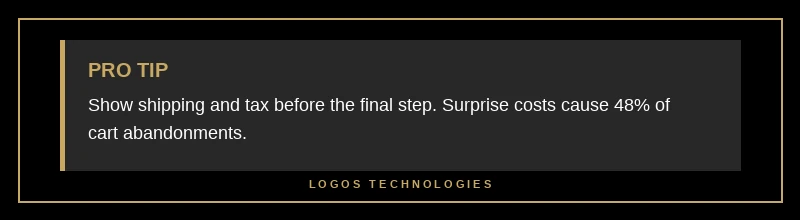
Surprise costs cause 48% of abandonments, so stop hiding them. Put a shipping and tax estimator on the cart page — before checkout begins — and show the all-in total as early as possible. If you can offer free shipping above a threshold, say so on the product page. The goal is zero surprises on the final screen.
2. Offer guest checkout
Forced account creation pushes away 26% of shoppers. Make accounts optional and offer sign-up on the confirmation page after the order is placed, where conversion from guest to registered account is far higher anyway. Nobody buying a $40 item wants to invent a password first.
3. Cut form fields to eight or fewer
Baymard found the average checkout asks for 11 form fields when most stores need 8 or fewer. Combine first and last name into one input, hide the optional second address line, and drop the phone number unless your carrier genuinely requires it. Every field you remove measurably lifts completion.
4. Add HTML autocomplete attributes
This one is free and overlooked. Tagging each input with the correct autocomplete value lets the browser autofill a shopper's name, address, and card in a single tap. Google's web.dev payment form guidance documents the exact attributes — and warns that custom form elements that break autofill are a common, invisible cause of abandonment.
5. Enable express and one-tap payments
Offer Apple Pay, Google Pay, and platform wallets prominently, especially on mobile. Accelerated checkout converts dramatically higher than hand-typing card numbers — Shopify reports Shop Pay lifts conversion by up to 50% over standard guest checkout, and one-page checkout flows convert 21.8% better than legacy multi-step ones.
6. Make the checkout page fast
A checkout that takes three seconds to become interactive loses buyers before they fill in a single field. Every 100ms of latency costs roughly 1% of conversions. Strip non-essential third-party scripts, and keep interaction latency low — the same discipline we describe in our guide to fixing Interaction to Next Paint.
The checkout speed problem nobody talks about
The most overlooked cause of cart abandonment is the checkout page itself being slow. Most CRO advice treats checkout as a pure form-design problem and ignores that the page has to load and respond before any of that design matters. On app-heavy stores, the checkout is the most script-bloated page on the site — analytics, chat widgets, upsell apps, and trust-badge scripts all firing at the exact moment the buyer is one tap from paying.
This is where the platform you build on decides your ceiling. App-stacked Shopify themes and plugin-heavy WooCommerce checkouts often can't hit fast interaction times no matter how clean the form is, because every add-on is third-party JavaScript you can't fully control. A hand-coded or static-first storefront gives you the headroom to actually fix it. We lay out the full trade-offs in our comparison of the best ecommerce platform for 2026, but the short version is that speed is built in, not bolted on — and checkout is where that difference turns into dollars. The product page that got them here matters too; we cover that in product page design that converts.
Frequently Asked Questions
What is a good cart abandonment rate?
There's no universal "good" number, but the average is 70.22%, so anything meaningfully below that is healthy. Stores with optimized checkouts — guest checkout, transparent costs, fast pages, and express payments — commonly pull abandonment into the 50-60% range. Track your own rate over time rather than chasing a benchmark.
Does guest checkout really increase sales?
Yes. Forced account creation is the second-biggest abandonment reason at 26%, and removing it directly recovers those shoppers. Offer the account at the end, on the order confirmation page, where shoppers are far more willing to register after a successful purchase.
How many checkout steps should an ecommerce site have?
Fewer is generally better, but the number of steps matters less than what each step asks of the shopper. Baymard found usability suffers noticeably at eight or more steps, while a well-designed one-page or two-step checkout works for most small stores — though your platform sets the ceiling on how clean that checkout can be, which is why choosing the best ecommerce platform for your store matters. Focus on cutting fields and friction, not just collapsing pages.
Will a faster checkout page actually improve conversions?
Yes — measurably. Every 100ms of added latency reduces conversions by about 1%, and a slow, script-heavy checkout loses buyers before they interact with the form. Faster checkout pages reduce abandonment and improve every downstream metric.
Recover the carts you're already paying for
You spent money on ads, SEO, and content to get shoppers to your cart. Letting 70% of them walk at checkout is the most expensive habit in ecommerce — and the most fixable. Start with cost transparency and guest checkout, cut your form fields, and make sure the checkout page itself is fast, because all the form design in the world won't save a page that takes three seconds to respond.
At LOGOS Technologies, based in Papillion, Nebraska, we build fast, hand-coded ecommerce sites where checkout speed and conversion are designed in from the first line of code, not patched on with apps. If your store's revenue doesn't match your traffic, take a look at our web design services or contact us and we'll help you find where the carts are leaking.