
How to Speed Up Your Shopify Store in 2026 (Without Stacking More Apps)

Table of Contents
TL;DR — Quick Hits
- A 0.1-second faster mobile load lifts retail conversions by 8.4% and average order value by 9.2% (Deloitte).
- Pages that load in 1 second convert roughly 3x better than pages that take 5 seconds (Portent).
- Most slow Shopify stores are slow because of app sprawl and oversized images — not a missing speed app.
- Aim for LCP under 2.5s and INP under 200ms; mobile is where the money is lost.
- If you have stripped the bloat and Shopify still can't keep up, the ceiling is architectural, not configuration.
Speed is not a vanity metric for an online store — it is a revenue lever you can measure to the cent. Deloitte's analysis of 30 million user sessions across 37 brands found that a 0.1-second improvement in mobile load time raised retail conversions by 8.4% and average order value by 9.2%. Portent's study of over 100 million page views came to a similar place from a different angle: pages that load in one second convert about three times better than pages that take five. For a Shopify merchant, that gap is the difference between a store that pays for itself and one that quietly leaks sales every day.
The frustrating part is that most advice about Shopify speed optimization points you toward yet another app — one more thing to install, one more monthly fee, one more script loading on every page. That usually makes the problem worse. This guide takes the opposite approach: find what is actually slowing the store down, fix the architecture, and only then decide whether the platform itself is your real ceiling.
Does Shopify store speed actually affect sales?
Yes — directly and measurably. Slower stores convert fewer visitors into buyers, and the effect is steepest on mobile, where most ecommerce traffic now lives. Google's own research found that 53% of mobile users abandon a site that takes longer than three seconds to load. Shopify's internal data tells the same story: stores that load faster convert at meaningfully higher rates than the platform average.

The reason speed converts is psychological as much as technical. A fast store feels trustworthy and effortless; a slow one feels broken, and shoppers do not give broken-feeling stores their credit card numbers. We dug into the dollar figures in our breakdown of what the page speed data actually shows, but the short version is that on a store doing six figures a year, a one-second improvement is often worth thousands of dollars in recovered revenue.
Why is your Shopify store slow? The real culprits
Most Shopify stores are slow for the same handful of reasons, and almost none of them are solved by installing a "speed" app. Real Shopify speed optimization starts by finding that weight, not by adding another tool on top. The biggest offenders are app sprawl, oversized images, a bloated theme, and render-blocking third-party scripts. Each one adds weight and work that the browser has to chew through before a shopper sees anything.
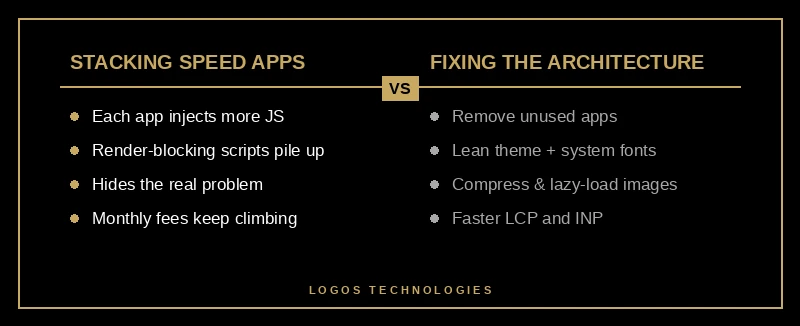
App sprawl is the quiet killer. Every app you install typically injects its own JavaScript and CSS into every page, whether or not that page uses the feature. A store with twenty apps can be loading a dozen scripts the customer never benefits from. This is the same architectural problem that makes WordPress get so slow — layers of plugins each doing a little work, adding up to a lot of lag.
Images are the other heavyweight. They typically make up the majority of a Shopify page's total weight, which is why Shopify's own performance guidance leads with image sizing. Upload a 4000-pixel product photo into a 600-pixel slot and the browser still downloads every one of those wasted pixels. We wrote a full image optimization playbook on this, because it is consistently the highest-ROI fix available.
How do you speed up a Shopify store, step by step?
Work the problem in order — diagnose first, then fix the heaviest items, then verify. Chasing a perfect score before you know what is slow just wastes time. Here is the sequence that actually produces durable Shopify speed optimization.
1. Audit your theme and apps
Run your store through PageSpeed Insights and note your starting Core Web Vitals. Then open your apps list and write down what each one does. Anything you are not actively using gets uninstalled — and uninstalling does not always remove the leftover code, so check your theme's theme.liquid for orphaned snippets after you remove an app.
2. Compress and modernize your images
Resize every image to the largest size it will actually display, then serve modern formats like WebP. Lazy-load everything below the fold so the browser prioritizes what the shopper sees first. This single step often shaves a full second off load time.

3. Defer and trim third-party scripts
Reviews widgets, chat boxes, pop-ups, and analytics tags all load JavaScript that can block rendering. Add async or defer to non-critical scripts so they stop holding up the page, and delete the ones you do not need. If you want the full mechanics, see our guide to eliminating render-blocking resources.
4. Fix your Core Web Vitals
Google measures real-world experience with three metrics, and the targets are public: LCP under 2.5 seconds, INP under 200 milliseconds, and CLS under 0.1. For a store, LCP is usually your hero or main product image, so preload it. INP — interactivity — is the one most Shopify merchants ignore, but every heavy app script that runs on a tap or click pushes it the wrong way. Semrush's Core Web Vitals guide is a solid reference for diagnosing each metric.
5. Test, measure, and re-check on mobile
Re-run PageSpeed Insights on a mobile profile after each change — not desktop, where everything looks faster than your customers experience. Then watch the Core Web Vitals report in Google Search Console over the following two to four weeks, because it reflects real users, not a single lab test.
When Shopify's speed ceiling is the real problem
Sometimes you strip the apps, compress the images, defer the scripts — and the store is still slower than you want. At that point you have hit an architectural ceiling, not a configuration mistake. Shopify renders pages from Liquid templates and a shared app layer you do not fully control, and there is a floor below which a hosted theme simply cannot go.
This is the moment to weigh your options honestly. For many small stores, a well-optimized Shopify theme is more than fast enough and the convenience is worth it — we laid out that trade-off in our guide to the best ecommerce platform for 2026. But if speed is central to your brand or your margins are thin enough that conversion rate decides whether you grow, a hand-coded static storefront removes the theme-and-app tax entirely. That is the core of the Shopify vs. a custom build decision: you are choosing between convenience with a speed ceiling and a leaner architecture you own. Fixing the architecture also protects the rest of your funnel, which is why checkout optimization and speed go hand in hand.
Frequently Asked Questions
What is a good page speed for a Shopify store?
Aim for a Largest Contentful Paint under 2.5 seconds and an Interaction to Next Paint under 200 milliseconds, measured on mobile. A total load time under 3 seconds keeps you out of the abandonment zone, and the fastest stores load in 1 to 2 seconds. Shopify's built-in speed score is a directional signal, but your real-user Core Web Vitals in Search Console matter more.
Do Shopify speed apps actually work?
Rarely as advertised, and sometimes they make things worse. Most "speed" apps add their own JavaScript to every page, which is the exact problem you are trying to solve. The durable wins come from removing weight — fewer apps, smaller images, deferred scripts — not from adding another layer on top.
Does Shopify speed affect Google rankings?
Yes. Core Web Vitals are a confirmed ranking signal, and a slow store competes from behind on both rankings and conversions. Speed will not single-handedly push you to position one, but a poor LCP or INP can hold you back when the rest of your SEO is strong.
How much is slow Shopify speed costing me?
More than most merchants realize. With every additional second of load time dragging conversions down by roughly 7%, a store doing $100,000 a year can lose several thousand dollars annually to a single extra second. Run your own numbers against the Deloitte and Portent figures above — the loss is usually larger than the cost of fixing it.
Make Speed a Built-In Advantage, Not a Patch
The fastest Shopify stores are not the ones with the most speed apps — they are the ones carrying the least weight. Audit honestly, fix the architecture, and measure on mobile, and you will recover conversions that app-stacking never could. If you have done the work and the platform is still your ceiling, that is exactly the kind of problem LOGOS Technologies solves: we build fast, static, hand-coded ecommerce sites for businesses that treat speed as a competitive edge. Based in Papillion, Nebraska and working with clients nationwide, we would be glad to look at your store. Explore our web design services or contact us to talk through what a faster storefront could do for your sales.