Why Is WordPress So Slow? The 2026 Answer (And What to Do About It)

Table of Contents
TL;DR — Quick Hits
- The average WordPress page loads in 3.4 seconds — well past Google's 2.5-second LCP threshold for "good" Core Web Vitals.
- Only 38% of WordPress sites pass Core Web Vitals on mobile; Next.js sites pass at 58%.
- WordPress is slow because every page request triggers PHP execution + a database round-trip + plugin code — work a static site does once at build time.
- TTFB is roughly 40% of LCP. WordPress hosting often delivers 300–600ms TTFB; static sites on a CDN deliver 30–100ms.
- The fix isn't another caching plugin. It's removing the dynamic stack you don't need.
If you Google "why is my website slow," half the answers are written by people selling you a caching plugin. That's not what's actually going on. The reason WordPress is slow in 2026 isn't a mystery, and it isn't fixable with one more plugin — it's structural.
WordPress powers roughly 43.5% of all websites and dominates the CMS market. That dominance is exactly why the performance problem is so widespread. According to public Core Web Vitals data and platform comparisons, the average WordPress page loads in 3.4 seconds, well above the 2.5-second LCP threshold Google calls "good". Only 38% of WordPress sites pass Core Web Vitals on mobile, while Next.js sites — which typically render to static HTML — pass at 58%. That gap isn't about effort. It's about what each platform asks the server to do on every request.
What actually happens when a WordPress page loads
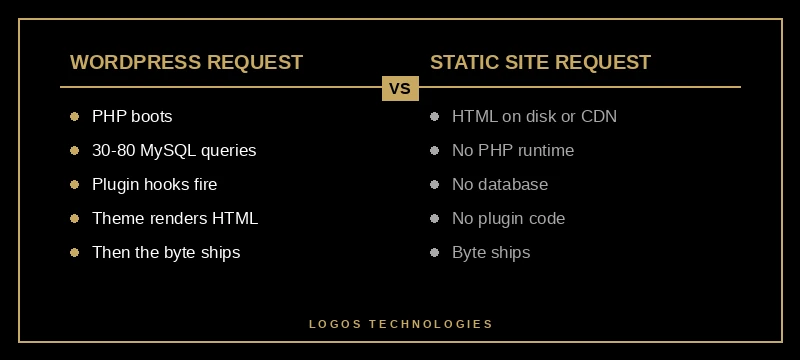
Direct answer: a WordPress page load is dynamic by default. When a visitor hits your URL, the server fires up PHP, runs your active plugins' hooks, queries MySQL for the post content, runs theme template logic, and assembles HTML on the fly — every single request. A static site does that work once, at build time, and then serves prebuilt HTML the way a web server was originally designed to.
That difference is the entire performance story. Everything else — image weight, plugin bloat, "slow hosting" — is downstream of it.
For a deeper explanation of why a static-first architecture is structurally faster, see our pillar guide on the best WordPress alternative for small business websites.
Why is WordPress so slow on the server?
The first 40% of your Largest Contentful Paint score is Time to First Byte (TTFB) — how long the server takes to send the first byte of HTML. According to web.dev's TTFB guide, a TTFB under 200ms is "great," 200–500ms is "okay," and above 600ms means there's a real problem.
A typical WordPress request burns time on:
- PHP boot. The PHP interpreter spins up, autoloads classes, and parses your active theme and every plugin file.
- Database queries. A standard page can fire 30–80 MySQL queries. One real-world Query Monitor audit found a single "related posts" plugin running 89 queries per page.
- The autoload table. WordPress's
wp_optionsautoload row balloons over time. Reducing autoload data from 3MB to 800KB has been shown to improve page generation by 50–100ms per request. - Hook waterfalls.
init,wp_loaded,template_redirect,the_content— every active plugin can hook into each, and they run sequentially.
A static site has none of this. The HTML is already on disk (or on a CDN edge), and the server's only job is to send the bytes. That's why static sites typically deliver 30–100ms TTFB and, in turn, much faster LCP. We covered the math in detail in How to Improve LCP in 2026.
Plugin bloat: real, but a symptom, not the cause
You'll read everywhere that "too many plugins" is why WordPress is slow. That's half-true. Plugins are slow because the WordPress request lifecycle invites them to inject code into every page render. In one documented case, reducing a site from 15 plugins to 5 dropped page weight from 2.3MB to 1.1MB and noticeably improved LCP. But the underlying issue is the architecture that lets a plugin author run an unbounded amount of code on every visitor's request.
This is also why caching plugins (WP Rocket, LiteSpeed Cache, W3 Total Cache) help so much: they convert your dynamic WordPress site into a temporarily static one. They're admitting, with their existence, that static is faster.
The trouble with caching plugins is that they're a bandage:
- Cache misses still hit PHP. New visitors, new pages, search results, logged-in users, dynamic widgets — all bypass the cache.
- Cache invalidation is famously hard. Update a post and you have to clear the right caches in the right order, or visitors see stale content.
- You're still maintaining the dynamic stack. PHP, MySQL, plugin updates, theme updates, security patches, malware scans. The cache layer is on top of all of it.
A static site skips the bandage and ships the actual cure: HTML.
Why WordPress is slow on mobile, specifically
Direct answer: mobile networks have higher latency and lower CPU, which amplifies every WordPress overhead. The PHP+MySQL boot cost is fixed per request, but on mobile the transport time is longer too. Render-blocking JavaScript and CSS — which most WordPress themes have plenty of — also hits harder on mid-tier Android devices, where INP (Interaction to Next Paint) often blows past Google's 200ms threshold. We wrote about that exact problem in How to Fix INP in 2026.
The combination is what produces the 38% mobile pass rate. It isn't that 62% of WordPress site owners are lazy. It's that a stack designed for desktop CGI in 2003 doesn't naturally hit 2026 mobile thresholds.
The actual fix: remove the dynamic layer
Here's the part most "speed up WordPress" articles won't tell you: the highest-leverage change is to not run WordPress on the public-facing side. There are three real paths:
- Switch to a static site generator like Eleventy, Astro, or Hugo. Content lives in Markdown files (or a headless CMS), the site builds to plain HTML/CSS/JS, and a CDN serves it. This is what we build at LOGOS Technologies. We explained the SSG landscape in Static Site Generators Explained.
- Go headless. Keep WordPress as a content backend if your team is attached to the editor, but serve the front-end from a static framework that pulls content via the WordPress REST API at build time. We broke down the trade-offs in our headless CMS guide.
- Static export the existing site. Tools like Simply Static can produce a static snapshot of an existing WordPress install. Useful for marketing sites where content updates are infrequent.
For a small business marketing site — landing pages, services, contact forms, a blog — option 1 is almost always the right answer. The site loads in under a second, plugins can't break it, hosting costs drop to roughly free on a CDN, and security exposure shrinks dramatically because there's no PHP runtime to exploit. We walk through the full case for picking a WordPress alternative built on static architecture in our pillar guide.
The conversion impact is real. We summarized the public data in Page Speed and Revenue: What the Data Actually Shows — every additional second of load time correlates with measurable drops in conversion and revenue, and Google's Core Web Vitals are a confirmed ranking signal.

"But I have a caching plugin and good hosting"
Direct answer: that helps until it doesn't. Caching plugins improve the median request, but they don't change the worst-case request — and Google measures field data (real visitors), not lab tests. If 1 in 4 of your visitors hits a cache miss, the dynamic floor is what shows up in your Core Web Vitals report.
This is why the gap between WordPress and static-rendered platforms is widening, not closing. Modern frameworks like Next.js and Astro default to pre-rendering and edge delivery. WordPress defaults to dynamic rendering and a database hop. Caching can narrow the gap; it can't close it.
If your CWV report shows 38–60% mobile pass rate after months of caching plugin tuning, the platform is the ceiling.
Frequently Asked Questions
Is WordPress always slow?
No. WordPress can be made fast with aggressive caching, premium hosting (Kinsta, WP Engine, Pressable), a lightweight theme, and minimal plugins. But "fast WordPress" usually means 1.5–2.5s LCP — acceptable, not exceptional — and requires ongoing maintenance. A static site at 0.5–1.0s LCP is the new fast.
How fast can WordPress actually get?
A well-tuned WordPress install on premium managed hosting with full-page caching, a minimal block theme, and a CDN can reach 1.0–1.5s LCP and pass Core Web Vitals. Reaching sub-second LCP consistently across all pages is rare without effectively serving cached static HTML — at which point, you've reinvented a static site.
Will switching from WordPress hurt my SEO?
The opposite, usually. Faster LCP, better INP, and stable CLS all directly help rankings. The risk is in the migration: keeping the same URLs, preserving meta tags, redirecting any changed slugs, and re-submitting your sitemap. Done correctly, most sites see ranking improvements within 30–60 days because Google's mobile-first index rewards the speed gain.
Are page builders like Elementor or Divi the real culprit?
They're a major contributor. Page builders inject large CSS bundles, deeply nested DOM structures, and JavaScript for animations that run client-side. Sites built on Elementor or Divi often weigh 2–4x what a hand-coded equivalent weighs. The page builder experience is convenient for editing but expensive at runtime.
What about WooCommerce — same advice?
E-commerce is the one case where WordPress's dynamic nature is genuinely useful (cart, checkout, inventory). For pure marketing sites, static wins easily. For stores, options include going headless (WooCommerce backend + static front-end), moving to a static-friendly e-commerce platform, or accepting that the cart pages will be dynamic while everything else is pre-rendered.
Want a website that loads in under a second?
LOGOS Technologies builds hand-coded static sites for small businesses across the country, from Papillion, Nebraska. We build on Eleventy and JAMstack so your site ships HTML, not PHP — which is why our client sites typically score 95+ on PageSpeed Insights and pass Core Web Vitals on mobile. If you're tired of paying for caching plugins and managed WordPress hosting just to stay average, see our web design services or contact us for a free site speed assessment. We'll tell you honestly whether your current site can be saved or whether a rebuild will pay for itself in conversions.