Static Site Generators Explained: Why Small Businesses Are Switching in 2026

Table of Contents
TL;DR — Quick Hits
- A static site generator (SSG) builds your whole website into plain HTML files at deploy time, so visitors get pre-built pages instead of pages assembled on every request.
- Static sites routinely score 95 or higher on Google Lighthouse; WordPress sites average only a 43% pass rate on Core Web Vitals across the open web.
- As of February 2026, the three most-used generators are Gatsby (24.8% share), Astro (24.6%), and Hugo (22.7%), with Eleventy a strong fourth for content-heavy small business sites.
- Small businesses save real money too — CDN hosting on Netlify or Cloudflare Pages starts at $0/mo, versus $30–$60/mo for comparably fast managed WordPress.
- You do NOT need a developer every time you want to update copy: static sites pair with a headless CMS (Decap, Sanity, Contentful) so non-technical staff can publish from a browser.
If you have shopped around for a new business website in the last year, a web designer has probably mentioned building it as a "static site." The question I get back almost every time is the same: a static what, and is that even a real website? It is — and by most of the measurements that decide whether Google ranks you and whether your page loads before a visitor loses patience, it is the better architecture in 2026. Static sites consistently score 95 or higher on Google's Lighthouse performance audit, while WordPress sites across the open web pass all three Core Web Vitals only about 43% of the time according to HTTP Archive data.
The engine making that possible for small business sites is called a static site generator. This guide explains what one is, why more small companies are moving to them in 2026, and how to pick between the big three without getting dragged into a dev-team argument.
What is a static site generator?
A static site generator is a tool that takes your content (usually written in Markdown or pulled from a headless CMS), runs it through page templates, and outputs a finished folder of plain HTML, CSS, and JavaScript files. Those files are what your visitors actually receive. There is no database being queried, no PHP being executed, no theme being stitched together on every pageview — all of that work happened once, at build time, before the site ever went live.
This is the opposite of how WordPress works. WordPress assembles each page from a MySQL database on every single request. A static site generator does that assembly once, publishes the results, and serves the finished files from a content delivery network. The reason that matters is purely mechanical: a pre-built HTML file can be delivered from an edge server in a hundred milliseconds. A dynamically assembled page has to wait for PHP, the database, plugin hooks, and template rendering before the first byte leaves the server. That is the gap you feel as "this site is fast" versus "why is this spinner still spinning."
The most popular generators in 2026, according to Jamstack.org's open-source SSG registry, are Hugo, Astro, Eleventy, Next.js (in static-export mode), and Gatsby. All of them produce the same kind of output — a folder of HTML — but they differ in the language they are written in, how they handle interactivity, and how steep the learning curve is for the people maintaining the site.
Why small businesses are switching to static site generators in 2026
Small businesses are switching to static site generators because the combination of speed, security, and hosting cost now leans decisively in favor of static architectures, especially for the marketing and service sites that most small companies actually run. The performance gap is the headline: static HTML sites routinely load in under a second, while typical WordPress sites average 3–5 second mobile loads. Speed is not a vanity metric — it is a direct input to Google's ranking algorithm through Core Web Vitals, and we have covered what the page speed data actually shows for revenue in painful detail.

The security math has also changed. Most of the real-world compromises of small business websites come from one of three places: an outdated WordPress plugin with a known CVE, a brute-forced wp-admin login, or a vulnerable PHP version on shared hosting. A static site has none of those attack surfaces — there is no admin login to brute-force, no plugins to patch, no PHP runtime to exploit. The 2026 Core Web Vitals March update reinforced that Google now treats stable, fast, uncompromised pages as a lower-risk surface to show in search.
Then there is the budget. A static site deployed to Netlify, Cloudflare Pages, or Vercel starts at $0/month for small business traffic volumes. A managed WordPress host that will actually keep up with Core Web Vitals starts at $30/month and usually runs $50–$60 once you add the plugin licenses (SEO, security, caching, form handling) that small business sites rely on. Over three years that is the difference between $0 and about $2,000 in recurring platform cost — and that is before you count the hour-or-two-a-month someone has to spend updating plugins on WordPress.
The people pushing back on this are usually developers who already run WordPress well and agency owners whose business model depends on billable maintenance hours. Both groups are right that a tuned WordPress stack can be fast. Neither changes the fact that for a 5–50 page small business site, a static site generator gives you faster pages, lower risk, and cheaper hosting out of the box, with less expertise required to keep it that way.
Which static site generator should a small business pick?
For most small businesses, the correct answer is one of Eleventy, Astro, or Hugo — and the choice is driven almost entirely by how the site is going to be updated, not by which tool is technically the "best."
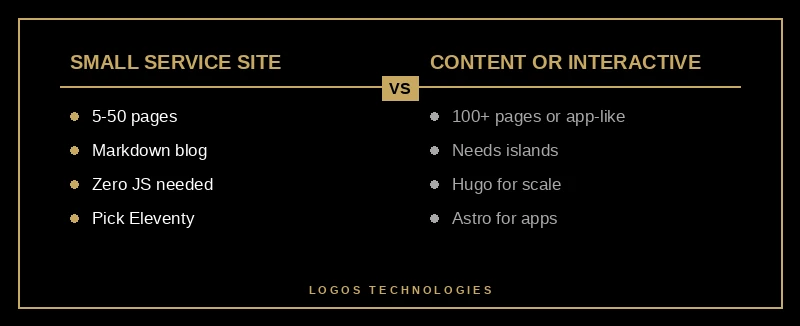
Eleventy (11ty) is the right call for a typical small business marketing site — a homepage, about page, services, a few landing pages, and a blog. It ships zero JavaScript by default, the templates are plain HTML, and it plays perfectly with Markdown. Eleventy 3.0 shipped in late 2024 with full ESM support, which matters to the developer maintaining it but is invisible to the business owner. This is the generator we use for most LOGOS Technologies client sites because it is dead simple, fast to build, and produces clean HTML that any future developer can read.
Astro is the right call when you also need selective interactivity — an interactive pricing calculator, a product configurator, a client portal login. Astro's "islands architecture" lets you sprinkle React, Vue, or Svelte components into otherwise static pages, and it still ships zero JS unless a specific island needs it. It is the tool I recommend when a small business is "a marketing site mostly, but with one or two interactive tools."
Hugo is the right call when you have hundreds or thousands of pages and build speed matters. Hugo is written in Go and is measurably the fastest generator — it can render thousands of pages in milliseconds. For a service business with 10 locations and a large resource center, or a real-estate firm with thousands of listing pages, Hugo is usually the pragmatic winner.
The tools to avoid for small business sites in 2026 are the ones that smuggle a heavy JavaScript framework into your production pages by default — Gatsby, which still holds the largest market share but tends to ship a large React bundle, and Next.js used in default (non-static-export) mode. Both are excellent tools, but the whole reason you are moving to a WordPress alternative like a static site architecture is to stop shipping unnecessary JavaScript to your visitors' phones. Picking a tool that ships a 200KB framework bundle defeats the point.
How do you run a blog on a static site?
You run a blog on a static site the same way you run a blog anywhere else — you write the post, publish it, and it shows up on the website — but the publishing step rebuilds the static files instead of saving to a database. For technical owners, that means writing a Markdown file, committing it to git, and letting the CDN deploy. For everyone else, you pair the static site generator with a headless CMS, which gives you a normal web-based editor on top of the generator. The editor writes Markdown in the background; you see a clean "new post" form in the browser.

Popular small business pairings:
- Eleventy + Decap CMS — free, open-source, lives in the same git repo as the site. This is what LOGOS uses for client sites.
- Astro + Sanity — when the client wants a polished editorial dashboard and has more than one person publishing.
- Hugo + Netlify CMS/Decap — for very large content sites where Hugo's build speed matters.
The broader architectural pattern here is the JAMstack approach to small business websites — JavaScript, APIs, and Markup assembled at build time rather than on request. A static site generator is the "Markup" part of that stack.
Frequently Asked Questions
Is a static site generator better than WordPress for a small business?
For most small business marketing sites, yes. Static site generators produce faster pages, have a much smaller security attack surface, and cost less to host. WordPress retains an edge when you truly need complex dynamic functionality — membership systems, real-time commerce at scale, or a 20-person editorial team with deep role-based permissions. For a typical 5–50 page service business website, the static architecture wins almost every time — we walk through the full head-to-head in our WordPress alternative guide for small business.
Can non-technical people update a static site?
Yes. When you pair a static site generator with a headless CMS (Decap, Sanity, Contentful), your marketing lead, office manager, or agency partner logs into a normal browser-based editor — the same way they would log into WordPress's admin — and publishes posts, edits page copy, or uploads images. The only difference is what happens behind the scenes: the CMS writes the change to the site's source files and triggers an automatic rebuild, which usually finishes in under two minutes.
What does a static site generator cost?
The generator itself is free — all of the major options (Eleventy, Astro, Hugo, Gatsby, Next.js) are open-source. Hosting on Netlify, Cloudflare Pages, or Vercel starts at $0/month for small business traffic and typically runs $19/month if you need the team-collaboration features. The real cost of a static site is the initial design and development, which is a one-time expense rather than the ongoing plugin-license + maintenance + hosting stack that a WordPress site accumulates every month.
Does SEO work the same way on static sites?
SEO works better on static sites for the mechanical reasons. Google rewards fast pages, clean HTML, and stable uptime — all three of which are the default output of a static site generator. You still need the same technical SEO fundamentals — clean title tags, descriptive meta descriptions, proper heading hierarchy, internal linking, schema markup — but those are easier to implement and audit on a static site than on a database-driven CMS with a dozen plugins interfering with the output.
How often does a static site need to be "rebuilt"?
Only when content changes. A typical small business site rebuilds once or twice a week when new blog content is published, occasionally more when product pages or service pages are edited. Rebuilds on modern CDN platforms like Netlify finish in 60–120 seconds and deploy automatically with zero downtime — the old version stays live until the new version is fully uploaded and verified.
If you are weighing whether a static site generator is the right call for your next website — or whether to migrate an existing WordPress site to one — that is exactly the conversation LOGOS Technologies was built for. We are based in Papillion, Nebraska, and we build fast, static, SEO-optimized websites using Eleventy, Astro, and the JAMstack ecosystem for small businesses across the country. Take a look at our web design services, or get in touch and we can walk through your specific situation — how big the site is, who will be updating it, and whether a static architecture will pay back its migration cost in speed and ranking gains.