How to Migrate from WordPress to a Static Site in 2026 (Without Breaking Your Site)

Table of Contents
TL;DR — Quick Hits
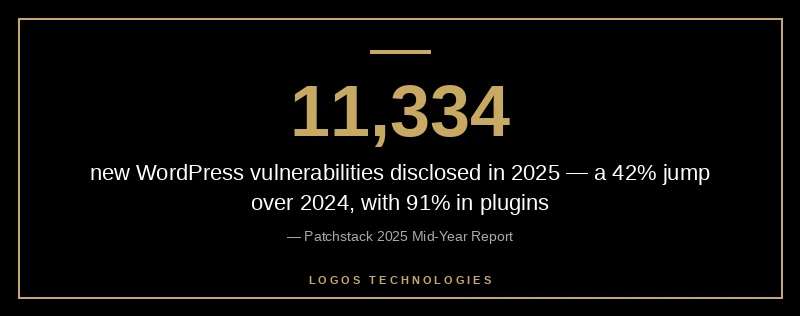
- 11,334 new WordPress vulnerabilities were disclosed in 2025 — a 42% jump over 2024 — and 91% lived in plugins, not core.
- Median time from vulnerability disclosure to first exploitation is 5 hours; the average admin patches in 14 days.
- A small WordPress site (under 100 pages) can be migrated to static HTML in under an hour with Simply Static; a full Eleventy or Astro rebuild takes 1-3 weeks.
- Static sites consistently hit 95%+ Core Web Vitals pass rates vs. WordPress's ~45% on mobile.
- Forms, search, and comments do NOT need WordPress — Netlify Forms, Pagefind, and Giscus replace them in minutes.
WordPress isn't broken. But the assumption that every website needs WordPress is. In 2025 the WordPress ecosystem racked up 11,334 disclosed vulnerabilities (a 42% increase over 2024) and per Patchstack's 2025 mid-year report, 91% of those lived in plugins, with a median time-to-first-exploit of just 5 hours after disclosure. Meanwhile the average WordPress admin takes 14 days to patch. The math doesn't work.
The way out, for a lot of sites, is a static site. No PHP runtime, no MySQL database, no wp-login page for bots to brute-force, no plugin update cascade — just pre-built HTML files served from a CDN. The question is how to actually move from one to the other without losing your content, your SEO, or your sanity. This guide is the playbook.
What "Migrating to a Static Site" Actually Means
Migrating from WordPress to a static site means replacing the dynamic WordPress runtime with a build step that generates plain HTML files once, then deploys those files to a CDN. After migration, visitors get the same pages, but those pages are built ahead of time instead of assembled on every request.
There are two practical paths in 2026. The first is to keep WordPress as your editing tool but export a static copy of the rendered site (using Simply Static or WP2Static) and host that publicly. The second is to abandon WordPress entirely and rebuild in a static site generator like Eleventy, Astro, or Hugo, with content authored as Markdown or pulled from a headless CMS. Both are covered below — they have very different costs and trade-offs.
For the broader argument on why small businesses are leaving WordPress, see our pillar guide on the best WordPress alternative for small business websites in 2026. This post is the practical migration playbook that follows from that decision.
Why Migrate in 2026? Three Numbers That Matter
Security. Per Patchstack's vulnerability data, 92% of successful WordPress breaches in 2025 originated from extensible components — plugins and themes. 57% of disclosed vulnerabilities required no authentication to exploit. A static site has no plugins to exploit, no database to dump, no admin login to brute-force. The attack surface isn't reduced; it's eliminated.
Performance. WordPress sites on shared hosting average 3-5 second load times on mobile, and only ~45% pass all three Core Web Vitals on mobile. A well-built static site routinely loads in under one second and posts CWV pass rates north of 95%. Google's March 2026 core update made Core Web Vitals an even louder ranking signal — that 50-point gap is now a SERP gap. We broke down the speed math in why WordPress is so slow in 2026.
Cost. Managed WordPress hosting runs $30-$300/month once you add security, backups, caching, and a developer on retainer. Static hosting on Netlify, Cloudflare Pages, or Vercel is free at small business traffic levels and tops out around $20/month at scale. Over five years that's $1,200 vs. $18,000.
How Long Does It Take to Migrate?
For a typical 10-50 page brochure site:
- Plugin-based static export (Simply Static / WP2Static): 30-90 minutes export plus 1-2 hours of cleanup. Best when you want off WordPress this weekend.
- DIY rebuild in a static site generator: 1-3 weeks of evening work for a 20-30 page site, if you're already comfortable with Markdown.
- Professional rebuild by a web design firm: 2-6 weeks. Most agencies quote $2,500-$15,000 depending on whether the design is preserved or refreshed.
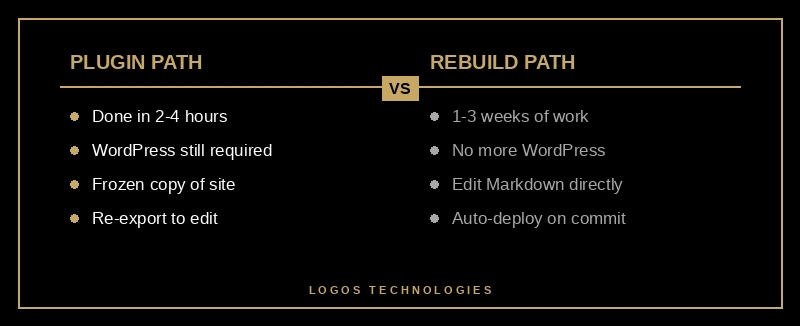
The plugin path is fast but produces a "frozen" copy of your WordPress site — every content edit means re-exporting and re-deploying. The rebuild path is slower up front but produces a system you can edit directly with no WordPress in the loop. For most small businesses, the rebuild pays for itself within a year because nobody wants to maintain two copies of their website forever.
The Plugin Path (Simply Static)
The fastest way to get a WordPress site onto static hosting. Not the best long-term solution, but it works in an afternoon.
- Back up your WordPress site — full files plus database.
- Install Simply Static from the plugin directory. The free version handles a few hundred pages; Pro adds forms, search, and incremental rebuilds.
- Configure the destination URL under Settings so internal links rewrite correctly.
- Run Generate Static Files. A 50-page site exports in 2-5 minutes as a ZIP.
- Deploy to a static host — Netlify Drop, Cloudflare Pages, or GitHub Pages. All three are free for small business traffic.
- Point your domain by updating DNS. Lower TTL the day before for a fast cutover. Keep WordPress online but unindexed for a few weeks as a safety net.
- Replace dynamic features. Forms → Netlify Forms or Formspree. Search → Pagefind. Comments → Giscus or Disqus.
End to end, a 2-4 hour Saturday for a typical small business site.

The Rebuild Path (Eleventy or Astro)
More work, but produces an asset you'll keep using for years. It's what we do for LOGOS Technologies clients and what we recommend for any business that updates their site monthly.
- Audit existing content. Export posts and pages to XML. Decide what's worth keeping — most WordPress sites have 30-50% dead weight.
- Pick a static site generator. Eleventy is our default — minimal dependencies, plain Markdown, no framework lock-in. Astro is right when you have interactive components. Hugo is right when build speed is critical (5,000+ pages).
- Convert posts to Markdown with
wp-export-to-markdown. Plan a few hours of cleanup — converters are good, not perfect. - Rebuild the templates. Header, footer, blog post layout, page layout, 404. Most small business sites need 5-7 templates total. Drop in Decap CMS for browser-based editing — free, git-backed, no database.
- Set up the build pipeline. Push to GitHub, connect Netlify or Cloudflare Pages, and the site rebuilds automatically on every commit. Build times: 30-90 seconds.
- Map every old URL to a new one. This is the step everyone botches. Export your top 100 URLs from Google Search Console, recreate the same paths or set up 301 redirects in
_redirects/netlify.toml, and verify each returns 200 before launch. - Cut over and monitor. Switch DNS, watch Search Console for crawl errors, resubmit your sitemap. Expect a 1-2 week ranking dip during recrawl; with URLs mapped correctly, rankings recover and usually beat baseline within 30 days.
There's no database to back up, no plugin updates to chase, no CMS auto-update breaking your homepage at 2 a.m. — just files, a build script, and a CDN. We made the broader case in our hand-coded custom web design breakdown.
What Stays Behind: WordPress Features That Don't Translate
Static sites do almost everything a brochure-style WordPress site can. A few features need a replacement plan:
- Native PHP forms → Netlify Forms, Formspree, or Web3Forms. Free for small volumes, integrate in 5 minutes.
- WordPress comments → Giscus (free, GitHub-issues-based) or Disqus. Or just remove them — most small business sites get more spam than discussion.
- WooCommerce → the hard one. If you process more than 10 orders a month, plan a separate strategy: a Shopify embed, Snipcart for static carts, or a headless commerce backend like Medusa. We covered the trade-offs in our best ecommerce platform 2026 guide.
- Membership / login walls → Auth0, Clerk, or Netlify Identity can bolt this onto a static site, but if your model depends on paywalls, WordPress + a membership plugin may still be easier.
- Real-time content (live inventory, countdowns) → handled with a sprinkle of client-side JavaScript fetching from an API.
If your site is a brochure, blog, portfolio, lead-generation page, or service business website, you don't have these problems. If you're running an active store with thousands of SKUs, a headless commerce setup may be a better fit — covered in our headless CMS explainer.
SEO During Migration: Five Things That Actually Matter
The biggest fear small business owners have about leaving WordPress is "will my Google rankings disappear?" The answer is no, if you preserve five things:
- URL structure. Every URL with backlinks or organic traffic needs to keep its path or have a 301 redirect. Use Search Console's Top Pages report.
- Title tags and meta descriptions. Carry over verbatim during migration. Improve later, not at cutover.
- Schema markup. Yoast and Rank Math emit Article and FAQ schema automatically — make sure your new templates emit the same types.
- Internal linking. Pages that linked to each other should still link to each other.
- Canonical tags. If
rel=canonicalwas configured, recreate it. Mismatched canonicals are the most common reason rankings dip and don't recover.
A careful migration helps SEO more often than it hurts it — speed gains translate directly into ranking gains. We laid out the broader picture in our page speed and revenue data breakdown.
Frequently Asked Questions
Will I lose my Google rankings if I migrate from WordPress to a static site?
Not if URLs are preserved or 301-redirected, schema is recreated, and internal links stay intact. Most sites see a 1-2 week dip during recrawl, then recover and often beat baseline within 30 days because speed gains improve Core Web Vitals scores. Migrations that crater rankings are the ones that change URL structure without redirects.
Can I still update my static site after migration without a developer?
Yes. Pair the static site with a git-backed CMS like Decap CMS or Sveltia CMS — both are free, both give you a familiar browser-based admin interface, and both commit changes to GitHub which triggers an automatic rebuild. The editing experience is similar to WordPress; what's running underneath is different.
Is migrating to a static site cheaper than just optimizing WordPress?
Long-term, yes. Optimization is a recurring cost — every plugin update, every core release, every theme refresh kicks off new speed regressions. A static site has no recurring optimization tax because there's nothing to slow down between deployments. Most clients break even on a $3,000-$5,000 rebuild within 12-18 months in saved hosting and maintenance.
What about WordPress sites with thousands of blog posts?
Static site generators handle large content sets fine — Eleventy, Hugo, and Astro routinely build 10,000+ page sites. The bottleneck is content cleanup, not rendering. Use the WordPress XML export as a one-time content seed, convert to Markdown, write a small script to clean up image paths and shortcodes. A 2,000-post blog migration is typically a 1-2 week project.
Do I need to know how to code to migrate from WordPress to a static site?
For the plugin path (Simply Static), no — it's a checkbox interface. For the rebuild path you need basic Markdown and command-line familiarity, or a developer. No middle option gives you the long-term benefits of a real static site without someone knowing how to commit a file to git.
If your WordPress site is slow, expensive to maintain, or constantly attacked by plugin vulnerabilities, a static migration is one of the highest-ROI moves you can make in 2026. It's the WordPress alternative for businesses that want a site that loads fast and stays up. At LOGOS Technologies in Papillion, Nebraska, we rebuild WordPress sites into hand-coded static sites that load in under a second, score 95+ on Core Web Vitals, and never need a security patch again. If you're tired of the WordPress treadmill, take a look at our web design services or contact us for a no-pressure migration estimate — we'll tell you honestly whether a static rebuild is the right call or whether you're better off staying on WordPress.