How to Improve LCP in 2026: A Practical Guide to Largest Contentful Paint

Table of Contents
If your Core Web Vitals scores are stuck, there is a very good chance Largest Contentful Paint is the metric holding you back. According to the 2025 Web Almanac, only 62% of mobile pages achieve a good LCP, making it the hardest of the three Core Web Vitals to pass. INP is at 77% and CLS at 81%. It is LCP that drags the overall mobile pass rate down to about half the web.
That is not just a lab-data curiosity. LCP is a confirmed Google ranking signal, and when real users on real phones wait too long to see the main content of a page, they bounce. The question I get from small business owners is almost always the same: "My site feels fast to me. Why am I failing LCP?" The answer is usually hiding in the resource load phases that most site owners never look at, and that most off-the-shelf WordPress themes get badly wrong.
This is the practical guide. What LCP actually measures, why sites fail it, and the fixes that move the number — ranked by how much work they take versus how much LCP they save.
What is Largest Contentful Paint, exactly?
Largest Contentful Paint, or LCP, measures how long it takes for the largest visible element inside the viewport to finish rendering after someone requests your page. On most pages, that element is the hero image, a hero background, or a large block of headline text. LCP is measured at the 75th percentile of real-user loads, split across mobile and desktop.
The thresholds Google uses are fixed:
- Good: 2.5 seconds or less
- Needs improvement: 2.5 to 4.0 seconds
- Poor: over 4.0 seconds

A "good" grade in Google Search Console means 75% of your real users see LCP finish within 2.5 seconds. Not you on your 300Mbps office fiber. Your users, on a midrange Android phone, on 4G, in whatever city they happen to be in. This is why a site that looks instant in Chrome on your desktop can still fail Core Web Vitals for a month straight — field data from a Pixel 6a on LTE is a different animal than a lab test from your home office.
Why so many sites fail LCP
The biggest misconception about LCP is that it is one thing. It is not. LCP is the sum of four phases, and Chrome DevTools will break them out for you if you open the Performance panel. Per the Chrome team's LCP breakdown documentation, the four subparts are:
- Time to First Byte (TTFB) — how long before the browser gets the first byte of HTML back from your server
- Resource Load Delay — the gap between TTFB and the moment the browser actually starts downloading the LCP resource
- Resource Load Duration — the time to download the LCP resource itself (usually an image)
- Element Render Delay — the time between the resource finishing and the element appearing on screen
Here is the stat that surprised me. DebugBear's analysis of real CrUX data found that the median site with a poor LCP spends 1.3 seconds just in Resource Load Delay — the gap before the image download even starts. That is more than half of the 2.5-second LCP budget, burned on discovery latency, before a single byte of the image has been requested.
In other words, most slow sites are not slow because of giant images or slow servers. They are slow because the browser has no idea the hero image is important until it has already parsed the entire head, executed render-blocking scripts, built the CSSOM, and finally stumbled upon the <img> tag deep in the body. By then the LCP clock is close to done.
If you are trying to understand why a page feels fast but tests poorly, this is almost always the reason. We go deeper into the anatomy of slow pages in our guide to what fast actually means in 2026, but for LCP specifically, Resource Load Delay is where most budgets go to die.
Five fixes that actually move LCP
These are ordered roughly by effort-to-impact. The first two are near-free and will move LCP on most sites today.
1. Add fetchpriority="high" to the LCP image
This is the single highest-leverage fix on the list. One HTML attribute.
<img src="/hero.webp" alt="..." fetchpriority="high" width="1200" height="600">
Adding fetchpriority="high" tells the browser to treat that image as critical and pull it ahead of other competing downloads. The results in production are not subtle. Addy Osmani reported that Google Flights dropped LCP from 2.6 seconds to 1.9 seconds — a 27% improvement — just from adding this attribute to their hero image. Etsy measured a 4% real-user improvement with 20–30% improvements in lab tests.
And yet, per the 2025 Web Almanac, only 17% of pages set fetchpriority="high" on their LCP image. The adoption gap is enormous, which means this is one of the rare fixes where a small business site can outrank much bigger competitors on the same keyword with a single line of code.
One caveat: only put fetchpriority="high" on one resource per page — the actual LCP element. If you promote every image, you have promoted nothing.
2. Preload the LCP image in the document head
Pair fetchpriority="high" with a preload hint so the browser discovers the image during the initial HTML parse instead of waiting to see it in the body:
<link rel="preload" as="image" href="/hero.webp" fetchpriority="high">
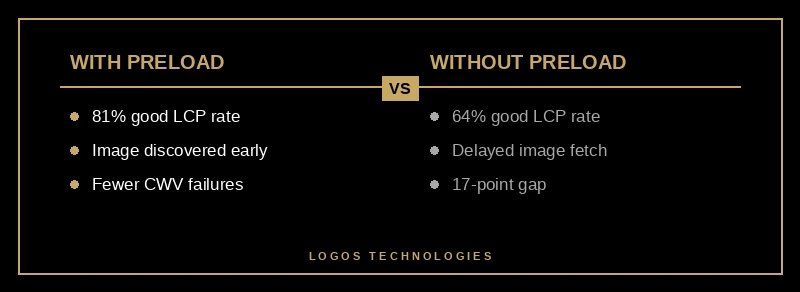
The 2025 Web Almanac found that pages with a preloaded LCP image have an 81% "good" LCP rate, compared to 64% without preloading. That is a 17-point gap, on the same metric, from moving one line into the head.
If your site uses CSS background-image for the hero rather than a real <img> tag, preload is not optional — it is required. Background images are not discoverable until CSS is parsed, which is the primary cause of Resource Load Delay on WordPress themes that use hero background CSS.
3. Kill render-blocking resources in the critical path
Render-blocking CSS and JavaScript is the second-biggest killer of LCP on the sites I audit. Every synchronous <script> tag and every CSS file linked in the head delays the browser from painting anything at all.
A few concrete moves:
- Add
deferorasyncto every non-critical<script>tag. Third-party tags like chat widgets, heatmaps, and analytics should never block rendering. - Inline critical-path CSS for above-the-fold content and lazy-load the rest.
- Move marketing scripts to a tag manager or load them after the
loadevent.
This is where the JAMstack and static-site approach pays off. A hand-built static site has no bloated theme framework fighting you for the critical path. If you are still running a traditional WordPress or page-builder stack, we cover the structural reasons it will always lose a head-to-head speed race in our WordPress alternative guide for small business.
4. Serve from a CDN and cut TTFB
TTFB is the first of the four LCP subparts, and everything else waits on it. A page hosted on a shared server in Dallas will feel quick to a Dallas visitor and painfully slow to a customer in Seattle. The fix is a CDN — a network of edge servers that cache your HTML and assets close to wherever the user actually is.
For static sites deployed to Netlify, Vercel, or Cloudflare Pages, the CDN comes included and TTFB is typically 50–200ms worldwide. For traditional hosts, Cloudflare has a free tier that sits in front of your existing site and will usually cut TTFB in half. Cloudflare's own Early Hints rollout reported average LCP improvements of 30% on participating sites, and Shopify measured 500ms faster LCP after enabling the same feature.
If your hosting provider charges you extra for a CDN, that is a sign it is time to move. We lay out the whole case in why speed has to be built in, not bolted on.

5. Right-size and modernize the hero image
This one is last on the list because it is what most blog posts tell you to do first — and it is rarely the biggest win. That said, it still matters:
- Use a modern format. AVIF or WebP instead of JPEG. WebP is typically 25–35% smaller than JPEG at the same visual quality, and AVIF is smaller still.
- Set
widthandheightattributes so the browser can reserve layout space without fetching the file. This also prevents Cumulative Layout Shift regressions. - Use a
<picture>element withsrcsetto serve a 1x image to phones and a 2x image only to high-DPR screens. Do not serve a 3000-pixel-wide hero to a 400-pixel-wide phone. - Never lazy-load the LCP image. Lazy loading is for below-the-fold images only.
loading="lazy"on the hero will tank your LCP score because the browser will deprioritize the fetch.
How do you measure LCP on a live site?
Two tools, both free.
PageSpeed Insights is the easiest check. Paste in your URL and it returns both lab data (a one-off Lighthouse run) and field data from the Chrome User Experience Report. Field data is the scoreboard Google uses to grade you — it is the metric tied to rankings.
Chrome DevTools Performance panel is the diagnostic tool. Record a page load and expand the LCP breakdown in the Insights panel. You will see the four subparts as a stacked bar, and it becomes obvious whether your problem is TTFB, Resource Load Delay, Resource Load Duration, or Render Delay. Fix what is biggest first. If your 1.3-second problem is Resource Load Delay, no amount of image compression will save you.
If you want to tie LCP back to actual business results — revenue, conversion, bounce rate — we pulled the data in what page speed actually does to revenue. The short version: every 100ms of LCP improvement is worth real money, and that math is roughly linear all the way down to sub-second LCP on conversion-focused pages.
The uncomfortable truth about LCP and the web stack you chose
LCP is mostly a symptom of architectural decisions you made before the page was ever written. A page-builder site on a shared host, with a stack of plugins all loading their own CSS and JavaScript, can be tuned — but there is a floor below which it will never go. A static HTML site served from a CDN, with a preloaded hero image and no render-blocking scripts, starts at sub-second LCP by default and stays there without anyone babysitting it. That is the architectural advantage behind our guide to technical SEO foundations that make or break rankings.
If you have tried the tactical fixes above and your LCP is still stuck above 2.5 seconds, the problem is probably not a missing attribute. It is the platform. At that point the highest-ROI move is usually a rebuild on a fast, static architecture that eliminates the bottlenecks instead of fighting them one plugin at a time.
At LOGOS Technologies, I build fast, static, SEO-optimized websites out of Papillion, Nebraska for small and growing businesses — the kind of sites that pass Core Web Vitals by default, not after six months of optimization. If you are tired of losing rankings to a slow site, take a look at our web design services or contact us for a straight answer on whether a rebuild or a tune-up is the better call for your business.