Image Alt Text in 2026: How to Write It for Screen Readers and Google

Table of Contents
TL;DR: Quick Hits
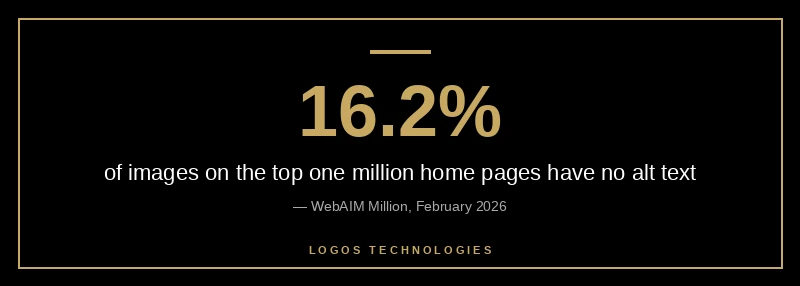
- 16.2% of images on the top one million home pages have no alt text at all, according to WebAIM's February 2026 scan.
- 45% of those images are links, so the missing text also leaves a link with no name for screen readers and no anchor text for Google.
- Google's documentation calls alt text the most important attribute for giving it more information about an image.
- No standard sets a 125-character limit. Google's writing guide asks for a short phrase or one or two sentences.
- Decorative images still need the attribute, left empty (
alt=""), so screen readers skip them instead of reading a file name.
Home pages keep getting more visual, and the text behind the pictures is not keeping up. WebAIM's February 2026 scan of the top one million home pages counted 66.6 images per page on average, a 13.6% increase in a single year. Of those images, 16.2% had no alternative text at all, which works out to 10.8 unlabeled images on a typical home page. Among the images that did have alt text, 10.8% carried something useless such as "image", "graphic", or a file name. WebAIM's summary is that more than one in four images on popular home pages have missing, questionable, or repetitive alternative text.
That matters twice over. Search Engine Land's guide to SEO accessibility describes alt text as serving dual purposes: screen readers announce it to people who cannot see the image, and search engines use it to understand and index the image. It is also one of the first things checked in any website accessibility audit, because it is cheap to fix and easy to get wrong.
What image alt text is and who reads it
Image alt text is the short written description stored in an image's alt attribute. It stands in for the picture whenever the picture cannot be seen. Three audiences rely on it: screen reader users, anyone whose browser fails to load the image, and search engine crawlers.
<img src="kitchen-remodel-after.jpg"
     alt="Finished kitchen remodel with white shaker cabinets and a walnut island">
Under WCAG, this falls under Success Criterion 1.1.1 (Non-text Content), a Level A requirement, which is the most basic tier of the standard. The same WebAIM scan found at least one image with missing alt text on 53.1% of home pages, second only to low contrast text among detected failures. When the attribute is absent entirely, Google's own guide to writing helpful alt text notes that screen readers fall back to reading the file name aloud, so a visitor hears something like "IMG underscore 4471 dot JPEG" in the middle of your sales copy.
Does alt text help SEO?
Yes, but mostly for how Google understands and surfaces your images. Google's image SEO best practices call alt text "the most important attribute when it comes to providing more metadata for an image," and say Google combines it with computer vision and the surrounding page content to work out what an image shows.
The same page is blunt about abuse. Stuffing alt attributes with keywords "results in a negative user experience and may cause your site to be seen as spam." Google's examples make the standard clear: alt="puppy" is rated better than nothing, and alt="Dalmatian puppy playing fetch" is rated best. Specific and plain beats long and keyword-heavy.
Google's John Mueller has also been direct about priorities. In January 2025, as reported by Search Engine Journal, he wrote that "the choice of ALT text is not primarily an SEO decision" and pointed people to the W3C's accessibility guidance instead. Ahrefs lands in the same place in its alt text guide for SEO: be concise, be accurate, and do not stuff keywords.
Two technical details decide whether any of this works. Google states plainly that it does not index CSS background images, so a product photo set as a background-image has no alt text and no place in image search. And alt text only helps if the image itself loads quickly, which is its own discipline covered in our guide to image optimization for website speed.
Why linked images are the costliest place to skip alt text
A linked image with no alt text fails twice: the link has no name for a screen reader, and it passes no anchor text to Google. WebAIM found that 45% of images missing alt text were links, and that one in four linked images had none.
For a screen reader user, that is a link announced as "link" and nothing else, or as a raw URL. It is the main reason empty links showed up on 46.3% of home pages in the same scan. It is the same class of problem a keyboard accessibility test exposes: the control exists, but nobody using assistive technology can tell what it does.
For search, Google's documentation says alt text is treated as anchor text when an image is used as a link. Anchor text is one of the ways Google learns what the destination page is about, which is the whole premise of internal linking for SEO. A logo that links home, a product thumbnail that links to its product page, and a "book now" graphic are all links first and pictures second. Their alt text should name the destination or the action: "LOGOS Technologies home", not "logo".
How do you write good alt text step by step?
Work through the W3C's alt decision tree, which reduces the choice to a handful of questions about what the image is doing on the page. It is the resource Mueller pointed to.
1. Check whether the image contains text
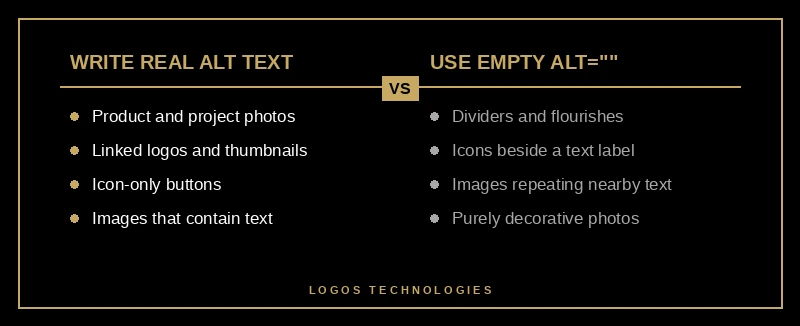
If the image shows words that appear nowhere else on the page, such as a promotional banner, put those words in the alt attribute. If the same words already sit next to the image as real text, leave the alt empty so they are not read twice.
2. Check whether the image is a link or button
When an image is the only thing inside a link or button, describe the destination or the action. A magnifying glass icon gets alt="Search". A thumbnail linking to a service page gets the name of that service.
3. Describe what the image adds to the page
For photos and simple graphics, say what the image contributes in this context. Google's writing guide shows the same photo earning different alt text depending on what the surrounding paragraph is about. Skip openers like "image of" or "photo of", since the screen reader already announces that it is an image. Charts and diagrams get a short alt that names the chart and its key point, with the full data in the page text.
4. Give decorative images an empty alt
Dividers, background flourishes, and icons that sit beside a text label get alt="". The empty value tells a screen reader to skip the image. Removing the attribute altogether does the opposite and triggers the file name fallback.
5. Check the page the way a screen reader hears it
The W3C's image alt text easy check uses a bookmarklet that flags every image with no alt attribute and marks empty ones for a human to confirm. Then read each alt text in place of its image. If the page still makes sense, you are done.
On length: the often-repeated 125-character limit does not appear in the W3C's images tutorial or in Google's documentation. Google's guidance is to "use a short phrase or one or two sentences," because long descriptions interrupt the reading flow.
Why your platform decides how much alt text gets written
Alt text gets skipped wherever the platform treats it as optional. Most content management systems and page builders let an editor upload an image and publish without ever being asked for a description, so coverage depends on every person remembering every time.
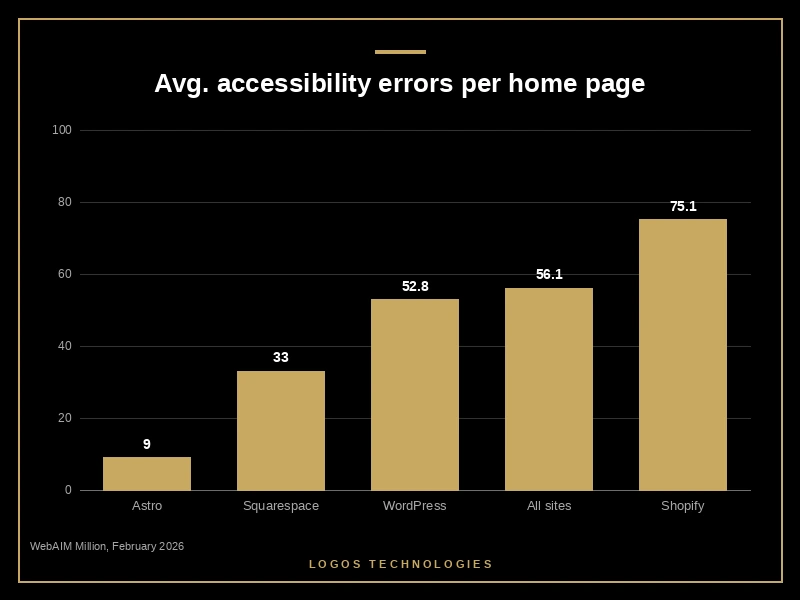
WebAIM's 2026 data hints at how much the underlying build matters. Across all accessibility errors, not only alt text, WordPress home pages averaged 52.8 detected errors, Squarespace 33.0, and Shopify 75.1, against 56.1 for the full sample. Sites built with the static-first framework Astro averaged 9.0. WebAIM cautions that extra errors cannot always be attributed to the technology itself, and the sample sizes differ widely (252,302 WordPress pages against 5,472 Astro pages), so read this as a pattern, not a verdict.
The reason hand-coded and static sites tend to do better is that the template can make alt text a requirement instead of a reminder. On an Eleventy build, the image shortcode can refuse to compile a page when a description is missing:
eleventyConfig.addShortcode("image", function (src, alt) {
  if (alt === undefined) {
    throw new Error(`Missing alt attribute on ${src}`);
  }
  return `<img src="${src}" alt="${alt}" loading="lazy" decoding="async">`;
});
An empty string still passes, so decorative images are a deliberate choice, and a forgotten description fails the build before it reaches a visitor. A script that guesses descriptions in the browser cannot do the same job, because it has no idea why you put the image on the page. That is one of the reasons accessibility overlays fail as a substitute for fixing the markup.
Frequently Asked Questions
Is alt text a Google ranking factor?
Google says it uses alt text, along with computer vision and page content, to understand what an image shows, and that alt text acts as anchor text for linked images. It has not described alt text as a way to lift a page's rankings in regular web results, and John Mueller has said the choice of alt text is not primarily an SEO decision. Treat it as an image search and accessibility signal.
How long should alt text be?
As long as it takes to convey what the image contributes, and no longer. Google's writing guide recommends a short phrase or one or two sentences. Complex images such as charts should get a brief alt plus a full explanation in the body text.
Should every image have alt text?
Every img element should have an alt attribute, but not every image needs a description. Informative and linked images get real text. Purely decorative images get an empty value, alt="", so assistive technology ignores them.
Can AI write alt text for me?
AI tools can produce a reasonable first draft of what a photo shows. They cannot know why the image is on your page, and Google's guidance is that alt text should explain the image in the context of the surrounding text. Use a generated description as a starting point and have a person edit it.
Is missing alt text an ADA compliance problem?
Missing alt text is a failure of WCAG's most basic conformance level, and it is one of the easiest failures for anyone to detect with a free scanner. That combination puts it near the top of any compliance review. Our breakdown of ADA website lawsuit risk covers the legal side.
Get every image working for you
Image alt text is a small piece of markup that does three jobs at once: it makes your pages usable for people who cannot see them, it tells Google what your images show, and it turns linked images into links with meaning. At LOGOS Technologies in Papillion, Nebraska, we hand-code static sites and write alt text for every image as part of the build, not as an afterthought. If you want to know how your current site scores, start with a website accessibility audit, look through our web design services, or contact us and we will review your images with you.