Accessibility Overlays: Why They Don't Make Your Site ADA Compliant in 2026

Table of Contents
TL;DR — Quick Hits
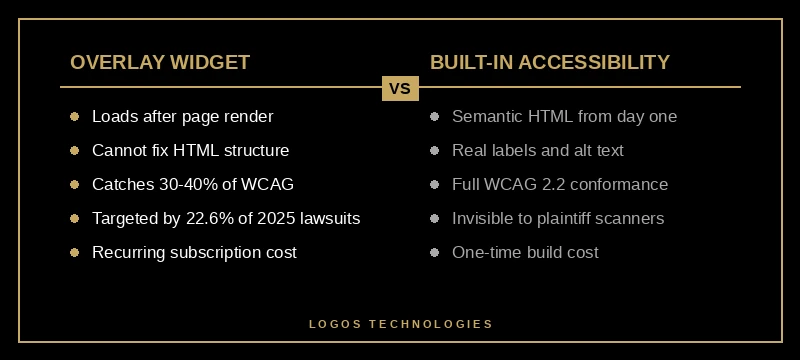
- 456 of 2,019 digital accessibility lawsuits filed in the first half of 2025 — 22.6% — targeted websites with an accessibility overlay installed.
- The FTC settled with overlay vendor accessiBe for $1 million in April 2025 over false ADA-compliance marketing claims.
- Automated overlays catch roughly 30–40% of WCAG issues; the rest require source-code remediation a widget cannot reach.
- WCAG 2.2 success criteria around target size, focus appearance, and accessible authentication cannot be retrofitted by any overlay.
- Static, hand-coded sites built with semantic HTML have no underlying accessibility debt for an overlay to mask.
If you've shopped for an accessibility solution in the last two years, you've seen the pitch: drop a single line of JavaScript on your site, and an AI-powered widget will make it ADA compliant overnight. No code changes. No audit. No lawyers. The companies selling these tools — accessiBe, UserWay, EqualWeb, AudioEye, and a dozen smaller players — have built a multi-hundred-million-dollar industry on that promise.
The 2025 data says the promise is broken. According to UsableNet's 2025 Mid-Year Digital Accessibility Lawsuit Report, 456 of the 2,019 federal lawsuits filed in the first half of 2025 specifically targeted websites that had an accessibility overlay installed at the time of filing. That is 22.6% of every digital accessibility case in the country, hitting businesses that thought they were protected.
What Is an Accessibility Overlay?
An accessibility overlay is a third-party JavaScript widget that loads on top of your existing website and attempts to fix accessibility problems on the fly. Most overlays present a small icon — usually a person, a wheelchair symbol, or an "accessibility" label — that opens a panel of toggles for font size, contrast, animation, and screen-reader behavior. Some go further and try to inject ARIA attributes, generate alt text with AI, or restructure focus order in real time.
What they all share: they don't change your underlying HTML. They run as a layer on top of it, in the user's browser, after the page has already loaded. That distinction is the whole story of why overlays fail courts, fail screen-reader users, and fail Google.
Do Accessibility Overlays Work for ADA Compliance?
No. Overlays do not make a website ADA compliant, and the federal government has now said so officially. On April 22, 2025, the Federal Trade Commission finalized a $1 million consent order against accessiBe for marketing its accessWidget as a tool that "makes any website ADA and WCAG compliant" — a claim the FTC found to be false, misleading, and unsubstantiated. The settlement also barred the company from making compliance guarantees without proof.
The legal exposure is rising at the same time. UserWay is currently defending a class action over similar marketing claims, with a magistrate judge recommending key portions of the case proceed. Plaintiffs' firms now scan the underlying HTML rather than the overlay-modified DOM, which means the widget is invisible to the lawsuit but visible to the customer who can't navigate your checkout. The result is a 40%-plus repeat-suit rate among overlay-using companies — many businesses get sued, install a widget, and get sued again within twelve months.

The deeper problem is structural. Automated tools — including every overlay on the market — identify only 30 to 40% of WCAG failures, according to industry consensus and the Overlay Fact Sheet signed by hundreds of accessibility practitioners. The remaining 60–70% are issues no script can detect: missing form labels, broken heading hierarchy, custom components that don't expose state to assistive tech, color choices that fail contrast, focus traps inside modals. These live in the source code, and source code is what plaintiffs cite.
What WCAG 2.2 Requirements Can Overlays Not Fix?
WCAG 2.2 became the enforceable standard for new web content in 2024 and added nine new success criteria specifically targeting cognitive, motor, and mobile-accessibility gaps. Several of those criteria are structurally impossible for an overlay to satisfy:
- 2.5.8 Target Size (Minimum) — interactive targets must be at least 24×24 CSS pixels. An overlay can't enlarge buttons without breaking the rest of the layout.
- 2.4.11 Focus Not Obscured — the keyboard focus indicator must remain visible. Sticky headers and chat widgets often violate this in source markup.
- 3.3.7 Redundant Entry — forms can't ask users to re-enter information they've already provided. This is a backend and form-architecture decision.
- 3.3.8 Accessible Authentication — login flows can't require cognitive function tests like remembered passwords with no alternative. CAPTCHA implementations and login screens have to be rebuilt.
- 2.5.7 Dragging Movements — drag interactions must have a single-pointer alternative. That requires changing the JavaScript event handlers.
None of these can be retrofitted by an external script that runs after page load. They need to be designed into the page. We walked through how to test for all of them in our website accessibility audit step-by-step guide — that's the right starting point, not a widget purchase.
Why Static, Hand-Coded Sites Sidestep the Overlay Trap
The reason most websites end up shopping for an overlay is that they were built on a templated CMS or page builder where the markup is generated by a theme rather than designed for purpose. Drag-and-drop builders frequently emit <div>-based menus, missing landmark roles, inconsistent heading levels, and click handlers attached to non-semantic elements. The site looks fine, but a screen reader hears nothing useful — and patching that after the fact requires either a complete rebuild or a widget that pretends to fix it.
A site built with semantic HTML from the first commit has none of that debt. When every button is a <button>, every navigation is wrapped in a <nav>, every form input has a real <label>, and every image has descriptive alt text written by a human, the WCAG criteria are met as a side effect of normal markup. Accessibility stops being a separate project and becomes the way the site exists. We argue this case at length in our breakdown of why hand-coded custom web design outperforms templated builds — accessibility is one of several compounding wins.
The same logic applies to the federal compliance deadline most small businesses are now navigating. We covered the legal landscape and 2026 timeline in our guide to ADA compliant websites and what businesses need to know, but the short version is: overlay or no overlay, the underlying HTML is what gets judged.
What Should You Do Instead of Installing an Overlay?
The replacement isn't a different vendor. It's a different approach. Run a real website accessibility audit using both automated tools (axe DevTools, WAVE, Lighthouse) and manual keyboard and screen-reader testing. Catalog the failures by WCAG criterion. Fix them in the source code. Re-audit. The ADA.gov web accessibility guidance explicitly notes that automated checkers "need to be used carefully" and that a clean automated report does not mean a site is accessible — that is the federal government telling business owners not to rely on widgets.
If your site can't be remediated economically — usually because the underlying CMS or theme is the problem — a rebuild is cheaper than five years of overlay subscriptions plus the eventual lawsuit. A static, accessible site built right the first time costs roughly one to three years of typical overlay fees and carries no recurring license. There is no "click here to be compliant" button, but there's also no gamble.
Frequently Asked Questions
Are accessibility overlays illegal?
Overlays themselves aren't illegal, but marketing them as ADA compliance solutions is increasingly being treated as deceptive. The FTC's April 2025 consent order against accessiBe explicitly prohibits unsubstantiated WCAG- and ADA-compliance claims, and class action plaintiffs are pursuing similar theories against UserWay and other vendors. Installing one doesn't break the law; relying on one for compliance does break the assumption you're protected.
Will an overlay protect me from an ADA lawsuit?
The 2025 numbers say no. Twenty-two and a half percent of digital accessibility lawsuits filed in the first half of 2025 targeted sites that already had an overlay installed. Plaintiffs' firms now scan the raw HTML and ignore the widget entirely, which means the overlay neither prevents the suit nor serves as a defense once it's filed.
What is WCAG 2.2 and is it required?
WCAG 2.2 is the Web Content Accessibility Guidelines version published by the W3C in late 2023. It is the current standard referenced by the Department of Justice, most state digital-accessibility laws, and the courts hearing Title III website cases. It adds nine success criteria to WCAG 2.1, all of which apply to new web content in 2026.
How much does it cost to make a website ADA compliant without an overlay?
For a small-to-medium static site, a remediation pass typically costs a few thousand dollars one time, depending on the scope of issues found in the audit. A full rebuild on a static, accessible foundation is more — but it eliminates the overlay subscription, removes the lawsuit exposure, and usually improves SEO and page speed at the same time, since the same disciplines that make a site accessible also make it fast.
Can a screen reader user tell if my site has an overlay?
Yes, immediately. Most overlays inject duplicate or conflicting ARIA labels, override skip links, and add a control panel that interrupts navigation. The Overlay Fact Sheet — signed by hundreds of accessibility practitioners and assistive-technology users — documents pattern after pattern of overlays making sites measurably harder to use for the people they claim to help.
Build It Right, Not Patched On
The accessibility overlay industry will keep selling the dream of one-line ADA compliance because the dream is easier to sell than the reality. The reality is that accessible websites are designed to be accessible, in the markup, from day one. That is what protects you in court, what works for users with disabilities, and what Google rewards in rankings — semantic HTML, keyboard-friendly interactions, real alt text, real labels.
We build static, hand-coded, WCAG-conformant websites for small businesses from our office in Papillion, Nebraska. If you're staring at an overlay subscription and a demand letter at the same time, that's the signal it's time to stop patching. Take a look at our web design services or contact us and we'll run a free accessibility audit on your current site and tell you honestly whether to remediate or rebuild.