Internal Linking for SEO in 2026: The Strategy That Compounds Your Rankings

Table of Contents
TL;DR — Quick Hits
- Internal linking for SEO is one of the highest-leverage on-site levers you control — Google's John Mueller calls it "super critical."
- In a 23-million-link study, pages with 40–44 internal links earned roughly 4x more Google clicks than pages with 0–4.
- Pages with at least one exact-match internal anchor saw about 5x more search traffic — but vary your anchors, don't repeat one phrase.
- 3–5 contextual links per article is a sane starting point; piling on 100+ dilutes the value each link passes.
- Static, hand-coded sites win here: you control every link instead of letting plugins generate orphan pages and sitewide clutter.
Most small-business owners chase backlinks for months while ignoring the links already sitting inside their own site. That's backwards. When Google's John Mueller was asked whether internal linking still matters, he answered that "internal linking is super critical for SEO" — "one of the biggest things you can do on a website to guide Google and visitors to the pages that you think are important." The data backs him up. A Zyppy study of 23 million internal links across 1,800 sites found that pages with 40–44 incoming internal links pulled in roughly four times the Google clicks of pages with only 0–4.
Internal linking for SEO is the rare tactic that costs nothing, requires no outreach, and compounds every time you publish. This guide covers how many links to use, what the data says about anchor text, and why a hand-coded site has a structural advantage that WordPress sites rarely capture. If you want the broader picture first, start with our pillar guide on how to rank on Google in 2026.
What is internal linking, and why does it matter for SEO?
An internal link is any hyperlink that points from one page on your site to another page on the same site. It matters for SEO because it does three jobs at once: it helps search engines discover new pages, it tells them what each page is about through anchor text, and it distributes ranking authority (PageRank) across your site. Without internal links, Google struggles to crawl and rank your content.
Discovery is the part most people underestimate. According to Google Search Central, links are how Google finds new pages — a crawler extracts a link from a known page and follows it to a new one. Google's Gary Illyes has said internal links are the single most important way Google discovers URLs, ahead of XML sitemaps. A page nobody links to is an "orphan": invisible to crawlers and starved of authority. Internal linking is also the engine behind building real topical authority — clusters of related pages linking to each other signal comprehensive coverage of a subject.
How many internal links should a page have?
For a typical article, 3–5 contextual links woven into the body is a solid target, scaling up with length. Ahrefs recommends 3–5 contextual links per article on top of your standard navigation, and Semrush suggests 2–5 contextual links per 1,000 words while keeping total links under about 150 per page. The point is intentional linking, not maximum linking.
There is a real ceiling. The Zyppy data showed traffic rising with internal links up to about 40–44, then reversing once a page passed roughly 45–50 links — largely because very high link counts tend to be sitewide navigation clutter rather than meaningful editorial links. Every link on a page also splits the authority it passes: a page with 100 links sends roughly one-hundredth of its equity through each. Placement matters too — under Google's "reasonable surfer" model, links in your main content body carry the most weight, while footer and deep-sidebar links carry the least.

Why static, hand-coded sites have an internal linking advantage
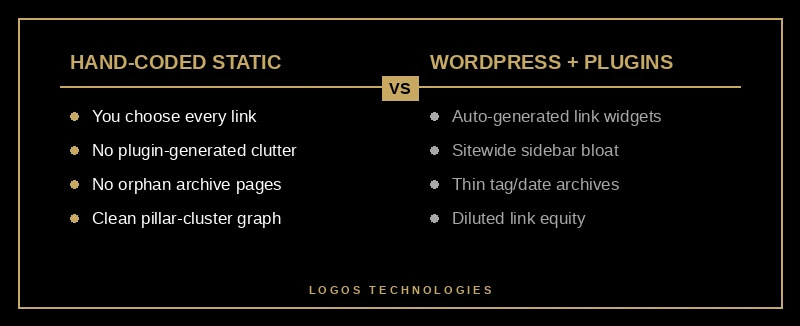
Static, hand-coded sites give you precise control over every internal link, which is exactly what internal linking for SEO rewards. On a typical WordPress build, plugins and themes auto-generate links you never chose — related-posts widgets, tag and date archives, and sitewide sidebar blocks — that inflate link counts past the useful threshold and quietly spawn thin, orphaned archive pages. None of the major guides frame internal linking as a content-management-system problem, but for small businesses it usually is.
When your site is built as fast static HTML, the opposite is true: nothing links anywhere unless you decided it should. You can wire a pillar-and-cluster structure deliberately, keep every important page within three clicks of the homepage, and avoid the link bloat that dilutes equity. That control is a big part of why we build on a static-site architecture instead of WordPress, and it pairs naturally with the crawl-efficiency wins covered in our technical SEO checklist.
How to build an internal linking strategy in 4 steps
A good internal linking strategy is a repeatable process, not a one-time cleanup — it is one of the most reliable ways to improve how to rank on Google without writing a single new post. Here is the workflow we use on every site we build and maintain.
1. Map your pillars and clusters
Group your content into topics. For each topic, pick one comprehensive "pillar" page and list the narrower posts that support it. This pillar-and-cluster map is the skeleton your links will follow, and it doubles as your editorial calendar — gaps in the map are the next posts to write.
2. Link clusters up to the pillar and back
Every cluster post should link up to its pillar at least once, and the pillar should link down to its strongest clusters. Semrush calls bi-directional pillar-cluster linking the 2026 standard because it concentrates topical authority on the page you most want to rank. This is also the difference between a real SEO strategy and chasing external links one at a time.
3. Write descriptive, varied anchor text
Anchor text tells Google what the destination page is about, so make it descriptive — "our guide to schema markup," not "click here." Then vary it. The Zyppy study found anchor-text variety strongly correlated with traffic, and pages with at least one exact-match anchor earned about 5x more clicks than pages with none. Use a mix of exact and partial phrases pointing to the same page.
4. Audit for orphans and broken links
Run a crawl every month or two to surface orphan pages with no incoming links and broken links pointing to 4XX errors. Add internal links to important orphans so Google can find them, and remove or 301-redirect dead links so authority stops leaking. New posts don't link themselves — building those bridges when you publish is the highest-impact habit in the whole process.

How does internal linking help with AI search and AI Overviews?
Internal linking now does double duty: it ranks you in classic search and helps AI engines understand and cite your site. AI search tools read your internal link structure to figure out which pages belong to a topic cluster and which page is the authoritative hub — the clearer your link graph, the more likely your hub gets cited. Google has also been adding more inline links inside AI Overviews and AI Mode, which raises the value of being the well-linked hub on a topic.
The practical takeaway combines two findings most guides treat separately: vary your anchor text and keep one obvious pillar per topic. That gives Google's classic crawler the keyword variety it rewards and gives AI engines the clean hub structure they need to cite you. It's the same discipline behind optimizing for AI Overviews and generative search.
Frequently Asked Questions
Do internal links still matter for SEO in 2026?
Yes — more than ever. Google's own representatives call internal linking "super critical," and it remains the primary way Google discovers and prioritizes pages. In 2026 it also shapes how AI search engines identify your authoritative pages, so its role has grown, not shrunk.
What anchor text should I use for internal links?
Use descriptive anchor text that summarizes the destination page, and vary the wording across links pointing to the same page. Avoid generic phrases like "click here" and avoid repeating one exact phrase every time. A mix of exact-match and partial-match anchors performs best.
Can you have too many internal links on a page?
Yes. Beyond roughly 45–50 internal links, the Zyppy data shows traffic benefits reversing, and every extra link dilutes the authority passed through the others. For a normal article, 3–5 contextual links in the body is plenty; reserve high link counts for genuine navigation.
How do I find orphan pages on my site?
Run a site crawl with a tool like Screaming Frog, Ahrefs, or Semrush and look for pages with zero incoming internal links. Cross-reference with Google Search Console to spot pages getting impressions but sitting deep in your structure, then add contextual links from related, higher-authority pages.
Internal linking for SEO is the cheapest ranking lever you own, and it rewards consistency more than cleverness. At LOGOS Technologies in Papillion, Nebraska, we build fast, static, hand-coded websites with internal link structures planned from day one — so authority flows to the pages that actually win you customers. If your site has grown into a tangle of orphan pages and dead links, take a look at our web design services or contact us for a straightforward audit of where your link equity is leaking.