
Can AI Crawlers Read Your Website? What GPTBot, ClaudeBot, and ChatGPT Search Actually See

Table of Contents
TL;DR — Quick Hits
- AI crawlers from OpenAI, Anthropic, Perplexity, Meta and ByteDance fetch your HTML but never execute your JavaScript.
- ChatGPT's crawler downloaded JavaScript files in 11.50% of its requests and ran none of them.
- If your text appears only after a script runs, it does not exist as far as most AI systems are concerned.
- Google says you do not need llms.txt, chunked content, or special AI markup to appear in AI Overviews.
- Blocking GPTBot stops model training. Blocking OAI-SearchBot removes you from ChatGPT search answers. They are separate decisions.
Search traffic is moving to places that do not render your site the way a browser does. Zero-click searches reached 68% in early 2026, and Semrush's six-month study of more than 600,000 keywords found AI Overviews grew 71% on commercial-intent SERPs — the searches where people are comparing options and picking a vendor. The systems answering those searches reach your site through a crawler, and that crawler has a very different set of capabilities than Chrome.
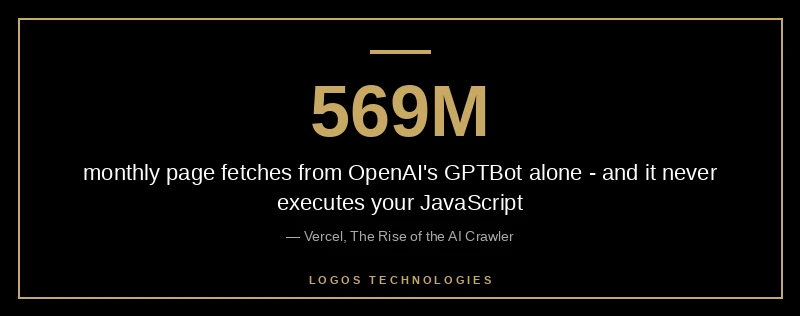
This is the part most business owners never hear. When Vercel and MERJ instrumented their network to watch how AI crawlers process web content, OpenAI's GPTBot alone made 569 million fetches in a month, and GPTBot, Claude, AppleBot and PerplexityBot together accounted for nearly 1.3 billion — a little over 28% of Googlebot's volume. That traffic is real. What those crawlers can actually read is the question nobody asks until rankings and citations start going somewhere else.
What do AI crawlers actually see when they visit your website?
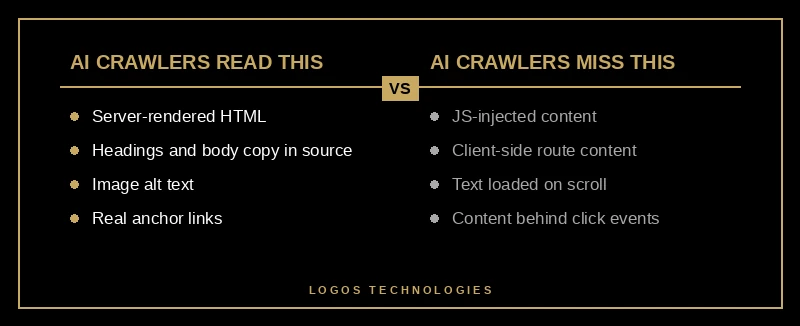
AI crawlers see the raw HTML your server returns, and nothing else. They request the URL, read the response body, and move on. They do not wait for scripts, they do not hydrate a framework, and they do not scroll. Whatever text, links and structure exist in that first response is the entire site as far as they are concerned.
That is a meaningful difference from Googlebot, which queues pages for rendering and comes back to execute JavaScript. The same Vercel and MERJ analysis found that ChatGPT's and Claude's crawlers do download JavaScript files — 11.50% and 23.84% of their requests respectively — but never execute them, so client-side rendered content stays invisible. Content placed in the initial HTML response, including JSON embedded in the page, can still be picked up, because a language model can read structured text directly.
For a hand-coded static site, this changes nothing: the HTML that leaves the server already contains the whole page. For a WordPress build leaning on a page builder, or a React app that assembles its content in the browser, it can mean the difference between being quoted in an answer and not existing. We went through the performance side of that tradeoff in our breakdown of why WordPress is so slow, and this is the same architectural decision showing up in a new place. The broader picture of where AI helps and where it quietly costs you sits in our guide to AI in web design 2026.
Which AI crawlers render JavaScript in 2026, and which do not?
Two camps. Google's Gemini runs on Googlebot's infrastructure and renders JavaScript fully, and AppleBot uses a browser-based crawler that processes JavaScript, CSS and Ajax requests. Everything else in common use does not: OpenAI's OAI-SearchBot, ChatGPT-User and GPTBot, Anthropic's ClaudeBot, Meta-ExternalAgent, ByteDance's Bytespider, PerplexityBot, and Common Crawl's CCBot, which is a standard training dataset for language models.
Practically, that means the rendering bet you made when the site was built now decides your visibility in every non-Google AI product. It also means the fix is boring and permanent rather than clever: put the content in the HTML. Server-side rendering, static generation, or plain hand-written HTML all satisfy it. Client-side rendering is fine for the things that genuinely need a browser — a live chat widget, a view counter, an interactive filter — as long as nothing a buyer needs to read lives there. If you are already trimming scripts for Core Web Vitals, you are working the same lever from the other end; our notes on reducing JavaScript execution time cover that side.
How do you check what AI crawlers see on your site?
You can answer this in about two minutes with tools you already have. The goal is to look at your page the way a non-rendering crawler does, then compare it to what you think is on the page.
1. Fetch your page as a crawler
Run this against your most important page:
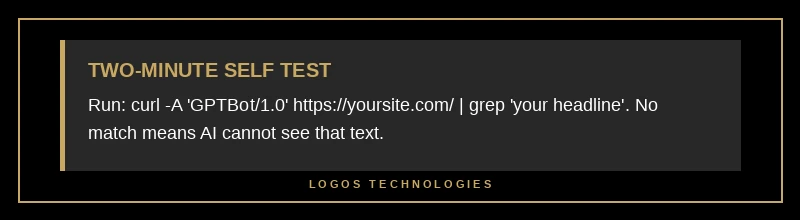
curl -A "GPTBot/1.4" https://yoursite.com/services/ -o page.html
That file is the raw HTML — the exact bytes a non-rendering crawler receives, before a single script runs.
2. Search the raw HTML for your content
Grep for the things that matter: your headline, the first paragraph of your service description, your phone number, your prices, your city.
grep -c "Licensed and insured" page.html
A result of zero means that text is being injected by JavaScript and no AI crawler outside Google and Apple can read it. Run the same check on your reviews, your FAQ answers and your product copy. Those are the passages that get quoted.
3. Check your robots.txt rules per bot
Open https://yoursite.com/robots.txt and read it line by line. Per OpenAI's own crawler documentation, GPTBot exists to collect training data, while OAI-SearchBot is what surfaces sites in ChatGPT's search answers — and sites opted out of OAI-SearchBot will not appear in those answers. A blanket disallow of everything with "AI" in the name, which several hosts and security plugins now apply by default, quietly removes you from a search surface you probably wanted to be on.
4. Review the accessibility tree
Open Chrome DevTools, go to the Elements panel, and switch to the Accessibility tab. Google's guidance on building agent-friendly websites explains that agents work from screenshots, raw HTML and the accessibility tree, and that the tree is the high-fidelity map — it strips the visual noise and leaves the structure. A form where every input is an unlabeled div reads as nothing there. The fix is the same one that helps screen reader users: real button and a elements, labels tied to inputs with for, headings in order. We walk through testing that properly in our guide to keyboard accessibility testing.
For reference, the page you are reading returns roughly 1,650 words of article text in its raw HTML response with zero JavaScript executed. That is not a clever optimization. It is what happens by default when the HTML is built at deploy time instead of assembled in the visitor's browser.
Do you need llms.txt, or is that a waste of time?
For Google, it is a waste of time. Google's official guide to optimizing for generative AI search lists llms.txt in its mythbusting section, alongside "chunking" content and rewriting pages specifically for AI: Google Search does not use those files, and maintaining one will neither help nor hurt your rankings. The same guide is equally direct that structured data is not required for AI Overviews, although it remains worth keeping for rich results.
That is worth sitting with, because a lot of 2026 advice is selling the opposite. The things Google's own documentation says do matter are unglamorous: be indexable, be crawlable, serve a good page experience, write non-commodity content with a point of view, and keep your Business Profile current. The last one is easy to forget — local visibility feeds AI answers too, and we covered it separately in our post on generative engine optimization. If you are publishing an llms.txt for a non-Google tool that genuinely consumes it, fine. Just do not mistake it for the work.
Should you block AI crawlers from your site?
It depends on what each crawler gives back, and the numbers are not close. In the breakdown Cloudflare published with its Radar AI Insights update, training accounted for nearly 80% of AI bot crawling, and the crawl-to-refer ratios were lopsided: Anthropic's crawlers fetched roughly 50,000 pages for every visitor referred back, OpenAI's 887, Perplexity's 118. A publisher living on ad impressions reads those ratios as a bill. A small business that wants to be recommended when someone asks an assistant for a contractor reads them differently — the referral is small, but the recommendation is the point.
The practical answer for most service businesses: allow the search and user-initiated crawlers, decide separately about training. Per-user-agent rules in robots.txt make that possible. Blanket-blocking is the choice that costs you something without giving anything back, and it usually happens by accident rather than on purpose.
Frequently Asked Questions
Do AI crawlers execute JavaScript?
Most do not. OpenAI's, Anthropic's, Perplexity's, Meta's and ByteDance's crawlers fetch HTML and never run scripts, so client-side rendered content is invisible to them. Google's Gemini renders fully because it uses Googlebot's infrastructure, and AppleBot runs a browser-based crawler. If your content only appears after JavaScript runs, assume most AI systems cannot see it.
Will blocking GPTBot hurt my visibility in ChatGPT?
Not by itself. GPTBot collects training data, while OAI-SearchBot is the crawler that surfaces sites in ChatGPT's search answers. You can disallow GPTBot and still appear in ChatGPT search results, as long as OAI-SearchBot is allowed. Blocking OAI-SearchBot is what removes you from those answers.
Does a static website rank better in AI search than WordPress?
The platform is not a ranking factor, but the rendering method decides what crawlers can read. Static sites ship complete HTML, so every AI crawler sees the whole page. A WordPress or page-builder site that injects content client-side can hide the very passages you want quoted, which is a self-inflicted visibility problem rather than a platform penalty.
How do I know if AI tools are sending me traffic?
Check your server logs or analytics for referrals from chatgpt.com, perplexity.ai, claude.ai and gemini.google.com, and watch for the AI crawler user agents in your access logs. Google Search Console also reports how your pages perform in its generative AI features, which covers AI Overviews and AI Mode.
Is llms.txt worth adding to my site?
Not for Google. Google's AI optimization guide states plainly that Google Search does not use llms.txt or similar AI text files, and that having one neither helps nor harms your visibility. Add it only if a specific tool you care about actually reads it, and never in place of putting real content in your HTML.
Ready to Find Out What AI Can Actually Read on Your Site
If you are not sure whether your site's content survives the trip to an AI crawler, run the curl test above on your three most important pages. It takes five minutes and the answer is not ambiguous. If the content is missing, the fix is architectural, and it is the same fix that makes the site faster for humans: build the HTML before the visitor arrives instead of after.
That is how LOGOS Technologies builds every site out of Papillion, Nebraska — hand-coded, static, complete in the first response, with nothing important hiding behind a script. If you want a look at how your current site holds up, see our web design services or contact us and we will run the check with you. And if you want the wider view of where AI genuinely helps a small business site, start with our guide to AI in web design 2026.