

How to Reduce JavaScript Execution Time (and Why It Matters in 2026)

Table of Contents
TL;DR — Quick Hits
- The median mobile page now ships 697 KB of JavaScript, and most of it runs on a single main thread (HTTP Archive, 2025).
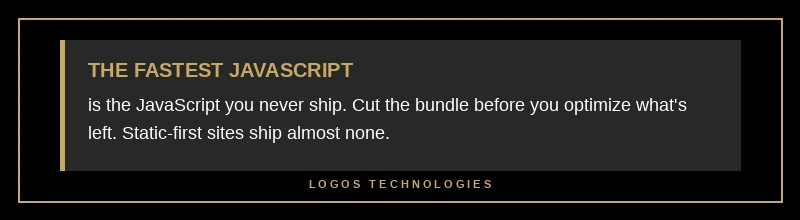
- Any task that holds the main thread longer than 50 ms is a "long task" that blocks user input (web.dev).
- Lighthouse warns when JavaScript execution passes 2 seconds and fails the audit past 3.5 seconds (Chrome).
- The fastest fix is not faster code — it is less code. Cutting the bundle beats micro-optimizing what ships.
- Reducing execution time directly improves Interaction to Next Paint, the Core Web Vital most sites now fail.
If your site feels sluggish when someone taps a button or opens a menu, JavaScript is almost always the reason. The median mobile page in 2025 shipped 697 KB of JavaScript — second only to images in total page weight — and unlike images, every kilobyte of that script has to be downloaded, parsed, compiled, and executed on the browser's single main thread before the page can respond to a tap. When that thread is busy, your visitor's click does nothing. That is the core problem behind Interaction to Next Paint, and it is why learning to reduce JavaScript execution time is one of the highest-leverage performance moves available in 2026.
This is the small-business angle the big framework guides skip: most advice assumes you are stuck with a heavy React or WordPress stack and need to optimize around it. The better answer is usually architectural — ship less script in the first place. This post is a cluster in our broader website speed optimization guide, focused specifically on the main-thread cost of JavaScript.
What causes high JavaScript execution time?
High JavaScript execution time comes from the browser doing four kinds of work on the main thread: downloading the script, parsing and compiling it, executing it, and holding it in memory. Google's Chrome team breaks the cost into exactly these buckets — network, parse/compile, execution, and memory — and all of it competes for the same main thread that handles user input. More bytes mean more of every category.
The single biggest culprit on most small-business sites is third-party script: analytics, chat widgets, ad tags, A/B testing tools, and social embeds. Each one is JavaScript you did not write and cannot easily optimize, and it runs on your main thread just like your own code. On many sites, third parties account for more execution time than everything first-party combined. That is why the first question is never "how do I speed this up" but "do I need this at all."

How JavaScript execution time hurts your Core Web Vitals
Execution time hurts responsiveness because a long-running script blocks the browser from reacting to clicks, taps, and keystrokes. Any task that occupies the main thread for more than 50 milliseconds is a "long task", and while one is running, input is frozen. Chain a few of these together during page load and a visitor who taps your menu waits — sometimes for hundreds of milliseconds — before anything happens.
This maps directly onto two metrics. In the lab, it shows up as Total Blocking Time, which measures the portion of main-thread tasks that run past 50 ms; DebugBear notes that TBT accounts for 30% of the overall Lighthouse performance score. In the field, the same behavior shows up as Interaction to Next Paint, where 200 ms or less is "good," 200–500 ms "needs improvement," and anything over 500 ms "poor." INP failures are almost never about network speed — they are about JavaScript architecture. We cover the metric itself in depth in our guide to fixing Interaction to Next Paint, and it is one of the Core Web Vitals we break down in the 2026 Core Web Vitals update.
Ship less JavaScript before you optimize it
The most effective way to reduce JavaScript execution time is to send less code, because code that never loads costs nothing to parse, compile, or run. Chrome's own guidance leads with code splitting, removing unused code, and text compression — every one of those is a subtraction, not an optimization. Audit your bundle and cut what you do not need: unused libraries, duplicate dependencies, a 90 KB date library used for one format string, animation frameworks driving a single fade.
This is where static-first architecture wins by default. A hand-coded static site built with a generator like Eleventy ships almost no JavaScript because most of the page is plain HTML rendered ahead of time. There is no framework runtime to hydrate, no page builder loading a dozen scripts to render a hero section. When the baseline is near-zero, you are not fighting execution time — you never created it. That is a very different starting line from a typical WordPress install running a theme plus fifteen plugins, each queuing its own scripts.
Break up the work that has to run
For the JavaScript that genuinely needs to run, the goal is to stop it from monopolizing the main thread. Break long tasks into smaller pieces and yield control back to the browser between them, so it can handle a pending click instead of making the user wait. The modern approach web.dev recommends is to yield regularly rather than run a big task to completion — using scheduler.yield() where available, or a setTimeout fallback, to hand the thread back roughly every 50 ms.
A few practical rules that move the needle: defer or async every non-critical script so it does not block the initial render, the same discipline we apply to render-blocking resources; load third-party scripts inside a requestIdleCallback so they run only when the browser is otherwise free; and keep expensive work out of input handlers, since a synchronous fetch or a large JSON.parse fired on click is felt directly as lag. None of this rewrites your app — it reschedules when the work happens so the user is never the one waiting.
Frequently Asked Questions
What is a good JavaScript execution time?
There is no single target number, but Lighthouse gives useful guardrails: it warns when JavaScript execution exceeds 2 seconds and fails the audit past 3.5 seconds. Because execution feeds Total Blocking Time, aim to keep total blocking under about 200 ms in the lab and Interaction to Next Paint at or below 200 ms in the field.
Does reducing JavaScript improve SEO?
Indirectly, yes. Core Web Vitals are a Google ranking signal, and JavaScript execution time is a primary driver of Interaction to Next Paint and Total Blocking Time. Lower execution time means better responsiveness scores, which supports rankings. It is one piece of the broader website speed optimization picture — and a faster site also converts better once visitors arrive.
How do I find what is slowing my page down?
Run the page through Lighthouse or PageSpeed Insights and open the "Reduce JavaScript execution time" and "Minimize main thread work" audits — they break execution down per script and flag first- versus third-party code. For a deeper look, record a Chrome DevTools performance profile to see exactly which functions occupy the main thread.
Is third-party script really that big a deal?
Often it is the single largest chunk of execution time on a small-business site, because tools like chat widgets, analytics, and ad tags run on your main thread with code you cannot edit. Audit every third party, remove the ones you do not use, and load the rest lazily so they never block the first interaction.
Get a site that ships less JavaScript by design
The hardest way to hit good Core Web Vitals is to bolt performance onto a bloated stack after the fact; the easiest is to start with an architecture that barely ships any JavaScript at all. At LOGOS Technologies in Papillion, Nebraska, we hand-code fast, static websites that stay responsive because there is almost no main-thread work to get in the way. If your current site fails its Core Web Vitals or feels slow to react, take a look at our web design services or contact us for a straight answer on what is dragging it down and what a leaner build would fix.