
AI Web Design Tools in 2026: Which Ones Actually Build a Faster, Higher-Ranking Site

Table of Contents
TL;DR — Quick Hits
- Not all AI web design tools are equal: "assist" tools (Figma AI, Cursor, Midjourney) speed up a pro workflow; "all-in-one" AI builders generate the whole site — and usually the bloat that comes with it.
- Only 48% of mobile sites pass all three Core Web Vitals, and Largest Contentful Paint is the biggest failure point — exactly what bloated AI-generated code makes worse.
- Google's targets are fixed: LCP under 2.5s, INP under 200ms, CLS under 0.1. The tool that built your site doesn't matter to Google — the shipped code does.
- Site speed is now an eligibility gate for AI-search citations too, so a slow AI-built site loses in both blue links and AI Overviews.
- Best-practice stack for 2026: use AI to draft and design faster, then ship hand-tuned static HTML.
The market is loud about AI web design tools right now, and most of the noise misses the point. Roughly half of all websites still fail Google's performance bar — only 48% of mobile sites pass all three Core Web Vitals, according to the 2025 Web Almanac by HTTP Archive, with Largest Contentful Paint the single biggest reason sites fall short. The tools you choose to build with directly shape which side of that line you land on.
That's the question this guide answers. Not "what are the flashiest AI web design tools," but which ones actually help you ship a site that loads fast and ranks — and which ones quietly hand Google a reason to bury you. It's the same theme we cover across our work on AI in web design in 2026: AI is a powerful accelerant when it stays in its lane, and a liability when it takes the wheel.
What are the best AI web design tools in 2026?
The best AI web design tools in 2026 fall into two very different camps, and the distinction matters more than any individual brand name. "Assist" tools plug into a professional workflow and speed up specific tasks — designing, drafting, generating assets, writing code — while a human keeps control of the final output. "All-in-one" builders generate an entire live website from a prompt, and you inherit whatever they produce, bloat and all.
The assist camp includes Figma AI for layout and component generation, Cursor and Vercel's v0 for turning designs into code, Claude Code for hand-tuning that code, and Midjourney for original imagery. The all-in-one camp includes Wix's AI assistant, Durable, Hostinger's AI builder, and Squarespace's AI features. Both can be useful. Only one of them consistently produces a site that competes on speed and search.
If you take one thing from this: judge an AI tool by the code it ships, not the demo that sells it.
Assist tools: AI that makes a pro workflow faster
Assist tools are the safest, highest-leverage way to use AI in web design because they compress the slow parts of building a site without touching the part Google actually measures. You still ship clean, intentional code — AI just gets you to the draft faster.
In practice, most teams in 2026 run a stack of two or three: Midjourney or a similar model for original imagery and concepts, Figma AI for auto-layout and component generation, and a code-aware tool like Cursor or v0 to translate the design into a real front end. The finished markup then gets hand-tuned for performance — deferring scripts, sizing images, eliminating layout shift — the same work we walk through in our website speed optimization guide. AI removes the busywork; a developer still owns the output.

This is why the assist approach wins. The AI never gets to decide how the page is structured or what ships to the browser. You get the speed benefit of AI drafting with none of the framework bloat that drags Core Web Vitals below Google's thresholds. Used this way, AI web design tools are genuinely an accelerant.
All-in-one AI builders: fast to launch, expensive to rank
All-in-one AI builders are excellent at producing a plausible-looking site in minutes and poor at producing a fast one. The trade-off is structural, not a bug. To generate any layout from any prompt, these platforms lean on large shared component libraries and render much of the page with client-side JavaScript — which means every site ships styles and scripts it never uses, and often waits on JavaScript before showing content at all.
That combination is exactly what hurts Largest Contentful Paint, the metric that already drags the global pass rate down. Google's official guidance is unambiguous: LCP should occur within 2.5 seconds, Interaction to Next Paint should stay under 200 milliseconds, and Cumulative Layout Shift should stay below 0.1. Bundled bloat and client-side rendering push you the wrong way on all three. We've dug into the specific failure modes in our breakdown of the AI website builder vs hand-coded question, and the pattern is consistent.
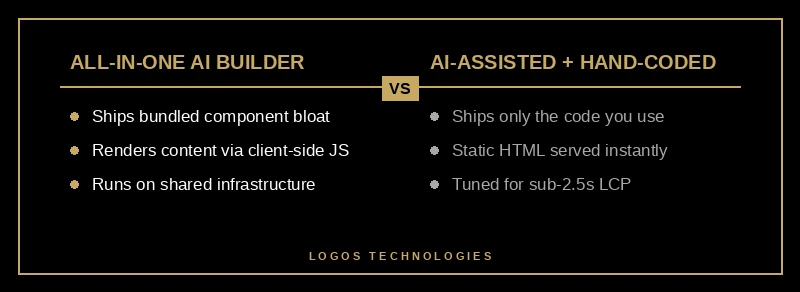
None of this means an AI builder can never rank — it means it starts every race with a weight around its ankle. If you want the full data picture, we covered whether AI-generated websites can rank on Google separately. The short version: they can, but the ones that do have usually had the generated bloat stripped out by hand afterward.
How do AI web design tools affect SEO and Core Web Vitals?
AI web design tools affect SEO entirely through the code they leave behind — Google never sees the tool, only the page. A tool that emits lean, static, fast-loading HTML helps your rankings; a tool that emits heavy, JavaScript-dependent pages hurts them, because Core Web Vitals feed Google's page experience signals and slow pages lose ground.
The stakes are higher than blue-link rankings now. Google's AI Overviews already appear on a meaningful and growing share of searches — around 16% as of late 2025, with nearly nine in ten of those queries carrying informational intent, per Semrush's AI Overviews research — and they are expanding across commercial-intent searches too. Site speed has become an eligibility gate for getting cited in those answers, which means a slow AI-built site now loses twice: once in the classic results and again in the AI ones. If AI visibility is a priority, pair a fast site with the tactics in our guide to getting cited in Google AI Overviews.

The practical rule that falls out of this: use AI to move faster, but let a human decide what actually ships to the browser — the same balance we lay out in our overview of AI in web design in 2026. That's the difference between a tool that compounds your rankings and one that quietly erodes them. The most effective Core Web Vitals fixes are almost all about shipping less — fewer bytes, fewer render-blocking resources, fewer surprises — which is the opposite of what an all-in-one generator does by default.
Frequently Asked Questions
Are AI web design tools good for SEO?
They can be, but only indirectly. Google ranks the page you publish, not the tool that made it, so AI tools help SEO when they produce lean, fast, well-structured code and hurt it when they produce bloated, JavaScript-heavy pages. Assist tools used inside a professional workflow are generally SEO-safe; all-in-one generators are the ones to watch.
Can I build a website entirely with AI in 2026?
Technically yes — an all-in-one AI builder can produce a complete, live site from a prompt in minutes. Whether it ranks and converts is another matter. Most AI-generated sites need hands-on performance work before they compete, which is why a hybrid approach (AI to draft, a developer to finish) tends to win.
Which AI web design tool is best for a small business website?
There's no single winner — the best choice depends on whether you value launch speed or long-term rankings. For a marketing site that needs to rank, a professional workflow using assist tools (design and drafting with AI, code shipped by a developer) beats a one-click builder almost every time. For a quick placeholder you'll replace later, an all-in-one builder is fine.
Do AI website builders hurt page speed?
Often, yes. All-in-one AI builders typically ship large shared component libraries and render content with client-side JavaScript, both of which inflate page weight and delay Largest Contentful Paint. That's a real risk given only 48% of mobile sites already pass all three Core Web Vitals. The fix is to trim what ships to the browser, which usually means moving off the generated output.
Choosing the right AI web design tools comes down to one habit: let AI accelerate the work, but never let it decide what reaches the browser. At LOGOS Technologies, based in Papillion, Nebraska, we build fast, static, hand-tuned sites — using AI where it helps and hand-coding where it counts — so your site passes Core Web Vitals and ranks instead of just launching quickly. If your current site loads slowly or was spun up by a builder and stalled, take a look at our web design services or contact us for a straight answer on what's holding it back.