

Website Maintenance Cost in 2026: What You're Actually Paying For

Table of Contents
TL;DR — Quick Hits
- Most of a small business website maintenance cost is labor spent holding a CMS together, not hosting.
- 11,334 new WordPress vulnerabilities were disclosed in 2025 — 42% more than 2024, and 96% of them live in plugins.
- The infrastructure under a static site — domain, hosting, TLS certificate — can total under $20 a year.
- 48.7% of WordPress origins pass Core Web Vitals on mobile. Performance decay is a maintenance cost too.
- Any maintenance quote that will not separate software from human hours is a subscription, not a service.
Website maintenance is the line item business owners approve without reading. The build gets scrutinized, negotiated, and compared across three quotes; the monthly fee that follows it forever gets a shrug. At $150 a month, that shrug is $9,000 over five years — frequently more than the site cost to build, and almost always more than the owner expected when they signed.
The reason nobody audits it is that maintenance quotes are written to be un-auditable. "Updates, security, backups, monitoring, support" is not a scope of work; it is a category list. So this post does the thing those quotes avoid: it takes website maintenance cost apart into infrastructure and labor, prices each piece from sources you can check, and shows why the platform decision you made years ago is still setting the number at the bottom of the invoice.
What does website maintenance actually cover?
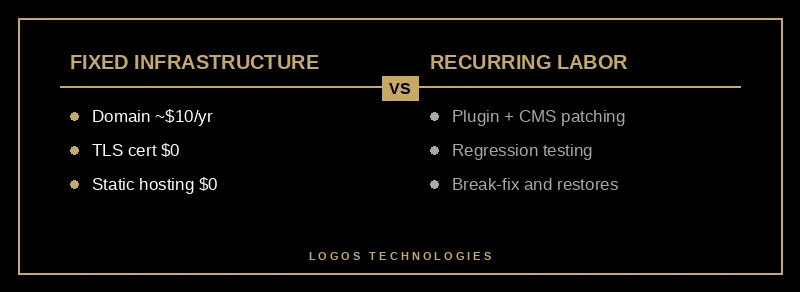
Website maintenance covers four distinct things that get bundled into one price: infrastructure (domain, hosting, TLS certificate), software upkeep (patching the CMS, plugins, and themes), monitoring and recovery (uptime checks, backups, restoring the site when something breaks), and content or feature work (edits, new pages, design changes). Only the first is a genuine fixed cost. The other three are labor, and labor is where the money goes.
That distinction matters because the four categories scale independently. Infrastructure barely moves as your traffic grows. Content work scales with how often you actually update the site. But software upkeep scales with the platform you chose — and on a plugin-driven CMS it scales in a direction you do not control.
What does the infrastructure actually cost?
Priced individually from the vendors themselves, the infrastructure under a small business website is close to free. A domain through Cloudflare Registrar is sold at wholesale cost with no markup — typically around $10 a year for a .com. A TLS certificate from Let's Encrypt is $0, issued automatically and renewed every 90 days without anyone touching it. Static hosting on Netlify's free tier is $0 for a brochure or content site, and Cloudflare Pages includes unlimited requests and bandwidth on its free plan.
That is the entire infrastructure bill for a static site: roughly $10 to $20 a year, most of it the domain. If your maintenance plan is $150 a month, infrastructure accounts for about one percent of it.
This is not an argument that maintenance should be free. It is an argument that you should know which part of the invoice is a pass-through cost and which part is someone's time — because only the second part is negotiable, and only the second part changes when the platform changes. We run the same exercise on the build side in what a small business website actually costs, and the pattern is identical: the software is cheap, the hours are not.
Why does WordPress maintenance cost more?
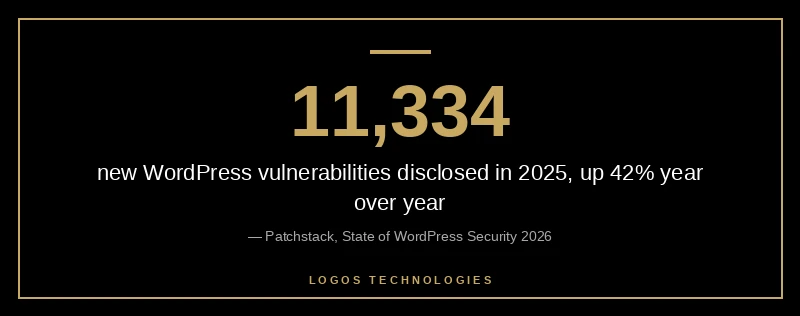
WordPress maintenance costs more because a WordPress site is not one piece of software — it is a running assembly of dozens of independently maintained packages, each of which can break or become dangerous on its own schedule. According to Patchstack's State of WordPress Security in 2026, 11,334 new vulnerabilities were disclosed across the WordPress ecosystem in 2025, a 42% increase over 2024, and 4,124 of them were serious enough to require active mitigation. In the prior year's report, 96% of disclosed vulnerabilities were found in plugins and only seven in WordPress core itself.
Every one of those disclosures is a potential unit of labor on somebody's website. Someone has to read the advisory, decide whether the affected plugin is installed, apply the update, and confirm the update did not break the checkout page or the contact form. That is the work you are buying. It has nothing to do with your business and it never ends.
The failure mode is worse than the cost. That same prior-year report found 33% of vulnerabilities were not fixed before public disclosure, and 1,614 plugins and themes were pulled from the WordPress repository over unpatched issues — often while still installed and active on live sites. Diligent patching does not close that gap, which is why we treat it as an architectural question in our comparison of static site security versus WordPress rather than a discipline question.
And when patching fails, the bill is not a maintenance invoice. Google's spam policies treat hacked content as a violation, and a site serving injected spam can lose its rankings until the content is cleaned and a reconsideration request is accepted. The cost of that outcome is measured in lost pipeline, not in hosting fees — the kind of downside you only see clearly when you measure website ROI rather than tracking expenses in isolation.
Is performance decay part of maintenance?
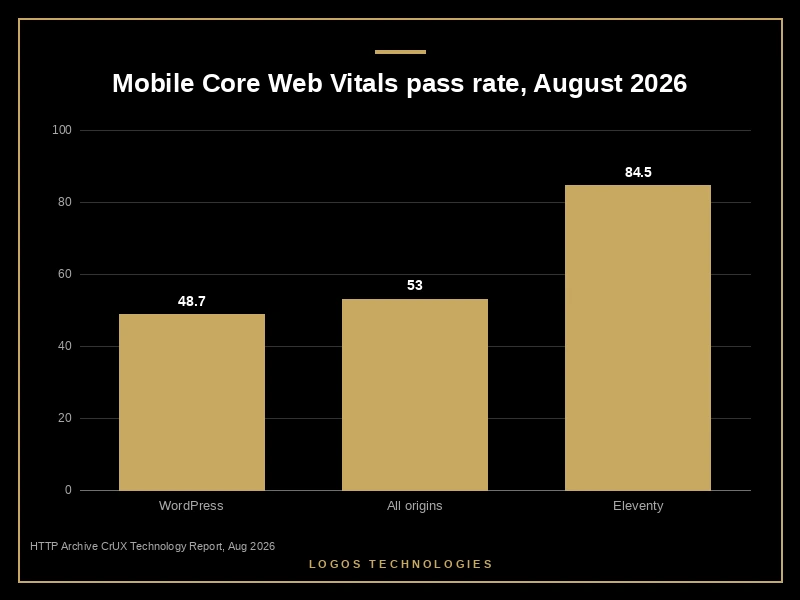
Yes — and it is the part almost nobody prices. A site that gets slower every year is losing traffic every year, and recovering that speed is billable work. Pull the August 2026 field data from the HTTP Archive Core Web Vitals Technology Report and 48.7% of the 2,752,367 WordPress mobile origins measured pass all three Core Web Vitals. Across all 8.7 million origins in the dataset, the figure is 53.0%. Eleventy origins pass at 84.5%, though on a much smaller sample of 194 mobile origins, so treat the size of that gap as directional rather than precise.
Google's page experience guidance confirms these signals feed its ranking systems, and Core Web Vitals is the measurement Google publishes for them. A platform that starts below the web-wide average and drifts further down with every plugin added is generating maintenance work by design — an optimization pass, a caching plugin, an image plugin, then a plugin to manage the plugins. We traced exactly where that time goes in why WordPress is so slow.
There is a second-order cost here that is getting harder to ignore. Semrush's study of more than 600,000 keywords found that the share of commercial-intent SERPs showing an AI Overview grew 71% between November 2025 and April 2026. As answer blocks move up the funnel, the organic clicks that remain go to fewer results — which raises the real cost of any month your site spends slow, broken, or deindexed.
How do you lower your website maintenance cost?
You lower your website maintenance cost by finding out what the labor is actually doing, then removing the work that exists only to hold the platform together. Four steps, roughly a week of effort.
1. Make the quote itemize hours
Ask your provider to split the monthly invoice three ways: software licenses, infrastructure, and human hours. Any competent provider can produce this in an afternoon. A plan that cannot itemize is a subscription, not a service — you are paying for the possibility of work rather than the work.
2. Audit your plugin count
List every active plugin, its purpose, and the date it was last updated. Anything not updated in twelve months is a liability, not a feature. Anything you cannot explain the purpose of is pure cost. Given that plugins are where nearly all disclosed vulnerabilities live, plugin count is the closest thing there is to a direct predictor of your maintenance bill.
3. Price the infrastructure separately
Get real numbers for your domain, hosting, and certificate from the vendors above rather than from your invoice. When the pass-through costs total roughly $20 a year, the remaining $1,780 stops being "maintenance" and becomes a specific question: what did those hours buy?
4. Decide whether you are maintaining a site or a platform
If most of the labor is patching, updating, and regression-testing the CMS rather than improving the site, the platform is the cost driver. Run the savings through the same framework you use to measure website ROI on any other investment: at that point the maintenance savings alone can fund a rebuild — the calculation we walk through in is a website redesign worth it. A hand-built static site has no plugin surface, no database to compromise, and no update treadmill, which is why our web design services are priced around building the thing correctly rather than around subscribing to its upkeep.
Frequently Asked Questions
How much should a small business spend on website maintenance?
Enough to cover real work, and nothing for work that does not exist. Price your infrastructure directly from the vendors — usually $10 to $20 a year for a static site — then treat everything above that as an hourly rate multiplied by hours. If your provider cannot name the hours, the number is arbitrary.
Do static websites need maintenance at all?
They need some, but a different kind. There is no CMS to patch, no plugins to update, and no database to compromise, so the security and compatibility work largely disappears. What remains is content changes, occasional dependency updates at build time, and monitoring — real work, but scheduled by you rather than by a stream of third-party advisories.
What happens if I stop paying for website maintenance?
On a static site, very little: the HTML keeps serving from the CDN and the certificate renews itself. On a plugin-driven CMS, the site starts accumulating unpatched vulnerabilities immediately, and abandoned plugins may never receive a fix at all. The risk is not that the site stops working; it is that it keeps working while quietly becoming exploitable.
Is website maintenance tax deductible for a small business?
Ongoing website maintenance is generally treated as a deductible operating expense for US businesses, while the original build may be treated as a capital expenditure depending on the amounts and timing involved. The distinction is real and worth getting right, so confirm the treatment with your accountant rather than with a web designer.
Does a maintenance plan improve my search rankings?
Not by itself. Patching and backups protect the rankings you already have; they do not earn new ones. Ranking improvements come from content, technical performance, and links — which is why we separate maintenance from growth work rather than selling a plan that quietly bundles both and delivers neither.
Where this leaves you
Website maintenance cost is not really a price question. It is a question about what your website is made of, because the architecture decides how much recurring human attention it demands before anyone quotes you a number. A site assembled from dozens of third-party packages generates a permanent stream of patching labor. A site built as static HTML on a CDN does not, and the difference shows up on the invoice every month for as long as you own it.
LOGOS Technologies builds hand-coded, static websites for small and mid-sized businesses from Papillion, Nebraska — sites designed to be fast on the day they launch and still fast three years later without a maintenance plan propping them up. If you are paying monthly for upkeep and cannot get a straight answer about what those hours buy, contact us and we will walk through your current invoice line by line before recommending anything.