How to Reduce Bounce Rate in 2026 (Without Chasing the Wrong Number)

Table of Contents
TL;DR — Quick Hits
- In GA4, bounce rate is just the inverse of engagement rate: a session "bounces" only if it lasts under 10 seconds, fires no key event, and has fewer than two page views.
- A bounce rate of 26–40% is excellent, 41–55% is normal, and consistently above 70% (outside blogs and news) is worth investigating.
- Bounce rate is not a Google ranking factor — Google has said so repeatedly. Treat it as a UX and conversion signal, not an SEO score.
- Speed is the biggest single lever: 53% of mobile visitors abandon a site that takes longer than three seconds to load.
- The fastest way to lower bounce is to match each page to search intent and cut load time — not to chase a smaller number for its own sake.
The median website engagement rate across industries sits around 56%, according to benchmarking data compiled in Semrush's bounce rate guide — which means the median bounce rate is roughly 44%. If your number is higher than that, it's tempting to panic and start ripping pages apart. Don't. Bounce rate is one of the most misread metrics in analytics, and most of the advice written about it is built on a definition Google retired years ago.
Here's the part that trips up almost every business owner: the bounce rate you see in Google Analytics 4 is not the bounce rate the older guides are describing. Universal Analytics counted any single-page visit as a bounce. GA4 measures something genuinely different. So before you learn how to reduce bounce rate, you need to know what your tool is actually counting — otherwise you'll optimize for the wrong thing.
What Is Bounce Rate in 2026 — and How Did GA4 Change It?
In GA4, bounce rate is the percentage of sessions that were not engaged — it is the exact inverse of engagement rate. Per Google's official definition, a session counts as engaged if it lasts longer than 10 seconds, includes a key event (like a form submission or purchase), or has at least two page views. If a visit hits none of those three bars, it's a bounce.
That's a big departure from the old model. Under Universal Analytics, a visitor who landed on your contact page, read it for two full minutes, found your phone number, and called you was recorded as a 100% bounce — they never loaded a second page, so the metric punished you for satisfying them instantly. GA4 fixes that: a single-page visit that lasts longer than ten seconds now counts as engaged. This is why blogs, landing pages, and "find the phone number" service pages look dramatically healthier in GA4 than they ever did before.
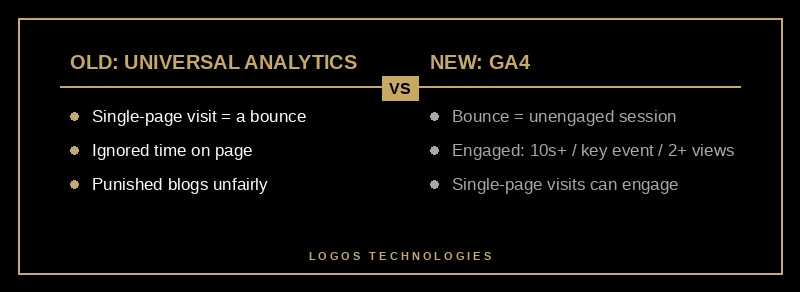
The practical consequence: any article telling you a "good" bounce rate is 30% is quietly comparing apples to oranges. GA4 bounce numbers run lower than the old Universal Analytics figures for the same site, because the bar for "engaged" is so easy to clear. Always check which definition a benchmark is using before you compare yourself to it. This is also why we treat bounce as one input among several when we help clients measure their website's ROI — no single metric tells the whole story.
What Is a Good Bounce Rate?
A good bounce rate in 2026 is roughly 26–40% (excellent) and 41–55% (average and perfectly acceptable for most sites); anything consistently above 70% is a flag worth investigating, according to the Semrush bounce rate benchmarks — unless you run a blog or news site, where one-and-done visits are normal and expected. Those ranges are a starting point, not a verdict.
The honest answer is that "good" depends entirely on the page's job and the traffic source. A blog post that fully answers a question in one read should have a high bounce rate — the reader got what they came for and left satisfied. A pricing page with a 65% bounce rate is a problem, because someone on a pricing page is high-intent and should be moving toward contact. Judge each page against its purpose, not against a single site-wide average. We break down which numbers actually deserve your attention in our guide to the website analytics metrics that matter.
One more nuance worth setting expectations on: mobile bounce runs structurally higher than desktop, usually by ten-plus percentage points, because mobile users are distracted, impatient, and on slower connections. If you're going to set a target, set separate ones for mobile and desktop, and benchmark each page against its own history rather than an industry table.
Does Bounce Rate Affect Your Google Ranking?
No — bounce rate is not a Google ranking factor, and Google has stated this directly and repeatedly. As documented in Search Engine Journal's ranking-factor breakdown, Google's John Mueller has said plainly that the search team does not look at Analytics bounce rate when ranking sites, echoing Gary Illyes' earlier confirmation that "we don't use analytics/bounce rate in search ranking."

So why does bounce rate still matter? Because it's a diagnostic, not a scoreboard. A page with a sky-high bounce rate is usually telling you one of three things: the content doesn't match what the searcher wanted, the page is too slow or annoying to use, or there's no obvious next step. Each of those also hurts conversions and the genuine engagement signals Google can see indirectly. Fixing the underlying problem helps your business and your rankings — but you're fixing the cause, not the bounce number itself. Chasing the metric directly (say, by forcing a second pageview with a pop-up) just annoys people and helps nothing.
Why Page Speed Is Your Biggest Bounce Rate Lever
If you only fix one thing, fix speed. Slow load time is the most common and most mechanical cause of a high bounce rate, and the data is stark: Think with Google's mobile speed research found that 53% of mobile visitors abandon a site that takes longer than three seconds to load — yet the average mobile landing page still takes around 22 seconds to fully load. Every second of delay before your content appears is a visitor deciding whether to wait or hit the back button.

This is where architecture beats band-aids. Google's Core Web Vitals measure exactly the experience that drives bounce — how fast the main content paints, how stable the layout is, and how quickly the page responds to taps. A site that passes all three holds visitors far better than one that doesn't. The catch is that you can't reliably bolt speed onto a bloated template after the fact; it has to be built in. That's the entire premise behind hand-coded static sites, and we lay out the revenue case in what the page speed data actually shows. If your current site is slow, the highest-leverage move is usually to make your website faster at the foundation — and to treat mobile-first design as the default, since that's where most of your bouncing visitors are.
How to Reduce Your Bounce Rate in 5 Steps
Reducing bounce rate is less about clever tricks and more about a disciplined sequence. Work through these in order.
1. Measure bounce by page, not site-wide
Add the bounce rate metric to your GA4 Pages and screens report and sort worst-first. A blended site number is meaningless — it averages your healthy blog posts together with the two or three pages that are actually leaking visitors. You can only fix what you can isolate.
2. Match each page to its search intent
Look at the query bringing people to a high-bounce page, then check whether the first screen answers it. The single biggest driver of bounce is a mismatch between what the visitor expected from the search result and what the page delivers. Rewrite the headline and opening so the answer is obvious in the first few seconds.
3. Cut load time under three seconds
Compress and properly size images, serve modern formats like WebP, defer non-critical JavaScript, and host on a fast CDN. Given that more than half of mobile visitors leave after three seconds, this step alone often moves bounce more than everything else combined.
4. Fix the above-the-fold experience
Kill intrusive pop-ups, autoplay video, and layout shift that makes buttons jump as the page loads. Make your headline, your core value, and your primary action visible without scrolling on a phone. Friction in the first screen is friction at the exact moment people decide to stay or go.
5. Give every page a clear next step
A visitor who has somewhere logical to go next doesn't bounce. Add one relevant internal link and one obvious call to action to every important page. This both improves engagement and, as a bonus, strengthens the conversion path that turns a visit into a lead.
Frequently Asked Questions
Is a high bounce rate always bad?
No. A high bounce rate is only a problem when the page's job requires a next step — like a pricing or service page. For a blog post or a single-answer page, a high bounce rate often means the visitor got exactly what they needed and left satisfied.
What is a good bounce rate in GA4 specifically?
Because GA4 counts any session over 10 seconds (or with a key event or second pageview) as engaged, GA4 bounce numbers run lower than the old Universal Analytics figures. For most small business sites, a GA4 bounce rate under 50% is healthy, and under 40% is strong. Always confirm a benchmark is using the GA4 definition before comparing.
How quickly can I lower my bounce rate?
Intent and content fixes can show up in a couple of weeks once Google re-crawls and traffic re-sorts. Speed improvements show up almost immediately for new visitors. Set a baseline before you change anything so you can measure the lift honestly.
Does reducing bounce rate increase conversions?
Often, yes — because the same fixes that lower bounce (faster pages, better intent match, a clear next step) are the fixes that move people toward a contact form or purchase. We cover the realistic targets in our website conversion rate benchmarks guide.
Should I worry about bounce rate for SEO?
Not directly — it isn't a ranking factor. Worry instead about the underlying causes (speed, intent, usability), which influence the real engagement signals search engines can observe and which directly affect whether visitors become customers and your overall website ROI.
At LOGOS Technologies, we build fast, hand-coded static websites for small and growing businesses from our home base in Papillion, Nebraska — sites engineered so that speed, clarity, and a clean next step are baked in, not patched on later. If your bounce rate is telling you visitors are leaving before they ever see what you offer, that's a fixable foundation problem. Take a look at our web design services to see how we approach it, and contact us for an honest look at what's driving people off your current site — and what it would take to keep them.