Website Trust Signals That Drive Conversions: The 2026 Data + What Actually Works

Table of Contents
TL;DR — Quick Hits
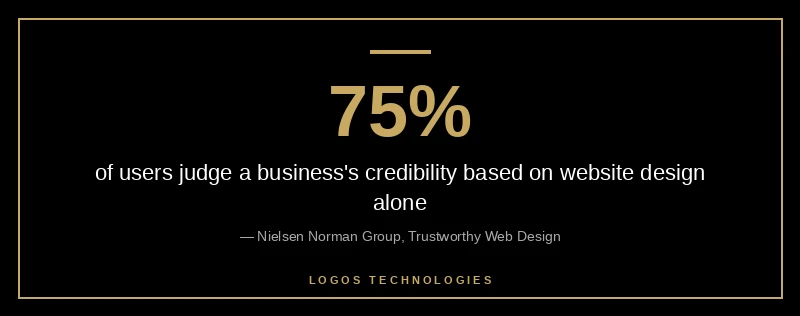
- Roughly 75% of users judge a business's credibility based on its website design alone, before reading a single word of copy.
- 19% of shoppers abandon checkout because they don't trust the site with their credit card data (Baymard, 2025).
- Trust badges placed adjacent to the payment form lift conversion 15–30% for less-familiar brands.
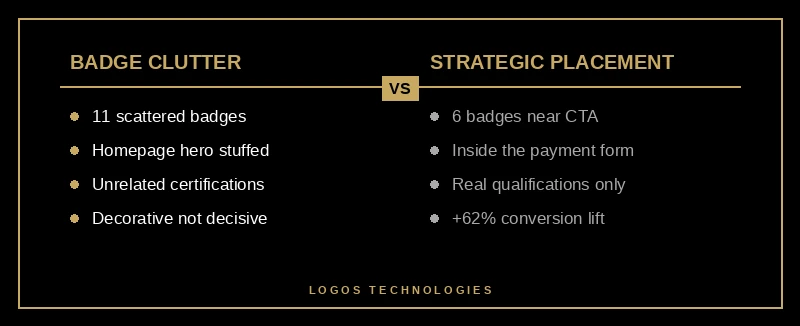
- One case study removed 11 scattered badges and kept 6 strategically placed ones — conversion jumped 62%. Placement beats quantity.
- AI search visitors (ChatGPT/Perplexity) convert at 3.49% vs 2.86% from organic; AI engines reward verifiable trust signals.
Most small business websites lose the sale before the visitor reads a single word. Nielsen Norman Group research on trustworthy design shows users form a credibility judgment within seconds, anchored almost entirely on visual cues. Get those wrong and traffic doesn't convert. The upside is just as clear: Baymard Institute's checkout usability research finds fixing trust and security gaps inside the checkout alone can lift conversion up to 35.26% — that isn't a redesign, it's repositioning cues a website already has.
What are website trust signals?
Website trust signals are the visible and structural cues that tell a visitor your business is real, safe, and competent. Reviews, security badges, real photos, a working phone number, named authors, HTTPS, a privacy policy, and named clients are all trust signals. Together they answer the silent question every first-time visitor asks: can I give these people my money or my data without regretting it?
They split into two buckets. Technical signals — HTTPS, SSL, a fast site, a working contact form, no broken links. Brand signals — real reviews, named team members, case studies, client logos, press mentions, accreditations, and clear ownership. A small business website needs evidence from both before strangers will convert.
Why trust signals are the highest-leverage CRO move in 2026
If you're optimizing conversions on a fixed budget, trust signals are the place to start. They don't require new traffic, new copy, or a new offer — they surface assets the business already has and put them where the decision happens. The conversion lift sits between 15% and 42% depending on industry and placement, per Hashmeta's analysis of trust block research and Crazy Egg's CRO writeups.
They also compound: they support E-E-A-T for rankings, earn AI Overview citations (see generative engine optimization for AI Overviews), reduce refunds, and raise the value of every paid ad click. Few CRO levers fan out that broadly — which is why they belong at the top of any website ROI improvement playbook.
The 7 trust signals that actually move conversions in 2026
Not every signal earns its pixel. These seven have the strongest 2026 data behind them, drawn from Baymard, Nielsen Norman Group, and Search Engine Journal's coverage of Google's trust ranking patent.
1. Real customer reviews with full names. Anonymous "John D." reviews read as fake. Full names, company, and a real photo convert. Roughly 93% of consumers consult reviews before a purchase, and real star ratings on a homepage convince about 86% of customers to keep evaluating.
2. Video testimonials. Text testimonials work; video testimonials work better, with reported conversion lifts 25–35% over text. Authenticity is the active ingredient — a phone-recorded one-take outperforms a polished studio shoot.
3. HTTPS and a valid SSL certificate. Table stakes in 2026 — browsers flag non-HTTPS pages. web.dev's guide on why HTTPS matters explains it's the prerequisite for almost every modern web capability that earns trust, from secure forms to service workers.
4. Trust and payment badges inside the form. Verified payment processor logos, real BBB accreditation, and your SSL provider's seal placed next to the credit card or email field move the needle. Baymard's research on the perceived security of payment forms shows visual treatment around the form — borders, padlock icons, a segregated section — reads as "secure" even when the underlying encryption is identical.
5. Named author and team bios. Pages with a real, named author and a real photo earn more trust than "Admin" or stock-photo bylines. This is one of the five trust signals Google's March 2026 core update specifically rewards.
6. Real address, real phone, real face. Identity transparency is the cheapest signal. About 67% of users abandon a site without visible contact information, and a single owner photo can swing conversion several points.
7. Specific, sourced numbers instead of vague claims. "We help businesses grow" is noise. "Our average client sees an 18% lift in qualified leads in 90 days, sourced from GA4" is a signal. Specificity is itself a credibility cue — and the AI search engines documented in the 2026 State of AI Search preferentially cite sources that show their work.
Where to place trust signals (placement beats quantity)
The biggest mistake small business websites make with trust signals is treating them like decoration. They're decision-aid — place them where the decision happens.
The case-study pattern is consistent: six badges in the right places outperform fifteen in the wrong ones. One widely cited test removed eleven scattered badges and kept six near the call-to-action — conversion rose 62%. The same effect shows up in Baymard's checkout testing: badges adjacent to the credit-card field produce 15–30% lifts for less-familiar brands.
Rule of thumb: a trust signal earns its space only if it answers the specific question the visitor is asking at that specific moment. Reviews next to the CTA. Security badges inside the payment form. Identity (address, phone, face) in the header and footer. About-page credentials on the About page. A SOC 2 logo on the homepage of a five-person plumbing business is noise — a Google review carousel above the "Get a quote" button is signal.
How do you add trust signals to a small business website?
Five steps that work whether the site was built last week or has been live since 2019.
1. Audit the current trust gaps
Open your site in incognito and screenshot the homepage, a service page, the contact form, and the checkout. Every spot where a first-time visitor has to decide whether to trust you needs a signal. Overlay with website analytics data — high-exit, low-conversion pages are usually trust-deficient pages.
2. Lock down the security baseline
Confirm HTTPS is enforced site-wide, the padlock shows in the address bar with no mixed-content warnings, and TLS 1.3 is enabled. Without this, every other trust signal is undermined — and browsers flag the page "Not secure."
3. Show real reviews next to the CTA
Pull two to four real reviews (full names, ideally company or city) directly above or beside your primary CTA. Star ratings convert when adjacent to the decision, not buried on a separate testimonials page. Use Google Business Profile reviews where possible — those are independently verifiable.
4. Place security and payment badges at the moment of risk
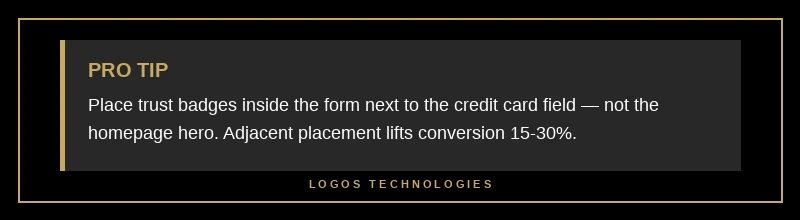
Trust badges belong inside the form, next to the credit card or email field — not the homepage hero. Use only badges you actually qualify for: real SSL provider, real BBB rating, real payment processor logos, real industry certifications. Aspirational badges erode trust faster than no badges.
5. Add identity and contact transparency
Display a real address, phone, owner or team photo, and an About page with named author bios. Identity transparency is the cheapest, highest-ROI trust signal a small business website has — and it feeds straight into our broader website conversion optimization playbook.
Common trust-signal mistakes that destroy credibility
The same patterns show up across audits.
Generic stock photos in the testimonial section. Reverse image search exists. Visitors will check. One spotted stock photo invalidates every other trust cue on the page.
Stale "as seen in" logos. A "Featured in TechCrunch 2017" badge in 2026 reads as "the last thing here happened eight years ago." Refresh the wall or take it down.
Trust badges for things that aren't real. Self-issued security seals, made-up awards, and fabricated certifications are worse than nothing. They expose the business legally and they destroy trust the moment they are noticed.
Hiding contact information. Burying the phone three clicks deep or using a generic info@ form with no human strips one of the highest-leverage signals off the page. Run the website ROI math — businesses that hide identity systematically under-convert and the numbers show it inside 90 days.
Pop-ups that block content on landing. Aggressive entry pop-ups erode trust before any other signal can register. Page speed and respect for the visitor are themselves credibility cues, which is why fast website design and trust signals are tightly correlated.
Frequently Asked Questions
What are the most important trust signals for a small business website?
The five that move the needle most are HTTPS with a valid SSL certificate, real customer reviews with full names displayed near the call-to-action, visible contact information (real address, real phone, real photo), named author bios on content pages, and payment or security badges placed inside the checkout or contact form rather than the homepage hero.
Do trust badges actually increase conversion rates?
Yes, when placed correctly. Baymard Institute's testing shows badge placement adjacent to the payment field produces 15–30% conversion lifts for less-familiar brands. Badges in the wrong place — scattered across the homepage, attached to unrelated content — can have a neutral or negative effect. Placement, not quantity, decides whether a badge is an asset.
How many trust signals should I show on my website?
Fewer than you think. One widely cited case study removed 11 scattered badges and kept 6 strategically placed — conversion rose 62%. The rule is: each trust signal must answer the specific question the visitor is asking at that specific moment. If a badge doesn't answer a question on that page, take it down.
Do trust signals help SEO and AI search rankings too?
Yes. Google's E-E-A-T framework (Experience, Expertise, Authority, Trust) is built on the same signal categories — named authors, real reviews, citations, contact transparency, security baseline. The March 2026 core update re-weighted trust signals as a ranking factor, and ChatGPT and Perplexity preferentially cite sources displaying verifiable trust cues.
Where should I place trust badges on a checkout page?
Directly adjacent to the credit card or email field, inside the same visual container as the form. Baymard's research shows visual treatment around the form — borders, segregation, a padlock icon, accepted-card logos — reads as "secure" even when the underlying encryption is identical.
Get a small business website built to convert
Trust signals only do their job on a website that loads fast enough for visitors to see them and is designed cleanly enough for them to register. At LOGOS Technologies in Papillion, Nebraska, we hand-build static websites that are fast by default and structured so trust cues land where buyers actually decide. See our web design services, or contact us for a free trust-signal audit.