
Website Animation Best Practices in 2026: Motion That Doesn't Cost You Rankings

Table of Contents
TL;DR — Quick Hits
- Sites running GSAP pass all Core Web Vitals on mobile 51.3% of the time, slightly below the 53.0% web-wide average.
- Animation libraries hurt loading, not interaction: GSAP origins hit "good" LCP just 58.0% of the time vs 65.8% across the web.
- Animate.css is the weakest measured stack at a 40.9% mobile pass rate.
- Animate
transformandopacityonly. Both run on the compositor thread and skip layout and paint entirely. - CSS
animation-timelineis still not Baseline, so scroll-driven motion needs an@supportsfallback in 2026.
Most advice about website animation is written by people who never checked what animation costs once real users load the page. So I pulled the field data. In the August 2026 snapshot of the HTTP Archive Core Web Vitals Technology Report, only 51.3% of the 772,379 mobile origins running GSAP passed all three Core Web Vitals, a shade under the 53.0% average across the 8.7 million mobile origins in the whole dataset. Sites built on Animate.css landed at 40.9%.
Those gaps are smaller than the "animation kills performance" crowd would like, and that is the interesting part. Animation is not automatically a disaster. But the data shows very clearly where the cost lands, and it is not where most designers assume it is. These website animation best practices come out of that data rather than out of taste.
What Does Website Animation Actually Cost in Performance?
It costs you loading speed, not responsiveness. Break the same August 2026 dataset apart by metric and the pattern is unmistakable: GSAP origins score "good" on LCP only 58.0% of the time against a 65.8% web-wide average, but they score "good" on Interaction to Next Paint 88.5% of the time against a web-wide 80.1%, and "good" on CLS 86.7% against 83.1%.
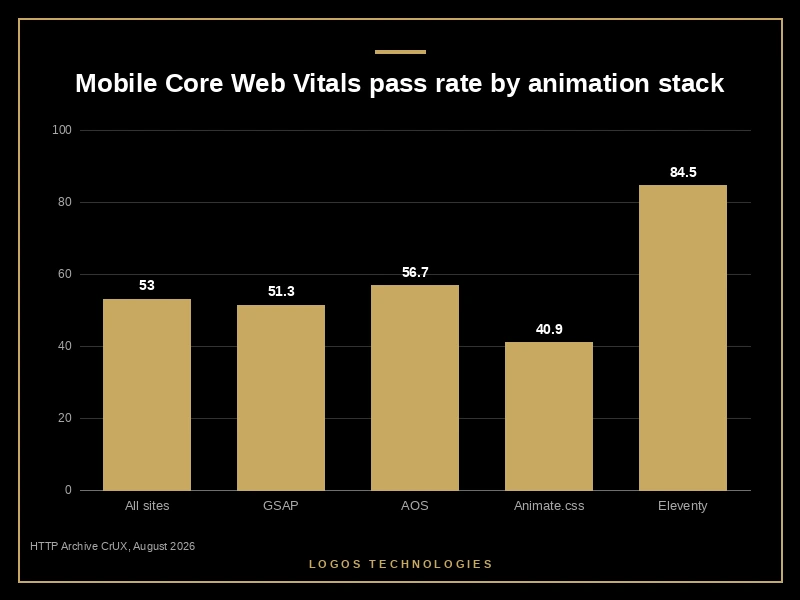
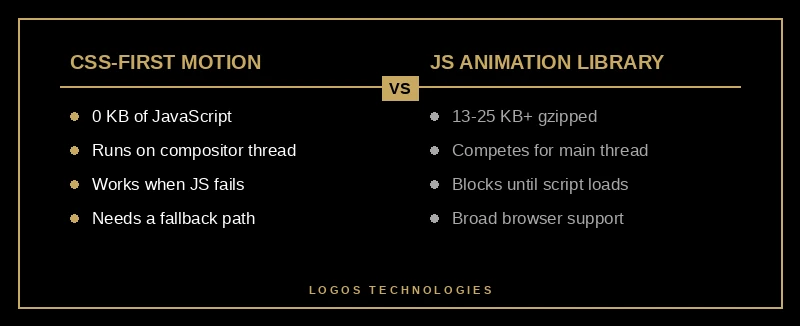
Read that carefully. Sites that use a serious animation library are more responsive and more visually stable than the average website. That makes sense: teams that care enough to install GSAP usually care about craft generally. What they lose is the load. The library plus its plugins sit in the critical path, and GSAP's core bundle alone is roughly 25 KB minified and gzipped before ScrollTrigger or anything else gets added. AOS is lighter at about 13 KB of JavaScript and does noticeably better on LCP, at 67.0%.
For comparison, sites built with Eleventy, the static generator we use, pass all Core Web Vitals on mobile 84.5% of the time. That number comes with an honest caveat: only 194 Eleventy mobile origins were in the August sample, so treat it as directional, not definitive. The mechanism behind it is not mysterious, though, and it is the same one we described in our breakdown of how to reduce JavaScript execution time. Less shipped JavaScript, faster everything.
Which Properties Are Safe to Animate?
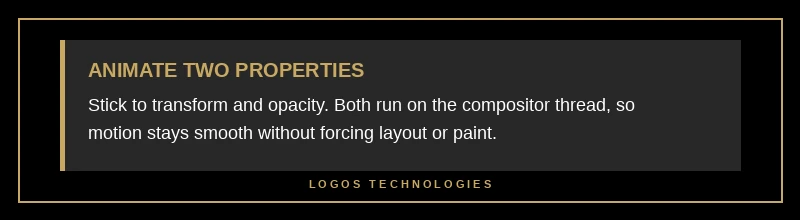
Two: transform and opacity. Every other property you might reach for (width, height, top, left, margin, padding) forces the browser to recalculate layout for the whole document on every single frame, then repaint it. transform and opacity are handled on the compositor thread, which means the browser can move pixels around without touching layout or paint at all.
The practical translations are simple. Sliding something in? translateX, not left. Growing a card on hover? scale, not width. Fading a modal? opacity, not visibility plus a height change. If there is one rule in website animation best practices that survives every redesign, it is that one. And resist the urge to sprinkle will-change everywhere as a performance charm. Modern browsers promote layers automatically, and a page full of will-change declarations just burns memory.
There is a second-order benefit here. Entrance animations that change an element's box are one of the quieter sources of layout shift, which is exactly the failure mode we walked through in our guide to fixing Cumulative Layout Shift. Compositor-only animation sidesteps the problem by construction.
Should You Use CSS Scroll-Driven Animations or a JavaScript Library?
Use CSS, with a fallback, and understand that in 2026 the fallback is still mandatory. CSS scroll-driven animations let you tie an animation's progress to scroll position with no JavaScript at all, using animation-timeline with scroll() or view(). Chrome shipped the APIs in version 115 and they are genuinely excellent.
They are also, per MDN's Baseline status for animation-timeline, still not Baseline. The property does not work across all of the most widely used browsers. This is the single detail that almost every "scroll animation trends 2026" listicle leaves out, and it is the one that will get you a support ticket.
The honest pattern is progressive enhancement. Ship the page in its final, readable state, then layer motion on top only where the browser supports it:
.reveal { opacity: 1; }

@supports (animation-timeline: view()) {
  @media (prefers-reduced-motion: no-preference) {
    .reveal {
      animation: fade-up linear both;
      animation-timeline: view();
      animation-range: entry 0% cover 30%;
    }
  }
}

@keyframes fade-up {
  from { opacity: 0; transform: translateY(16px); }
  to   { opacity: 1; transform: none; }
}
Nothing is hidden by default, so a browser without animation-timeline support shows a perfectly good page. No JavaScript runs. Nothing blocks. That is the whole trick, and it is a small example of the difference between decoration and professional website design: the motion is the last thing added, not the thing the page depends on.
How Do You Add Animation Without Breaking Core Web Vitals?
1. Animate transform and opacity only
Restrict every animation to transform and opacity. Both are handled on the compositor thread, so the browser never has to recalculate layout or repaint while motion is running.
2. Keep motion short and purposeful
We cap entrance and hover motion at roughly a third of a second. Longer than that and users read it as lag rather than polish. Anything that auto-plays for more than five seconds also needs a pause, stop or hide control under WCAG Success Criterion 2.2.2.
3. Ship CSS first, JavaScript only if you must
Write the effect in CSS. Reach for a library only when the effect genuinely cannot be expressed in CSS, and when you do, load it after first paint so it never competes with your LCP element.
4. Honor prefers-reduced-motion
Wrap all non-essential motion in a prefers-reduced-motion media query. This is the mechanism W3C technique C39 points at directly.
5. Reserve space so nothing shifts
Give every animated element its final dimensions before the animation runs, and animate from that reserved box. Entrance effects that grow an element's footprint are a CLS penalty waiting to happen.
Those five checks are the whole of our website animation best practices list. Follow them and animation stops showing up in your Core Web Vitals report as a problem. Skip them and the loading penalty in the chart above is what you inherit.
Motion Accessibility Is Not Optional
People with vestibular disorders get dizziness, nausea and headaches from parallax, zooming and large-scale movement. This is a documented medical response, not a preference. WCAG Success Criterion 2.3.3, Animation from Interactions requires that motion animation triggered by interaction can be disabled unless the animation is essential to what is being communicated.
The implementation is four lines, and web.dev's guidance on prefers-reduced-motion covers it well:
@media (prefers-reduced-motion: reduce) {
  *, *::before, *::after {
    animation-duration: 0.01ms !important;
    animation-iteration-count: 1 !important;
    transition-duration: 0.01ms !important;
    scroll-behavior: auto !important;
  }
}
There is a practical argument alongside the ethical one. The users who have that setting enabled are the same users who are hardest to win back after a bad experience, and motion that respects their settings costs you nothing. It is the same logic that drives everything in our accessible website design work, and it is a straightforward complement to getting visual hierarchy right in the first place. A page that communicates clearly when nothing moves is a page that can afford to move.
For a broader view of how motion fits alongside typography, spacing and layout, web.dev's accessibility guidance on animation and motion is the reference we hand to clients.
Frequently Asked Questions
Do website animations hurt SEO?
Indirectly, through Core Web Vitals. Animation itself is not a ranking signal, but the JavaScript that powers it can push your Largest Contentful Paint past the 2.5-second threshold, and Core Web Vitals are used by Google's ranking systems. In the August 2026 field data, sites running GSAP passed LCP 58.0% of the time versus 65.8% web-wide, and the entire measured penalty lands on loading, not on interaction.
What is the ideal duration for a website animation?
Roughly 150 to 300 milliseconds for entrance, hover and state-change motion. Below about 100ms the change is hard to perceive; above 400ms it starts reading as lag. Page transitions can run a little longer, but any motion that loops or auto-plays for more than five seconds needs a visible pause control to meet WCAG.
Are CSS animations faster than JavaScript animations?
Usually, for two reasons. CSS animations on transform and opacity run on the compositor thread rather than the main thread, and they ship zero additional bytes. A JavaScript library has to be downloaded, parsed and executed before the first frame renders, which is why GSAP and Animate.css origins show weaker LCP than the web-wide average even though their interaction scores are strong.
How many animations should one page have?
Fewer than you think. A good working limit is one attention-directing animation per screenful: enough to guide the eye, not enough to compete with the content. If two elements are animating at once, the visitor does not know where to look, and the animation has stopped doing its job.
Is scroll-driven animation ready to use in production?
Yes, as a progressive enhancement, not as a dependency. animation-timeline is not yet Baseline across all major browsers, so any scroll-driven effect must sit inside an @supports (animation-timeline: view()) block with the page fully readable when the block does not apply.
Website animation best practices come down to a trade almost nobody states out loud: animation is one of the easiest ways to make a site feel expensive, and one of the easiest ways to make it slow. The difference is whether the motion was designed in from the start or bolted on at the end. It is the same distinction that separates professional website design from a template with effects layered on top. Sites that get it right animate two properties, ship almost no JavaScript to do it, and stay fast enough that nobody ever thinks about the performance cost. Sites that get it wrong pay for the polish in LCP, and their visitors leave before they see any of it.
At LOGOS Technologies, based in Papillion, Nebraska, we hand-code static sites where motion is part of the design system rather than a plugin. If your current site feels sluggish, or your animations are fighting your rankings instead of supporting them, take a look at our web design services or contact us and we will run your Core Web Vitals and tell you honestly what the motion is costing you.