Accessible Website Design in 2026: How to Build It In From the Start

Table of Contents
TL;DR — Quick Hits
- 95.9% of the top one million homepages failed WCAG conformance in early 2026 — up from 94.8% a year earlier, the first regression in seven years.
- Six error types cause 96% of all failures: low-contrast text, missing alt text, missing form labels, empty links, empty buttons, and missing page language.
- Fixing accessibility in the design phase is up to 30x cheaper than fixing it in production; shifting it left cuts remediation costs roughly 75%.
- Homepage complexity rose 22.5% in a single year to 1,437 elements per page — and ARIA bloat correlates directly with more errors, not fewer.
- Accessible design and SEO reward the same thing: clean semantic structure, real headings, and labeled controls.
Accessibility on the web is getting worse, not better. The WebAIM Million 2026 report — an automated scan of the top one million homepages — found WCAG conformance failures on 95.9% of pages, up from 94.8% the year before. That ends a six-year streak of small annual improvements. The average page now carries 56 detected accessibility errors, a 10.1% jump in twelve months.
The cause is not a mystery. Pages are getting heavier and more tangled: the average homepage grew to 1,437 elements in early 2026, a 22.5% increase in one year, and the report found that more ARIA code correlated with more errors, not fewer. Accessibility problems are being built into sites faster than anyone is fixing them. The fix is not a plugin or a widget — it is designing for access from the first wireframe. This post is the design-phase layer on top of our website accessibility audit step-by-step guide; the audit tells you what is broken, accessible design keeps it from breaking in the first place.
What Is Accessible Website Design?
Accessible website design is the practice of building a site so that people with disabilities — visual, motor, auditory, cognitive — can perceive, navigate, and use it as effectively as anyone else. The working standard is the Web Content Accessibility Guidelines (WCAG) 2.2 at Level AA, organized around four principles: content must be perceivable, interface elements must be operable, information must be understandable, and the markup must be robust enough for assistive technology to interpret.
The distinction that matters is design versus remediation. Accessible design means the decisions that determine access — color, type, layout, structure, interaction — are made deliberately while the site is still being designed. Remediation means patching those same decisions after the site is live, usually after a complaint. The W3C's Web Accessibility Initiative guidance for designers is explicit that this is a design responsibility, not a final-QA checkbox.
Why Accessible Design Has to Start at the Wireframe
Because retrofitting is expensive and designing-in is nearly free. A defect that is a concept on a screen costs almost nothing to fix — it is a conversation. The same defect shipped to production costs real engineering time, regression testing, and redeployment. Industry analysis from Deque's research on shifting accessibility left found that catching issues in design and development instead of production reduces remediation cost by about 75% and triples how fast fixes ship. A widely cited WebAIM figure puts design-phase fixes at up to 30 times cheaper than post-launch ones.
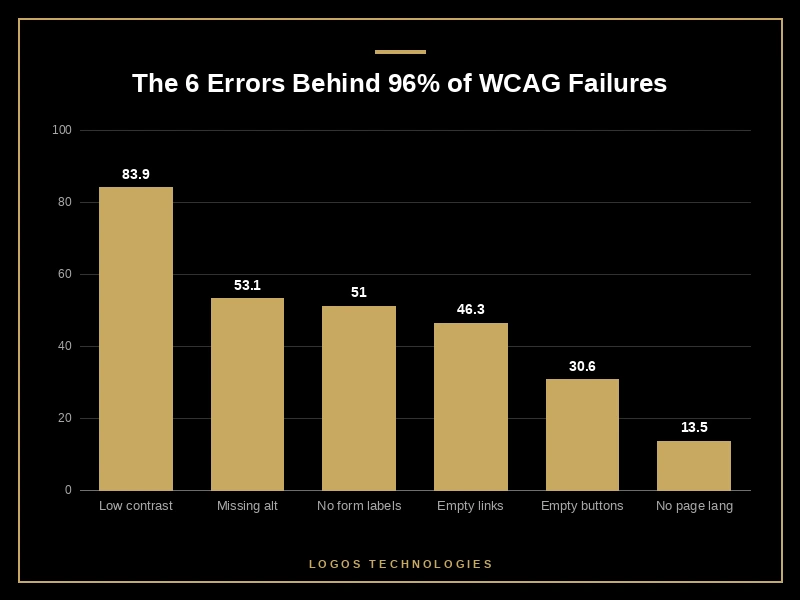
It helps to see what actually breaks. The WebAIM Million found that six issues account for 96% of every detected error: low-contrast text (83.9% of homepages), missing alternative text (53.1%), missing form input labels (51%), empty links (46.3%), empty buttons (30.6%), and missing document language (13.5%). Every one of those traces back to a design or build decision: the color palette, the image workflow, the form components, the button system. Lock those down early and you have eliminated the overwhelming majority of failures before a single page is coded.
The Design Decisions That Make or Break Accessibility
A handful of choices carry most of the weight. Get these right in the design system and accessibility largely takes care of itself.
Color contrast. Body text needs a contrast ratio of at least 4.5:1 against its background (3:1 for large text). Since low contrast is the single most common failure on the web, the move is to choose a WCAG-passing palette before designing any pages and never use a color pairing that has not been checked.
Typography and layout. Use real, resizable text — not text baked into images. Keep a logical reading order, and let the layout reflow without horizontal scrolling when a user zooms to 200%.
Semantic structure. Headings should form a true outline: one <h1>, then <h2>s and <h3>s nested in order, never chosen for how big they look. Use <nav>, <main>, <header>, and <footer> so assistive technology can map the page.
Focus and keyboard operability. Every interactive control must be reachable and usable with the keyboard alone, in a focus order that follows the visual flow, with a clearly visible focus indicator. Native elements like <button> and <a href> are focusable and operable for free — a <div> with a click handler is not. A "skip to main content" link that appears on focus saves keyboard users from tabbing through the whole navigation on every page.
Forms and labels. Every input needs a programmatically associated <label>. Missing labels are one of the top three errors on the web, and they are almost always a component-design oversight, not a coding mistake.
Target size. WCAG 2.2 requires pointer targets of at least 24×24 CSS pixels. Icon-only buttons and tight mobile menus are the usual offenders — a constraint best solved in the design system. We go deeper on the 2.2 specifics in our WCAG 2.2 compliance checklist.
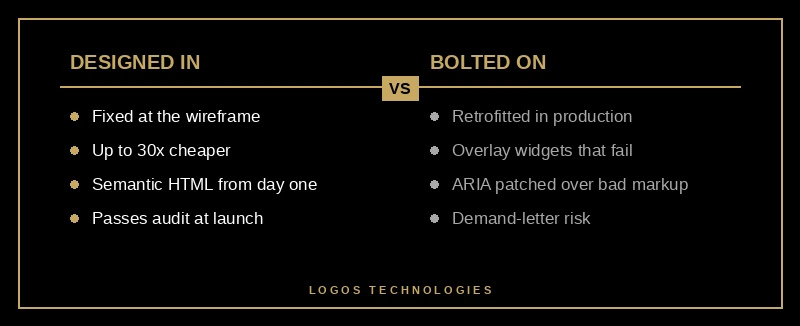
This is also why accessibility overlays do not work: a script injected at runtime cannot retroactively fix a heading structure, a contrast choice, or an unlabeled form. We covered why in accessibility overlays and why they fail — the short version is that they patch symptoms a designer should have prevented.
Does Accessible Design Help SEO?
Yes — directly, because accessibility and search engines reward the same underlying structure. Semantic headings, descriptive link text, image alt attributes, and a logical document outline are simultaneously what a screen reader needs to navigate and what a crawler needs to understand a page. Analyses of large site samples have repeatedly found that WCAG-aligned sites pull meaningfully more organic traffic and rank for more keywords than non-compliant peers, and Nielsen Norman Group research has tied core accessibility improvements to conversion gains for all users, not just those with disabilities.

The 2026 angle makes this stronger. AI search surfaces — Google's AI Overviews, ChatGPT, Perplexity — extract from clean, well-structured content. The same markup discipline that makes a page accessible makes it extractable. Accessible design is no longer a compliance cost; it is the same investment as technical SEO, paid once.
Why Lean, Hand-Coded Sites Have an Accessibility Advantage
The WebAIM Million finding worth sitting with is the correlation between page complexity, ARIA volume, and error count: the heavier and more ARIA-laden a page, the worse it scored. The industry is responding with a quiet shift back toward native HTML elements and away from JavaScript-heavy, ARIA-patched custom widgets.
That is a structural argument for how we build at LOGOS Technologies. A lean, hand-coded static site ships only the markup it needs. There is no page builder injecting nested wrapper <div>s, no plugin stack adding ARIA to compensate for non-semantic components, no theme bloat. Fewer elements and honest semantic HTML is not just faster — the data says it is measurably more accessible. The cheapest accessible site to build and maintain is the one that was never overbuilt.
Frequently Asked Questions
What is the difference between accessible design and ADA compliance?
Accessible design is the practice; ADA compliance is the legal outcome. U.S. courts evaluate ADA web claims against WCAG, so designing to WCAG 2.2 Level AA is how you get compliant. The Department of Justice's web accessibility guidance confirms WCAG as the working reference. See our ADA compliant website guide for the legal detail.
Can I make my existing website accessible without a full redesign?
Often, yes. Start by running a website accessibility audit to see what is actually broken. Many of the top failures — contrast, alt text, form labels, page language, empty links — are fixable without rebuilding. But if the site's heading structure, navigation, or component system is fundamentally non-semantic, a redesign is usually cheaper than indefinitely patching around it.
How much should accessible website design cost?
When accessibility is designed in from the start, it adds little to no cost — it is just how the site is built. The expense comes from retrofitting: industry data puts post-launch fixes at up to 30 times the cost of design-phase ones. The honest answer is that accessible design is cheapest when it is not treated as a line item at all.
Does WCAG 2.2 Level AA apply to small business websites?
In practice, yes. U.S. ADA litigation regularly targets small businesses, and regulations like the European Accessibility Act extend WCAG-aligned requirements to many e-commerce sites. Level AA is the standard courts and regulators apply, regardless of company size.
Accessible website design is not a separate project bolted onto web design — it is web design done properly. At LOGOS Technologies, based in Papillion, Nebraska, we build fast, hand-coded sites where semantic structure, real contrast, keyboard operability, and labeled controls are part of the design system from the first wireframe — which is also why they rank. If your site was built by a page builder or predates your last accessibility review, see our web design services or contact us for a straight assessment of where it stands.