WCAG 2.2 Compliance Checklist for 2026: The Criteria Most Sites Still Fail

Table of Contents
TL;DR — Quick Hits
- WCAG 2.2 adds nine new success criteria on top of WCAG 2.1 — six are required for Level AA conformance and apply to virtually every business website.
- The WebAIM Million 2025 report found 96% of all detected accessibility errors come from just six recurring issues, led by low-contrast text on 79.1% of homepages.
- The DOJ extended its Title II web accessibility deadline in April 2026 — public entities of 50,000+ now have until April 26, 2027, but private business standards under Title III are unchanged.
- Pointer targets must now be at least 24×24 CSS pixels (Success Criterion 2.5.8), and authentication flows cannot require cognitive function tests like puzzles or memorized codes (3.3.8).
- An automated scanner catches 30–40% of WCAG 2.2 issues. The rest require a human walk-through with a keyboard and a screen reader — there is no shortcut.
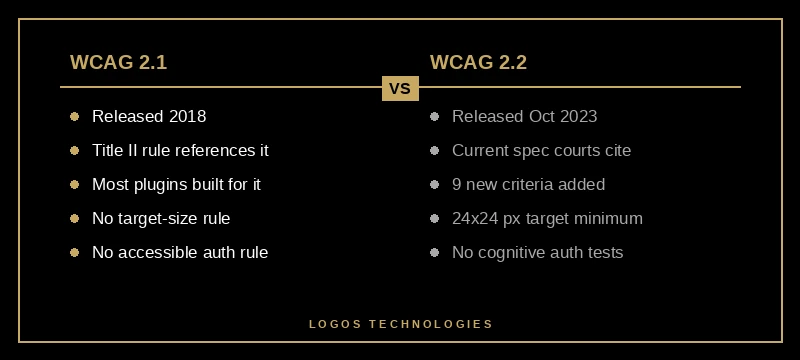
Federal ADA website lawsuits hit a record 8,667 filings in 2025, a 37% jump over 2024 and roughly seven times the volume from 2018. The standard those courts are applying is the World Wide Web Consortium's Web Content Accessibility Guidelines, and as of October 2023 the version they reference is 2.2 — not the older 2.1 that most "ADA compliance" plugins were built against.
If your last accessibility review predates 2024, your site is being evaluated against criteria you have never tested for. This checklist exists to fix that. It walks through what is new in WCAG 2.2, the six failures that cause almost every automated scanner finding, and the code-level patterns that hold up under both legal review and a real screen reader. We covered the broader audit process in our website accessibility audit step-by-step guide — this post is the WCAG 2.2-specific layer on top of that audit.
What Changed in WCAG 2.2 vs WCAG 2.1?
WCAG 2.2 is a backwards-compatible extension of WCAG 2.1 — every site that conforms to 2.2 automatically conforms to 2.1, but not the other way around. The 2.2 update adds nine new success criteria and removes one (4.1.1 Parsing, which was made obsolete by modern browser parsing). Six of the nine new criteria are Level AA, which is the conformance level US courts and the DOJ apply.
The new AA criteria, per the official W3C What's New in WCAG 2.2 page, are:
- 2.4.11 Focus Not Obscured (Minimum) — when an element receives keyboard focus, it cannot be entirely hidden behind sticky headers, cookie banners, or chat widgets.
- 2.4.12 Focus Appearance (this one is AAA — listed for context).
- 2.5.7 Dragging Movements — anything draggable must have a non-drag alternative (a click, a tap, a button).
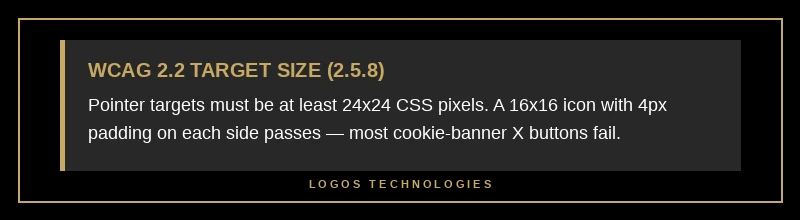
- 2.5.8 Target Size (Minimum) — pointer targets must be at least 24×24 CSS pixels, with narrow exceptions.
- 3.2.6 Consistent Help — if a "contact" or "help" link appears on multiple pages, it has to be in the same relative location.
- 3.3.7 Redundant Entry — do not make users re-enter the same data within a single process unless it is essential.
- 3.3.8 Accessible Authentication (Minimum) — login flows cannot require a cognitive function test (puzzle, memorized code) without offering an alternative.
The most underestimated of these is 2.5.8 Target Size. A 16×16 icon button with 4px of padding now technically passes (24×24 total hit area), but the icon-only social media buttons and the "X" close button on most cookie banners I audit fail it outright. WCAG 2.2 forces the design system fix that contractors keep deferring.
What Are the Six WCAG Failures That Account for 96% of Errors?
The WebAIM Million 2025 report — an automated audit of the homepages of the top one million websites — found that just six issue types accounted for 96% of all detected accessibility errors. Fixing these is the highest-leverage work on any compliance checklist.
In order of prevalence on homepages, per the 2025 WebAIM Million report:
- Low contrast text (79.1% of homepages) — text-to-background ratio below WCAG's 4.5:1 for normal text or 3:1 for large text. The average homepage had 29.6 distinct instances.
- Missing alternative text (55.5% of homepages) —
<img>elements with noaltattribute. 18.5% of all images audited had this issue. - Missing form input labels (48.2% of homepages) — inputs without an associated
<label>,aria-label, oraria-labelledby. - Empty links (45.4% of homepages) —
<a>elements with no accessible text. Most often icon-only links with noaria-label. - Empty buttons (29.6% of homepages) — same problem,
<button>flavor. - Missing document language (15.8% of homepages) — no
langattribute on the<html>tag.
If you do nothing else this month, grep your codebase for these six patterns. Every one of them is fixable in the source HTML with a code change, not a JavaScript overlay. We wrote a longer piece on why third-party widgets do not actually solve this in why accessibility overlays fail in 2026.

How Do You Test Against the WCAG 2.2 Checklist?
Direct answer: you run an automated scan, then you do a manual keyboard-and-screen-reader walk-through, then you fix what both surface. Neither layer is sufficient on its own — automated tools catch 30–40% of WCAG issues, and the remaining 60–70% require human judgment about whether alt text is meaningful, whether focus order makes sense, and whether your custom UI components announce correctly.
The minimum testing kit for WCAG 2.2:
- Automated: WebAIM's WAVE (free browser extension) and axe DevTools (free Chrome extension). Run both — they catch overlapping but non-identical issue sets.
- Keyboard: Tab through every page from the URL bar. Confirm focus is always visible, never trapped, and never obscured behind a sticky header (2.4.11).
- Screen reader: VoiceOver on Mac (Cmd+F5) or NVDA on Windows (free download). Listen to the homepage and one form-bearing page top to bottom.
- Target size: Use browser DevTools to measure interactive elements. Anything with a clickable area smaller than 24×24px is a 2.5.8 fail unless it qualifies for one of the spec's narrow exceptions.
The full audit process — including how to prioritize the findings and what a remediation plan looks like — is what our website accessibility audit guide is built around. The WCAG 2.2 checklist is the input; the audit is the workflow.
Will the 2026 ADA Title II Extension Affect Private Businesses?
No — the April 2026 Federal Register extension only applies to state and local government entities. Public entities with a total population of 50,000 or more now have until April 26, 2027 (was April 24, 2026), and entities under 50,000 have until April 26, 2028.
Private businesses operate under ADA Title III, which has no fixed compliance deadline because the courts have been the de facto enforcement mechanism. That enforcement is accelerating, not slowing: 5,100+ federal ADA website cases were filed in 2025, with Illinois filings up 745% in the first half of 2025 as plaintiff firms relocated from New York. The standard the courts apply when deciding a case is WCAG 2.0 or 2.1 Level AA — but plaintiffs' demand letters now routinely cite WCAG 2.2 because that is the current version of the spec, and settlements increasingly require 2.2 conformance going forward.
The practical takeaway: government extensions do not change anything for a small business website. WCAG 2.2 is the standard you should be working against today.
How Should a Small Business Prioritize WCAG 2.2 Fixes?
Direct answer: in three tiers — legal-risk fixes first, the WebAIM Six second, then the new WCAG 2.2 criteria. This sequencing minimizes lawsuit exposure while building toward full conformance.
Tier 1 — Legal-risk fixes (week 1): Add a visible accessibility statement page with a contact email. Fix any top-of-page issues that a plaintiff's tester would screenshot first: low contrast on the hero, missing alt text on the homepage, an unlabeled search input. These are the elements named in the vast majority of demand letters.
Tier 2 — The WebAIM Six (weeks 2–4): Sweep the entire codebase for the six common failures listed above. On a static site, this is mostly a templating-layer fix: add lang="en" to the base layout, run a script that flags any <img> without alt or any <a> with no text content, run a contrast checker against your design tokens. The fixes are mechanical once you find them.
Tier 3 — WCAG 2.2 specifics (month 2+): Audit pointer-target sizes against 2.5.8. Re-test focus visibility against sticky headers and cookie banners (2.4.11). Walk your authentication flow against 3.3.8 — if a CAPTCHA or memorized code is the only path to login, add an alternative. These are the criteria that will dominate the next wave of lawsuits, but they are rarer in current demand letters.
This tiering matters because most small businesses try to fix everything at once and ship nothing. A two-week Tier 1 sprint reduces the bulk of legal risk and proves the development workflow can actually move accessibility tickets to "done." The rest follows from there.
Why Static Sites Make WCAG 2.2 Compliance Easier
Static, hand-coded sites have a structural advantage on WCAG conformance: there is no third-party plugin layer injecting markup you did not write, no theme builder generating empty <div> button substitutes, and no page builder collapsing semantic structure into nested wrappers. When the source HTML is what ships to the browser, the audit surface is the source HTML — you fix it once, in one place, and it stays fixed.
WordPress, Wix, and Squarespace sites I have audited routinely fail 2.2 not because the platforms are uniquely bad, but because the gap between "the editor said it was published" and "this is what the browser actually rendered" hides the failures. Plugins inject buttons with no accessible name. Theme stylesheets override your contrast tokens at the cascade level. Caching plugins re-order the DOM in ways that break focus order.
The static-site stack we use at LOGOS Technologies — Eleventy templates rendering pre-built HTML, deployed to a CDN — gives every audit finding a single source-code location to fix. That is not a marketing claim; it is the reason our technical SEO checklist and our accessibility checklist are essentially the same artifact at the file level. Performance, SEO, and accessibility all share one bottleneck on a hand-coded site: the HTML you wrote.
Frequently Asked Questions
Is WCAG 2.2 legally required in the United States?
WCAG 2.2 is not directly written into US law, but the DOJ's April 2024 Title II rule for state and local governments adopts WCAG 2.1 Level AA, and federal courts have applied WCAG 2.0/2.1 Level AA to ADA Title III claims against private businesses for over a decade. WCAG 2.2 is the current version of the spec, so demand letters and settlements increasingly cite it. Conforming to 2.2 automatically satisfies any earlier version.
How long does it take to bring a small business website into WCAG 2.2 compliance?
A 5–15 page small business site with no major structural issues typically takes 1–4 weeks for a developer working alongside an accessibility audit. Larger or template-driven sites with platform-level barriers (page builders, third-party plugins) can take 3–6 months. The slowest sites are not the largest — they are the ones with the most layers between the source content and the rendered HTML.
Do accessibility overlays make a website WCAG 2.2 compliant?
No. Overlays are JavaScript widgets that try to retrofit fixes at runtime, and the FTC fined accessiBe $1 million in April 2025 for marketing claims that overstated their compliance impact. Overlays cannot fix WCAG 2.2 criteria like Target Size (2.5.8), Focus Not Obscured (2.4.11), or Accessible Authentication (3.3.8) because those require source-level changes the widget has no access to. We covered the broader case for a code-level approach in our guide on ADA-compliant websites and the 2026 deadline.
What's the cheapest first step toward WCAG 2.2 compliance?
Run the free WAVE accessibility checker against your homepage, your contact page, and your most-trafficked landing page. It will surface 30–40% of issues in five minutes for free. The output is a printable report you can hand to whoever maintains your site. Total cost: zero. This is not full compliance — but it is the lowest-effort way to know whether you are sitting on a Tier 1 problem.
Does WCAG 2.2 apply to mobile apps?
The W3C designed WCAG 2.2 to apply to web content, including responsive sites viewed on mobile browsers. For native iOS and Android apps, the equivalent guidance comes from each platform's accessibility frameworks (Apple's Accessibility API, Android's Accessibility Suite), but the underlying principles align with WCAG and the DOJ's Title II rule explicitly extends to "mobile applications" alongside websites.
Get a WCAG 2.2 Audit That Doesn't Hand-Wave
Most "accessibility audits" small business owners receive are the unedited output of an automated scanner with a logo on top. That is not an audit — it is a scan, and it misses the majority of WCAG 2.2 issues by definition. A real audit pairs the automated tools with a human keyboard-and-screen-reader pass and gives you a remediation plan tied to actual code locations.
LOGOS Technologies builds fast, hand-coded static websites for businesses across Papillion, Nebraska, and the country. Because we own the HTML end-to-end, we can audit and fix WCAG 2.2 conformance at the source file level rather than papering over it with widgets. If you are staring down a demand letter, a Title II deadline, or just want to know where your site actually stands against the current spec, take a look at our web design services or contact us for a real audit conversation.