Squarespace vs WordPress for Small Business (2026): An Honest Comparison

Table of Contents
TL;DR — Quick Hits
- WordPress runs about 43% of all websites; Squarespace sits near 3% — popularity is not the same as the right fit for you.
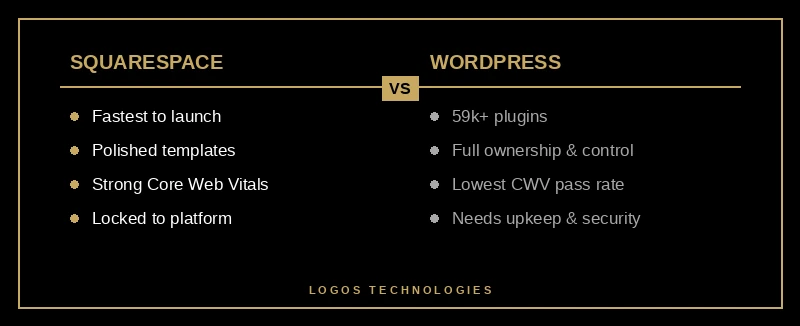
- Squarespace wins on speed-to-launch and design polish; WordPress wins on customization, plugins, and full ownership of your site.
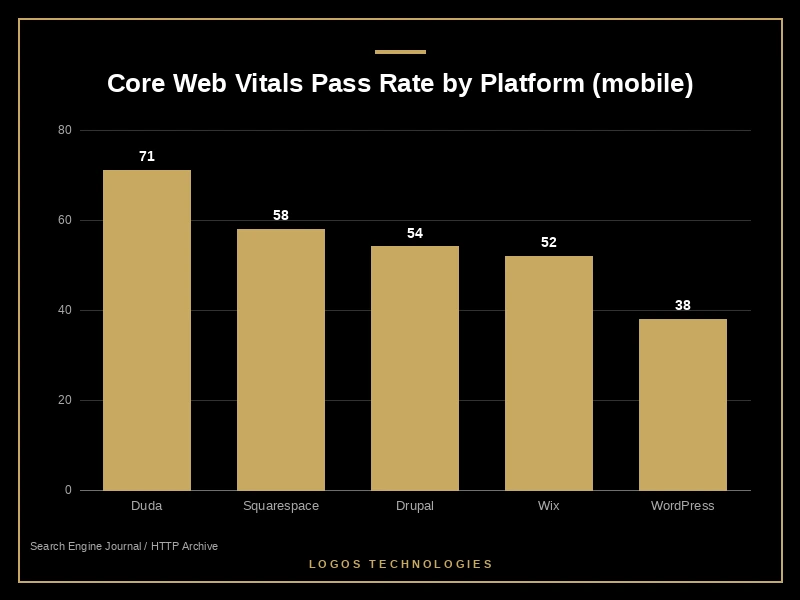
- On Google's Core Web Vitals, Squarespace passes far more often than WordPress (58% vs 38% of mobile sites in HTTP Archive field data).
- Squarespace runs $16–$99/month billed annually; self-hosted WordPress costs less in theory but adds hosting, plugins, updates, and security work.
- If raw speed and Google rankings are the goal, a hand-coded static site beats both platforms — it passes Core Web Vitals out of the box.
Picking a website platform is one of the few early decisions that follows a small business for years, and the two names that dominate the shortlist are Squarespace and WordPress. WordPress powers roughly 43% of all websites and about 59% of every site running a known CMS, according to W3Techs, while Squarespace holds around 3% of the market. But market share is a measure of momentum, not of what will rank, convert, and stay maintainable for your business. This Squarespace vs WordPress comparison sticks to the parts that actually move revenue: ease of use, SEO and speed, cost, and who really owns the site when you're done.
Squarespace vs WordPress: which is better for a small business?
For most small businesses that want a polished site live this week with no ongoing upkeep, Squarespace is the better fit; for businesses that need deep customization, want to own every file, and plan to scale content or commerce, WordPress wins. There is no universal winner — the right answer depends on how much control and maintenance you're willing to take on.
Squarespace is a closed, all-in-one platform: hosting, templates, security, and updates are handled for you. WordPress (specifically self-hosted WordPress.org) is open software you install on your own hosting, giving you near-unlimited flexibility at the cost of doing the maintenance yourself. That single trade — convenience versus control — explains almost every other difference below. If you're still deciding whether either platform is even the right category for you, our breakdown of static website vs WordPress is a useful companion read.

Ease of use, design, and maintenance
Squarespace is easier to start and easier to keep running. Its drag-and-drop editor and library of professionally designed templates let a non-technical owner launch a clean, mobile-responsive site in hours, and there are no plugins to update or security patches to chase. The trade-off is constraint: you build within what Squarespace allows, and you cannot crack open the code when you need something the platform doesn't offer.
WordPress is more capable and more demanding. With more than 59,000 free plugins in its official directory, you can add nearly any feature — but every plugin is code someone else maintains, and the stack of plugins, themes, and core updates is exactly what creates the maintenance burden (and the security surface) that WordPress is known for. For a small team without a developer on call, that upkeep is the hidden cost of all that flexibility.
SEO, speed, and Core Web Vitals: what the field data shows
On measured real-world performance, Squarespace currently beats WordPress, but neither leads the pack. Google's Core Web Vitals — Largest Contentful Paint, Interaction to Next Paint, and Cumulative Layout Shift — are part of the page-experience signals Google uses, and the gap between these two platforms is real. In Search Engine Journal's analysis of HTTP Archive field data, Squarespace passed Core Web Vitals on about 58% of mobile visits while WordPress passed on roughly 38% — and that ordering has held in more recent HTTP Archive Web Almanac performance data, where platform-hosted builders continue to outscore the average WordPress install.
WordPress's biggest drag is Largest Contentful Paint driven by slow server response and plugin bloat — a problem we dig into in why WordPress is so slow. On pure SEO control, WordPress still offers more levers (granular metadata, schema, redirects via plugins like Yoast or Rank Math), while Squarespace covers the SEO basics well but limits how far you can tune. Both platforms can rank; WordPress gives you more rope, and Squarespace makes it harder to shoot yourself in the foot.
The takeaway is not "pick the faster logo." It's that on both platforms, speed is something you fight for after the fact. That's the opening for a different approach — covered below — and it's why we treat website speed optimization as an architectural decision, not a plugin you bolt on later.
Cost and ownership: the part most comparisons skip
Squarespace is more predictable; WordPress is cheaper on paper but harder to budget. Squarespace runs $16 to $99 per month billed annually across its Basic, Core, Plus, and Advanced plans, with the higher tiers charging 0% Squarespace transaction fees (Basic adds a 2% fee on sales). Self-hosted WordPress has no software license, but you pay for hosting, a premium theme, plugins, and — directly or in your own time — updates, backups, and security. For a fuller breakdown, see how much a small business website actually costs.
Ownership is the quieter issue. On Squarespace, your site lives inside Squarespace; if you leave, you rebuild, because the design and structure don't travel with you. WordPress is open source, so you own your database and files and can move hosts freely. For a business that expects to evolve its site over years, that portability is worth real money — and it's the strongest argument in WordPress's favor.
The third option most guides ignore: a hand-coded static site
If your top priorities are speed, SEO, and security, the best move is often neither platform — it's a hand-coded static site. Squarespace and WordPress both ship a heavy runtime to every visitor, which is why both fight Core Web Vitals. A static site generated from clean HTML, CSS, and minimal JavaScript serves pre-built pages from a CDN, so it passes Core Web Vitals out of the box and has almost no attack surface to patch.
This is exactly the gap we built LOGOS around, and it's why we consider a static-first build the best WordPress alternative for small business owners who care about ranking. You keep full ownership of your code like WordPress, get the low-maintenance calm of Squarespace, and beat both on the speed metrics Google rewards. If you're comparing tooling specifically, our guide to building on a modern static site generator walks through how these sites are made and why they stay fast. It's not the right answer for everyone — if you need a sprawling plugin ecosystem or want to self-edit complex layouts daily, a platform may serve you better — but for a fast, lean marketing site, static wins on the numbers that matter.
Frequently Asked Questions
Is Squarespace better than WordPress for SEO?
Neither is inherently better; they trade off control for simplicity. WordPress gives you more granular SEO control through plugins and direct access to metadata and schema, while Squarespace handles the fundamentals well but limits deeper customization. WordPress also tends to need more performance work to pass Core Web Vitals, which now factor into Google's page-experience signals.
Is Squarespace or WordPress cheaper for a small business?
Squarespace is more predictable at $16–$99/month all-in. Self-hosted WordPress can be cheaper because the software is free, but once you add hosting, a premium theme, plugins, and maintenance time, the real total cost of ownership often matches or exceeds Squarespace — and it's harder to forecast.
Can I move my website off Squarespace later?
Only partially. Squarespace lets you export some content, but your design, layout, and platform-specific features do not transfer, so leaving usually means rebuilding. WordPress, being open source, lets you move your full database and files to any host — which is why ownership and portability are a key part of the Squarespace vs WordPress decision.
Do I need WordPress to rank on Google?
No. Google ranks pages, not platforms, and a well-built site on any system can rank. What matters is fast load times, clean structure, strong content, and solid technical SEO — which is why many businesses get the best results from a hand-coded static site that's fast by design rather than fast by patchwork.
Make the platform decision around your goals, not the logo
The honest version of the Squarespace vs WordPress debate is that both are good tools aimed at different priorities: Squarespace optimizes for ease and design, WordPress for control and ownership. But if your real goal is a website that loads instantly, ranks on Google, and rarely needs maintenance, you owe it to yourself to look past both at a hand-coded static build — the WordPress alternative we recommend most for businesses that live or die by Google rankings. At LOGOS Technologies in Papillion, Nebraska, that's the only kind of site we make — fast, secure, and built to rank. See what that looks like on our web design services page, and when you're ready to talk through the right fit for your business, contact us for a straight answer.