Webflow vs WordPress in 2026: Which Wins, and the Option Both Skip

Table of Contents
TL;DR — Quick Hits
- WordPress still powers 41.9% of all websites, but its share has fallen six straight months — the steepest slide in a decade.
- Webflow gives non-coders cleaner output than WordPress, but it adds a monthly platform fee and real lock-in.
- In real-world Core Web Vitals data, WordPress ranked dead last of seven platforms at 49%; lightweight static sites topped the chart.
- Webflow vs WordPress is the wrong question for most small businesses — a hand-coded static site beats both on speed and ownership.
- Pick the platform by who maintains it and how fast it loads, not by which name you recognize.
The platform you build on is shifting under your feet. WordPress still runs the largest slice of the web, but its market share has now declined for six consecutive months — slipping from 43.2% in December 2025 to 41.9% by late May 2026, double the drop it saw across all of 2025. Owners who picked WordPress years ago by default are reopening the question, and "Webflow vs WordPress" is one of the first comparisons they hit.
It's a fair fight to pick. But the honest answer is that the two best-known options aren't the only two, and for a small business that lives or dies on how fast its site loads and ranks, the most important comparison happens off to the side. Here's how Webflow and WordPress actually stack up — and where both of them lose.
Webflow vs WordPress: what's actually different?
Webflow is a hosted, all-in-one visual design platform; WordPress is self-hosted software you assemble from a theme plus plugins. That single architectural difference drives almost everything else. With Webflow, hosting, the CDN, SSL, and updates are handled for you, and the platform ships relatively clean code because you're not stacking third-party plugins on top of a theme. With WordPress, you control everything — and you're responsible for everything, from security patches to plugin conflicts to the performance overhead each add-on introduces.
For a non-technical owner who wants a polished marketing site fast, Webflow is usually the smoother path. For a site that needs a specific feature for which a plugin already exists, WordPress's enormous ecosystem is hard to beat. Neither is "wrong." They're just different trade-offs between convenience and control. We walk through the broader version of this in our guide to static website vs WordPress, and the same logic applies to Webflow.
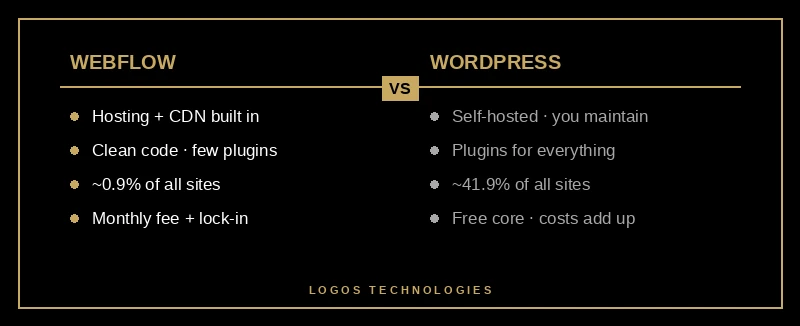
The market is voting, too. W3Techs' platform data shows Webflow holding steady at roughly 0.9% of all websites while Wix sits near 4.3% and Squarespace around 2.5%. WordPress is still an order of magnitude larger than any single competitor — but it's the only major platform currently shedding share rather than holding or gaining it.
Is Webflow better than WordPress for SEO?
For technical SEO fundamentals, Webflow usually starts ahead, because clean markup and consistent page speed are baked into the platform instead of bolted on with plugins. WordPress can absolutely rank — plenty of top results run on it — but it gets there by adding SEO plugins, caching plugins, and image plugins that each carry their own weight. The fragility is the problem: one plugin conflict or a bad update can quietly undo months of configuration.
The clearest signal is real-world performance. Google's Core Web Vitals measure loading, interactivity, and visual stability, and the official thresholds are a Largest Contentful Paint under 2.5 seconds, an Interaction to Next Paint under 200 milliseconds, and a Cumulative Layout Shift under 0.1. When Search Engine Journal analyzed HTTP Archive's April 2026 Core Web Vitals report, WordPress ranked dead last of seven platforms: about 49% of WordPress sites passed, its median page weight was roughly 2.63 MB, and it scored 44 on Lighthouse against 68 for the lightest, static-first platform — which topped the chart with a median page weight near 1.6 MB.
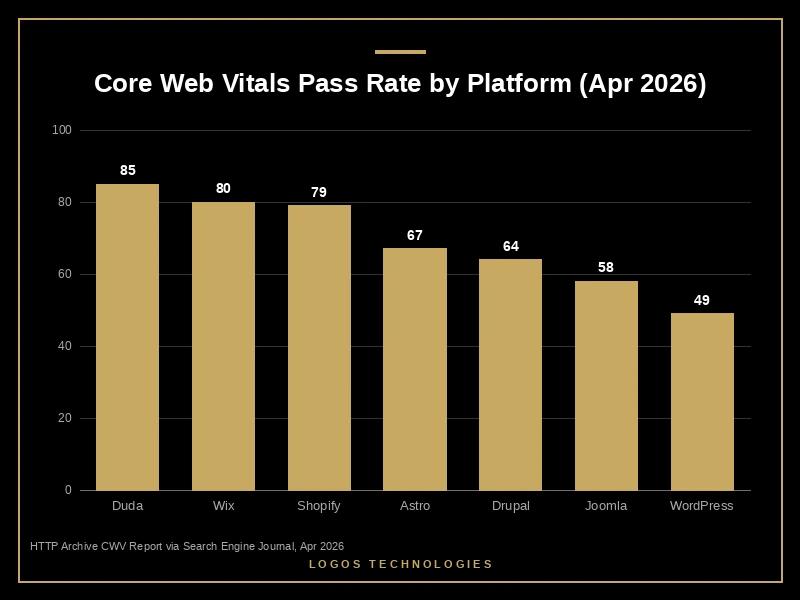
Speed isn't a minor SEO tiebreaker in 2026 — it shapes conversions and ad performance — which is a big part of why WordPress feels so slow compared to leaner alternatives. Webflow generally outperforms WordPress here thanks to its managed hosting, but it still ships a heavier runtime than a site built only with the HTML, CSS, and JavaScript a page actually needs.
What Webflow and WordPress both cost you
Both platforms carry hidden costs that the sticker price hides: recurring fees, lock-in, and maintenance time. Webflow's monthly hosting and CMS fees scale as your site grows, and migrating off Webflow means rebuilding, because its visual editor produces a structure tied to the platform. WordPress's core is free, but the real bill arrives through premium plugins, managed hosting, security tooling, and the hours you or someone you pay spend keeping it patched.
There's also the ownership question. On Webflow you're a tenant on someone else's platform; if pricing or features change, you adapt. On WordPress you own your install, but you also own every vulnerability and every update. The version most small businesses actually want is a site they fully own that costs almost nothing to host and needs almost no maintenance — which is exactly what neither platform delivers by default.
The option neither comparison mentions: a hand-coded static site
A static site — built with a generator like Eleventy or Astro and served as plain, pre-built HTML — beats both Webflow and WordPress on the metrics that move rankings, because it ships less code. There's no database query on every page load, no plugin stack, and no platform runtime: just files delivered from a CDN. That's why static-first frameworks topped the Core Web Vitals comparison, and why Astro's downloads roughly doubled from 4.59 million in January to 9.24 million in April 2026 while WordPress lost ground.

For a small business, static delivers the combination Webflow and WordPress each give up half of: the speed and clean output of a managed platform, plus the ownership and near-zero hosting cost of files you control. It's the reason we believe hand-coded custom web design is the strongest foundation for most local and national small businesses, and why we consider a static build the best WordPress alternative for small business. The catch is that it's not a drag-and-drop tool — it's a craft, which is where working with a builder matters. If you've outgrown a slow CMS, here's how to migrate from WordPress to a static site without losing your rankings.
None of this means Webflow or WordPress is a bad choice. If you need to self-edit daily and value an ecosystem, WordPress fits. If you want a clean managed platform and don't mind the fees, Webflow fits. But if the goal is to load fast, rank, and own your site outright, the answer to "Webflow vs WordPress" is often "neither" — the strongest WordPress alternative is a fast site you own outright.
Frequently Asked Questions
Is Webflow better than WordPress?
For non-technical owners who want a polished, fast marketing site without managing plugins, Webflow is usually the better fit because hosting, performance, and clean code are built in. WordPress wins when you need its vast plugin ecosystem or want to fully self-host and self-manage. Neither is universally "better" — it depends on whether you value convenience or control.
Is Webflow good for SEO?
Yes — Webflow handles technical SEO fundamentals like meta tags, canonical tags, sitemaps, and structured data natively, and its managed hosting tends to produce better Core Web Vitals than a plugin-heavy WordPress site. It's a strong SEO platform, though a lightweight hand-coded static site can still load faster because it ships less code.
Is Webflow cheaper than WordPress?
Not always. Webflow charges a predictable monthly platform fee, while WordPress core is free but accumulates costs through premium plugins, managed hosting, security tools, and maintenance time. A static site is typically the cheapest to host long-term because pre-built files can be served from low-cost or free CDNs.
Can you switch from WordPress or Webflow to a static site?
Yes. Content, pages, and images can be migrated to a static build, and done correctly the move preserves your URLs and rankings while improving load times. The main work is rebuilding templates as static layouts and setting up proper redirects, which is why most businesses do it with a developer rather than a one-click importer.
LOGOS Technologies builds fast, static, SEO-optimized websites for small and growing businesses from Papillion, Nebraska — the kind of site that wins the speed-and-ownership trade-off Webflow and WordPress each give up half of. If you're weighing your options or stuck on a slow platform, take a look at our web design services and contact us for a straight answer about what would actually serve your business best.