Page Load Time: What 'Fast' Actually Means in 2026 (and How to Get There)

Table of Contents
Page load time is the most-measured, most-ignored metric on the web. Most business owners have vaguely heard it matters. Far fewer can tell you what a "good" number actually is in 2026, or which part of the load sequence Google is grading them on. And almost nobody has opened their own site in a cold browser session and timed it.
That gap is exactly where rankings and revenue leak out. Google has been using speed as a ranking signal since 2010 and has made it steadily more important every year since. In 2026, the bar is higher than it has ever been — not because Google moved the goalposts overnight, but because the competition quietly got faster while a lot of small business sites stood still.
This is the guide I wish more site owners read before blaming their SEO agency or their ad budget. We're going to cover what page load time actually means, the numbers Google uses to grade your site, the concrete business impact of every extra second, and the fixes that move the needle.
What counts as a "fast" page load time in 2026?
There is no single stopwatch number that defines fast anymore. Google grades sites on a handful of user-centric metrics, and the one that most closely tracks "how fast did the page feel" is Largest Contentful Paint (LCP). LCP measures how long it takes the biggest above-the-fold element — usually a hero image or headline — to render.
Google's published thresholds, unchanged in the 2026 Core Web Vitals update, are straightforward:
- Good: LCP under 2.5 seconds on mobile
- Needs improvement: 2.5 to 4.0 seconds
- Poor: over 4.0 seconds
Those numbers are measured at the 75th percentile of real user visits — meaning three out of four of your visitors need to see a load under 2.5 seconds for Google to call your page "good." You can read the full definitions in Google's Core Web Vitals documentation on web.dev.
Two details most site owners miss. First, these are real-world numbers collected from actual Chrome users, not lab tests. A PageSpeed Insights score of 95 doesn't matter if the real field data tells a different story. Second, mobile is where this is graded. If your site is fast on your desktop fiber connection but a four-second crawl on a mid-range Android phone with spotty coverage, Google is grading the crawl.

Why does page load time move revenue, not just rankings?
This is the part that usually shocks people: the commercial hit from a slow page shows up long before Google notices. Your visitors give up first.
Google's own research — summarized in Think with Google's mobile page speed benchmarks — found that as page load time goes from one second to three seconds, the probability of bounce increases by 32 percent. From one to six seconds, bounce probability jumps 106 percent. Those are the users who never saw your offer, never read your reviews, never filled out your form.
The conversion data is even blunter. A well-cited analysis from Portent's site speed and conversion study found that a site that loads in one second has a conversion rate roughly three times higher than a site that loads in five seconds. I walked through that data in more detail in our piece on what the page speed revenue data actually shows, and the takeaway hasn't changed: every additional second of load time is a meaningful percentage of your revenue sliding off the table.
If your website exists to make the phone ring, load time is not a technical nicety. It is the top of your sales funnel.
What's actually making your page slow?
In my experience auditing small business sites, the slow ones are almost never slow for the reason the owner thinks. It's rarely "too much content." It's almost always one or more of these:
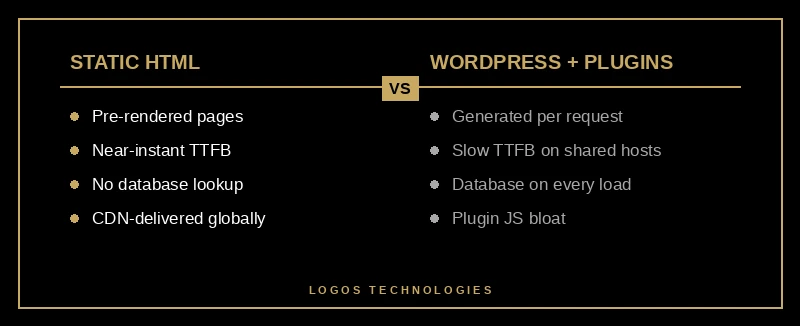
1. A platform tax. Most WordPress sites are running 15 to 40 plugins, a bloated theme, and a page builder on top of a database that generates HTML on every single request. Every layer adds weight. This is one of the biggest reasons we keep arguing — in our post on the best WordPress alternative for small business websites — that the platform choice itself is a performance decision, not a cosmetic one.
2. Unoptimized hero images. A single 4 MB JPEG at the top of the page can blow your LCP past four seconds all by itself. The fix is to serve modern formats (WebP or AVIF), resize appropriately, and set explicit width and height attributes so the layout doesn't shift.
3. Render-blocking JavaScript. Third-party scripts — chat widgets, analytics stacks, A/B testing tools, social pixels — pile up in the <head> and force the browser to stop and wait before painting anything. The HTTP Archive Web Almanac's performance chapter documents how third-party weight has ballooned year over year, and it is now one of the biggest LCP killers on the web.
4. Cheap, overloaded shared hosting. A cold response from a budget shared host can eat a full second before your page even starts downloading. If Time to First Byte is over 800 ms, your hosting is a problem regardless of what else you do.

How do you actually fix page load time?
There is an honest answer to this question, and then there's the pretty one. The honest answer is that you either fix the root cause or you keep patching symptoms forever.
The patching route looks like installing a caching plugin, buying a CDN, enabling "image optimization," and hoping. It can buy you 20 to 30 percent on a bad site. It will not get a slow, plugin-heavy site into the "good" Core Web Vitals band reliably.
The root-cause route looks like this:
Serve static HTML. If your pages are pre-rendered as plain HTML files and served from a CDN, your Time to First Byte drops to near-instant and there is no database waiting to generate a response. This is exactly why we build LOGOS Technologies sites on a static architecture. I laid out the reasoning in fast website design: why speed needs to be built in, not bolted on — it is enormously easier to ship a fast site from day one than to unwind a slow one.
Optimize the LCP element first. Identify the largest above-the-fold element and cut its weight. Compress the hero image, use loading="eager" and fetchpriority="high", and inline the critical CSS needed to render it.
Defer or delete third-party scripts. For every pixel, widget, or tag, ask: is the revenue this generates bigger than the conversions it is costing me by slowing the page? About half the time the honest answer is no, and the fix is to delete it.
Measure from real devices, not just Lighthouse. Use Chrome's real user data in Search Console's Core Web Vitals report. That's what Google grades you on. For a deeper treatment of the step-by-step process, our how to make your website faster guide walks through the exact order of operations, and the website speed optimization guide for 2026 covers the tooling side in more depth.
What should you actually do this week?
If you only do three things, do these. Open your site on your phone, on mobile data, in a cold private window, and actually time it. Drop your homepage URL into Google's PageSpeed Insights and read the "Field Data" section — not the lab score, the field data. And check your Core Web Vitals report in Search Console to see what percentage of your real visitors are getting a "good" experience.
If the answer is ugly, you have two paths. You can spend months chasing plugin bloat and shared hosting limits, or you can move to a platform where speed is the default instead of the goal. Our web design services build every site on a static, CDN-delivered architecture that ships with Core Web Vitals in the green on day one — no caching plugins, no "speed audits," no ongoing maintenance tax.
If you're a small business owner in Papillion, the Omaha metro, or anywhere in the U.S., and your current site is the reason visitors bounce before they ever see your offer, get in touch. Tell me the URL. I'll run it, show you where the time is actually going, and tell you straight whether a tune-up will be enough or whether a rebuild is the honest path forward.
Page load time is one of the few things on the web where the math is clean: faster pages rank better, convert more, and make more money. The only question is whether your site is on the right side of the line.