

Headless CMS Explained: What It Is, Why It's Faster, and Whether Your Business Needs One

The term "headless CMS" keeps showing up in web development conversations, and if you're a business owner trying to figure out whether it matters to you, the jargon doesn't help. Content layer. Decoupled architecture. API-first. It sounds like something only a developer would care about.
But here's what you should care about: the headless CMS market hit roughly $1.25 billion in 2026 and is growing at nearly 20% year over year. That kind of growth doesn't happen because developers like shiny new tools. It happens because the architecture solves real business problems — speed, security, and the ability to publish content anywhere without rebuilding your entire site.
I've been building websites with this exact approach at LOGOS Technologies. We pair static site generators like Eleventy with headless content management, and the results speak for themselves: sub-second page loads, zero database vulnerabilities, and sites that rank. If you've read our breakdown of what JAMstack actually means for small businesses, you already know the foundation. A headless CMS is the content engine that powers that stack.
What Is a Headless CMS, and How Is It Different From WordPress?
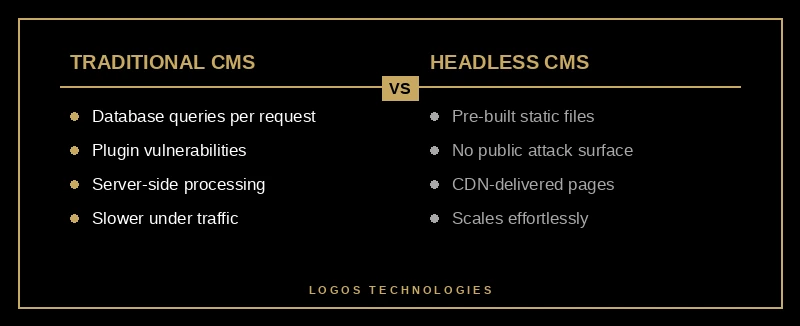
A traditional CMS like WordPress bundles everything together. Your content, your templates, your design, your plugins — they all live in one monolithic system. When someone visits your site, WordPress queries a database, assembles the page on the fly, and sends it to the browser. Every single time.
A headless CMS splits that apart. The "head" — your website's frontend — is completely separate from the content management backend. You write and organize your content in the CMS, and it delivers that content through an API. Your frontend (whether it's a static site generator, a React app, or even a mobile app) pulls in the content and renders it however you want.
The practical difference is enormous. With WordPress, your content is locked inside a system that also handles design, security, server processing, and plugin management. With a headless CMS, your content is portable. It can feed a website, a mobile app, a digital kiosk, or all three — from a single source of truth.
For most small businesses running a marketing website, the biggest tangible difference is performance. Sites built on headless architecture achieve 40% faster Time to First Byte compared to traditional CMS sites. That's not a theoretical benchmark — it's the gap between a site that loads before your visitor's patience runs out and one that doesn't.
Why Does a Headless CMS Make Websites Faster?
Speed isn't just a nice feature. It's a ranking factor, a conversion factor, and increasingly a dealbreaker for visitors who won't wait more than two or three seconds. We covered this extensively in our guide to why speed needs to be built into your website from the start, and a headless CMS is one of the most effective ways to build that speed in at the architecture level.
Here's why the speed difference exists. A traditional CMS processes every page request dynamically. Someone clicks a link, the server runs PHP code, queries a MySQL database, assembles the HTML, and sends it back. That round trip takes time, and it multiplies under traffic. Add a handful of plugins (which most WordPress sites have — the average is over 20), and each one adds its own database queries and processing overhead.
A headless CMS paired with a static site generator like Eleventy eliminates all of that. Pages are pre-built at deploy time. When someone visits your site, they get a static HTML file served directly from a CDN — no database queries, no server-side processing, no plugin overhead. The content is already rendered and ready.
The result? Pages that load 3.5 times faster compared to traditional CMS platforms. And because static files are inherently cacheable and distributable across global CDNs, your site performs the same whether it's serving 10 visitors or 10,000.
If you've been wondering how to make your website faster, switching from a monolithic CMS to a decoupled headless architecture is one of the highest-impact changes you can make.
Is a Headless CMS More Secure Than WordPress?
This is where things get serious. WordPress currently powers over 40% of the web, which makes it the single biggest target for attackers. According to Patchstack's State of WordPress Security report, over 11,000 vulnerabilities were discovered in WordPress plugins and themes in 2025 alone, with 91% originating in plugins. In 2026, the pace hasn't slowed — new plugin vulnerabilities are being disclosed at a rate of roughly 36 per day.

The fundamental issue isn't that WordPress developers are careless. It's the architecture. A traditional CMS exposes a database, a server-side runtime, an admin panel, and dozens of third-party plugins to the public internet. Every one of those is an attack surface.
A headless CMS paired with static site generation removes most of those surfaces entirely. There's no public-facing database. There's no admin panel accessible through your website URL. There's no PHP runtime processing requests. The content API is separate from your live site and can be locked down to only respond to your build process. We explored this exact comparison in depth in our post on why static websites are more secure than WordPress.
For business owners, this translates to fewer emergency security patches, no waking up to a defaced homepage, and no worrying that a plugin you installed for contact forms just exposed your customer data.
Does Every Business Need a Headless CMS?
No. And anyone telling you otherwise is selling something.
If you need a basic blog or brochure site and you're comfortable managing it yourself through a visual editor, a traditional CMS with proper security hardening can still work. The tradeoff is that you'll spend more time on maintenance, your site will be slower by default, and you'll always be one missed plugin update away from a vulnerability.
A headless CMS makes the most sense when you care about three things: performance that directly impacts your search rankings, security that doesn't depend on keeping 30 plugins updated, and a content workflow that lets you publish without worrying about breaking your site's design.
The businesses we work with at LOGOS Technologies tend to fall into this camp. They want a website that loads fast, ranks well on Google, and doesn't require constant babysitting. Our approach — hand-coded static frontends powered by headless content management — delivers exactly that. If you're evaluating whether your business needs a WordPress alternative, the headless approach is worth serious consideration.
It's also worth noting that 52% of IT professionals report headless CMS is more cost-effective over time according to Ramotion's analysis, primarily because maintenance overhead drops dramatically when you remove plugins, database management, and server-side patching from the equation.

How to Get Started With a Headless CMS Approach
If you're convinced the architecture makes sense but aren't sure where to start, here's the practical path:
First, separate your concerns. Think of your website as two things: the content (what you write and update) and the presentation (how it looks and performs). A headless CMS handles the first part. A static site generator or modern frontend framework handles the second.
Second, pick a CMS that matches your technical comfort level. Options range from developer-focused platforms like Sanity and Contentful to more editor-friendly tools like Decap CMS (which is what we use at LOGOS Technologies for our own site and many client projects). The right choice depends on who's going to be editing content day to day.
Third, invest in the frontend. The whole point of going headless is that your frontend isn't constrained by CMS templates. That means you can build exactly the site your business needs — optimized for Core Web Vitals, designed for conversions, and fast by default rather than fast after dozens of optimization plugins.
The catch? A headless architecture requires more upfront development expertise than installing a WordPress theme. You need someone who can build and maintain a static frontend, connect it to your content API, and set up a deployment pipeline. That's the work we do at LOGOS Technologies — we handle the technical architecture so you get the performance and security benefits without needing to become a developer yourself.
The Bottom Line
A headless CMS isn't a trend. It's the architecture that underpins the fastest, most secure websites being built right now. The market is growing at nearly 20% annually because businesses are figuring out what developers have known for years: decoupling your content from your presentation layer makes everything better — speed, security, flexibility, and long-term cost.
Whether you're building a new site from scratch or considering a website redesign, understanding what a headless CMS offers is worth your time. And if you want a team that builds this way by default, take a look at our web design services or get in touch — we're based in Papillion, Nebraska, and we build websites that are fast because they're built right.