

ADA Compliant Website: What Every Business Needs to Know Before the 2026 Deadline

The federal government just set a hard line. Starting April 24, 2026, all state and local government websites serving populations of 50,000 or more must conform to WCAG 2.1 Level AA. Smaller entities have until 2027. And while the rule technically targets public-sector sites, the ripple effects are already hitting private businesses — through procurement requirements, lawsuit risk, and customer expectations.
If your website can't be used by someone with a visual, motor, or cognitive disability, you're not just losing customers. You're building legal exposure into every page.
What Does "ADA Compliant" Actually Mean for a Website?
The Americans with Disabilities Act doesn't spell out a pixel-perfect technical standard for websites. Instead, the DOJ's 2024 rule points to WCAG 2.1 Level AA as the benchmark. WCAG (Web Content Accessibility Guidelines) is organized around four principles — your site must be perceivable, operable, understandable, and robust for all users, including those who rely on screen readers, keyboard navigation, or voice control.
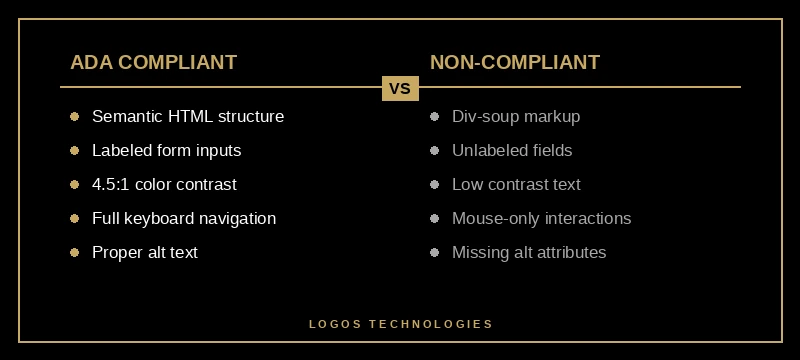
In practical terms, an ADA compliant website handles things like: proper alt text on every image, labeled form inputs, sufficient color contrast between text and background, keyboard-navigable menus, and correct heading hierarchy. None of this is exotic engineering. It's the structural discipline that separates a well-built site from one that was thrown together.
WCAG 2.2, released in late 2023, adds success criteria around dragging movements, consistent help placement, and redundant entry — addressing gaps in mobile usability and cognitive accessibility. It's now the current enforceable standard, and it's what auditors and courts are referencing.

How Bad Is the Problem Right Now?
Worse than most business owners realize. The WebAIM Million 2026 report — an annual audit of the top one million homepages — found that 95.9% have detectable WCAG 2 failures. That's actually a regression from 94.8% in 2025, reversing six years of incremental improvement.
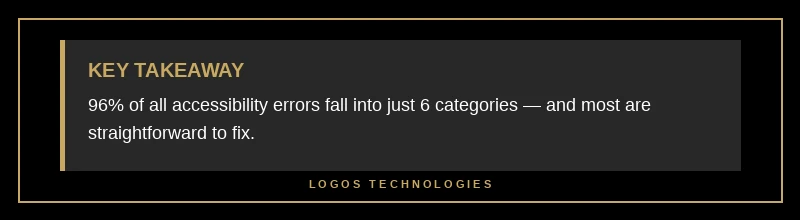
The six most common failures account for 96% of all detected errors, and they haven't changed in seven years:
Low contrast text leads the pack at 83.9% of pages — up from 79.1% last year. This is the single most widespread accessibility failure on the web, and it's often the easiest to fix. If your body text is light gray on a white background, you're failing this criterion.
Missing form input labels affect 48.2% of homepages. Without a programmatic label, a screen reader user has no way to know what a form field is asking for. Your contact form, your newsletter signup, your search bar — all unusable.
Empty links (45.4%), empty buttons (29.6%), missing alt text, and missing document language (15.8%) round out the list. The average page carries 51 individual errors.
These aren't theoretical problems. They translate directly into lost revenue. Someone who can't navigate your checkout can't buy from you. Someone who can't read your service descriptions can't hire you.
Are Businesses Actually Getting Sued Over This?
Yes — and the pace is accelerating. More than 5,100 ADA digital accessibility lawsuits were filed in federal and state courts in 2025, with nearly 70% targeting e-commerce companies. What's more troubling: roughly 45% of those federal filings targeted companies that had already been sued before. Repeat lawsuits are now the norm, not the exception.
You don't need to be a Fortune 500 to get hit. Small businesses with inaccessible websites are targets precisely because they're less likely to have counsel on retainer. Settlement demands typically start at $5,000-$25,000 — painful enough to settle but not enough to justify a full legal fight. It's a volume game for plaintiffs' firms, and your broken contact form is the entry point.
The April 2026 deadline will only intensify scrutiny. Government agencies that need WCAG-compliant vendor websites will start requiring accessibility documentation in procurement contracts. If your site can't pass an audit, you could lose public-sector opportunities before a conversation even starts.
What Does an ADA Compliant Website Look Like in Practice?
The overlap between accessibility and good web development is almost total. An ADA compliant website is built with semantic HTML — proper heading levels (h1 through h6 in order), meaningful link text, native form elements with associated labels. This is the same structural discipline that helps search engines understand your content.
Here's what the technical checklist looks like:
Color contrast ratios of at least 4.5:1 for normal text and 3:1 for large text. Tools like WebAIM's contrast checker make this a 30-second test.
Alt text on every non-decorative image. Not "image123.jpg" — actual descriptions of what the image conveys. Decorative images get an empty alt attribute so screen readers skip them.
Keyboard navigation that works end to end. Every interactive element — links, buttons, form fields, modals, dropdown menus — must be reachable and operable with Tab, Enter, and arrow keys alone. No mouse required.
ARIA attributes where native HTML falls short. Custom components like accordions, tabs, and carousels need ARIA roles and states so assistive technology can convey their purpose and current state.
Visible focus indicators. When a keyboard user tabs through your page, they need to see where they are. Removing the default focus outline (a common "design" choice) breaks this.
Skip navigation links. A hidden link at the top of the page that lets screen reader users jump past the header and nav directly to the main content.
Why Accessibility Is an SEO Advantage
Google's ranking algorithms don't check WCAG compliance directly. But the structural practices that make a site accessible are the same ones that make it crawlable, understandable, and performant — all of which Google does reward.
Proper heading hierarchy helps Googlebot parse your content structure. Alt text gives image search context. Semantic HTML reduces rendering errors. Keyboard-navigable sites tend to have cleaner DOM structures that load faster. And sites built with Core Web Vitals in mind — as any performance-focused build should be — already address many accessibility performance overlaps.
There's also a direct user signal: accessible sites have lower bounce rates because more people can actually use them. The CDC reports that 1 in 4 U.S. adults lives with a disability. That's not a niche audience — it's a quarter of the market that your competitors are accidentally excluding.
Building an ADA compliant website isn't a separate project from building a good website. It's the same project, done with discipline.
How to Get Your Site Compliant
Start with an audit. Run your homepage through WAVE (free, from WebAIM) or Google Lighthouse accessibility scoring. These automated tools catch the low-hanging fruit — contrast issues, missing labels, empty links. They won't catch everything (keyboard navigation and screen reader flow need manual testing), but they'll give you a severity-ranked list to work from.
Then prioritize by impact: fix form labels and contrast first (they affect the most users), then address navigation and ARIA issues, then handle edge cases. If your site was built on a static architecture with semantic HTML from the start, you're probably closer to compliant than you think. If it was built on a theme-heavy CMS with layers of JavaScript overlays, the remediation is steeper.
Avoid "accessibility overlay" widgets that promise one-line compliance. They don't work — multiple studies and lawsuits have confirmed they don't fix underlying code issues, and courts have ruled that overlays don't constitute compliance.
At LOGOS Technologies, every site we build starts with semantic HTML, proper heading structure, labeled forms, and contrast-tested color palettes. Accessibility isn't an add-on we bolt on at the end — it's in the foundation. If your current site needs an accessibility overhaul, or if you're ready for a rebuild that gets this right from day one, get in touch. We're based in Papillion, Nebraska, and we work with businesses nationwide.